If email is part of your marketing strategy, timing is not a small detail. It can decide whether your campaign gets noticed, clicked, or buried under ten newer messages.
The tricky part is that there is no universal best time to send marketing emails. Some marketers use benchmarks, while others go with their gut, but neither approach works well on its own. The perfect timing depends on your audience, campaign type, goals, and their time zone.
In this guide, we break down the latest data from four major studies, provide timing recommendations for seven different email campaign types, and suggest practical ways to find the best time to send your emails.
TL;DR When is the best time to send emails?
There is no single best time to send emails, but you can start with some good guesses. Benchmarks can point you in the right direction, but performance depends on what you optimize for: visibility, clicks, or revenue. For example, a newsletter, a flash sale, and an abandoned cart email each have their own purpose and should be sent at different times, since they address different needs and user behaviors.
Based on our analysis of 2023–2026 data from four major studies, here is a simple cheat sheet with recommended send times for seven common email campaign types:
| Email type |
Best time window |
Primary KPI to track |
SendPulse feature to use |
| Newsletters |
Tuesday through Thursday, 9–11 AM |
Click-to-open rate |
Scheduler + Segmentation |
| Promotional emails |
Tuesday through Friday, 4–8 PM |
Revenue per recipient |
A/B testing + Scheduler |
| eCommerce flash sales |
Friday, 11 AM–1 PM or 7–9 PM |
Revenue per recipient |
Automation + Scheduler |
| Webinar invitations |
Tuesday through Wednesday, 10 AM–2 PM |
Registrations |
Automation (series) |
| Welcome emails |
Immediately after signup |
Activation rate or first click |
Automation (“Add to list” trigger) |
| Abandoned cart emails |
1–3 hours after abandonment |
Cart recovery rate |
Automation (Event manager) |
| Re-engagement emails |
Start with evenings and weekends |
Click rate |
A/B testing + Segmentation |

Create and send high-performing emails
Use an AI assistant, pre-made templates, advanced segmentation, and feature-rich automation to run campaigns without coding. Start for free with up to 15,000 monthly emails.
Get started for free
Why is there no single best time to send emails?
To find the best time to send emails, you need a bit of research. The right timing depends on how your audience behaves, what you want them to do, and when they are actually available to act. Here are the key factors that shape the answer for any business.
Your KPI changes the answer
Different goals peak at different times. Opens, clicks, conversions, and replies don’t happen in the same time window. Focusing on one can mean you might miss out on another.
To give you an idea: a weekly newsletter aims for visibility, so morning slots can work well. A flash sale needs quick action and often does better later in the day when people are ready to buy.
Choose your email send time based on your main goal, and adjust it as you see what works best:
| Goal |
Recommended time window |
| Opens |
Morning (8–11 AM) |
| Clicks |
Early morning and mid-afternoon (7–8 AM and 4 PM) |
| Conversions/revenue |
Early morning (7–10 AM) |
| Replies (B2B) |
Business hours, Tuesday through Thursday |
| Re-engagement |
Evenings or weekends |
B2B and B2C audiences act in different ways
B2B audiences follow a different daily routine. Their engagement usually happens during the workday, when people are focused on tasks like planning, replying, or making decisions. This is why sending B2B emails in the mid-morning or early afternoon on weekdays often works best.
B2C behavior is less predictable. People tend to browse and shop whenever they have free time, like after work, during their commute, or in the evening. That’s why sending emails later in the day often gets better results.
Here’s an easy way to picture it:
- A SaaS email for B2B goes out at 10 AM, gets opened during work hours, and is often reviewed or forwarded.
- An eCommerce promo for B2C is sent at 7 PM, opened during people’s downtime, and often leads to clicks and purchases.
Time zones can break campaigns
If you don’t segment your list or schedule emails by local time, your “perfect” send time turns into a compromise. Some people get the email too early, others too late, and only a few see it at the right time.
Here’s what that looks like in practice: 10 AM in New York is 7 AM in California, and that same 10 AM is already 4 PM in Central Europe.
So, one campaign can reach people before work, during work, or at the end of the day. Each timing leads to different actions, or sometimes no action at all.
Open rates can be misleading
Open rates were once the main way to judge when to send emails. Now, they are one of the least reliable signals.
This change is mostly due to Apple Mail Privacy Protection. It automatically loads tracking pixels, even if someone never opens your email. As a result, open rates are inflated, and location data is lost, making it harder to understand when and where real engagement happens.
Find out more about tracking pixels, Apple MPP, and why open rates may be unreliable.
Because of this, an email might seem successful in your reports but lead to little or no real action.
Open rates can still give you a rough idea, but they are not enough to guide decisions anymore. Here is what you can track instead:
- Clicks show that your email reached someone when they were ready to engage.
- Click-to-open rate tells you how interesting your content is to people who actually open your email. It also helps filter out the inflated open numbers.
- Conversions (signups, purchases, registrations) show if your timing matches when people are ready to make decisions.
- Revenue per recipient links your email timing directly to business results. It is the most useful measure for sales-focused campaigns.
- Unsubscribes can be a sign of poor timing or message fatigue, especially if your emails arrive at the wrong time.
- The complaint rate (spam reports) shows when your emails seem intrusive or irrelevant. This often happens when timing is off.
These metrics reflect real behavior and give you a much clearer signal when testing the best time to send newsletters.
Email send time benchmarks based on 2023-2026 data
Next, we’ll compare the latest data from MailerLite, Omnisend, HubSpot, and Constant Contact to see what patterns emerge.
We’ll point out where these studies agree, where they disagree, and what those differences reveal about timing, audience behavior, and campaign goals.
Where studies agree
Recent reports do not offer a single best time to send emails, but they do highlight a common starting point you can rely on.
First, early to midweek days tend to perform best. Tuesday is especially strong for engagement. For instance, Omnisend found that Tuesday had a 31.27% open rate and the highest click-to-sent rate of 0.81%. HubSpot also notes that most marketers choose midweek slots. Here are the top responses:
- 27% of U.S. marketers prefer Tuesday;
- 19% choose Monday;
- 17% opt for Thursday.
MailerLite’s data also supports strong early-week performance. Monday has an open rate of 49.44%, and Tuesday leads for clicks at 7.84%. Interestingly, Friday edges ahead on both metrics — 49.72% for opens and 8.09% for clicks — but the gaps between top days are small, reinforcing that early-to-midweek sends are a reliable starting point.
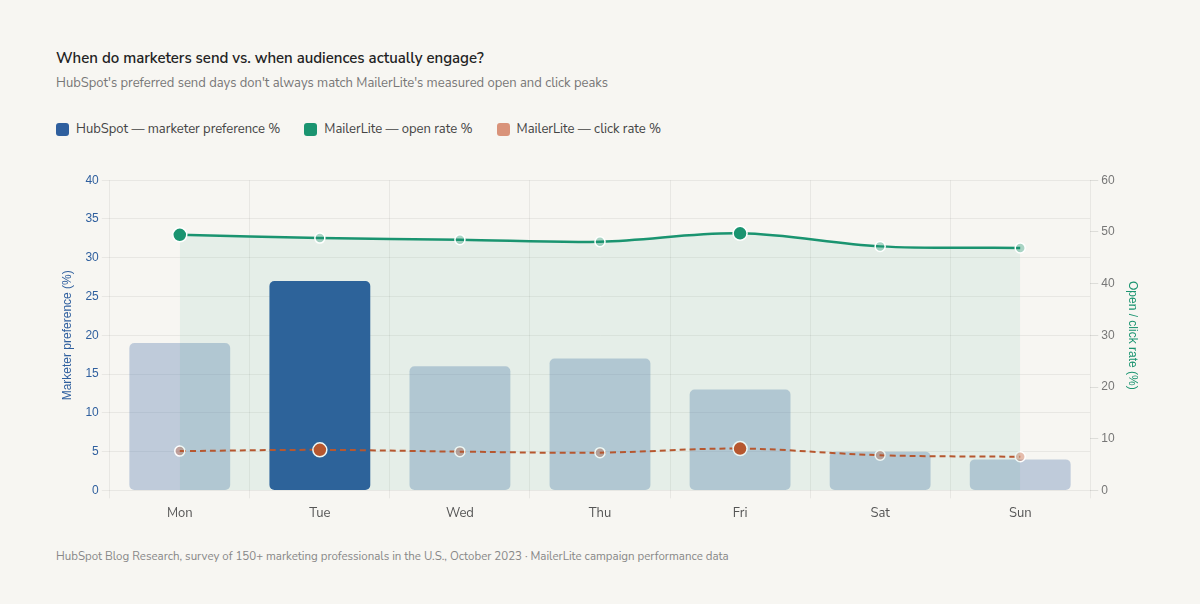 Marketers favor Tuesday, but actual open and click peaks don’t always align with their preferences
Second, the time of day matters more than the day itself. Most studies suggest late morning, around 9 to 11 AM, is a good time for opens. Omnisend’s data supports this, showing the strongest open rates during this window.
However, conversions follow a different pattern. The highest purchase activity happens early in the morning. For example, Friday at 7 AM has the top hourly conversion rate at 0.138%, with Monday at 8 AM next at 0.114%. Clicks tend to peak twice: once in the early morning (7 to 8 AM) and again in the mid-afternoon (around 4 PM). This shows that while people see emails most in mid-morning, they are more likely to buy earlier than many marketers expect.
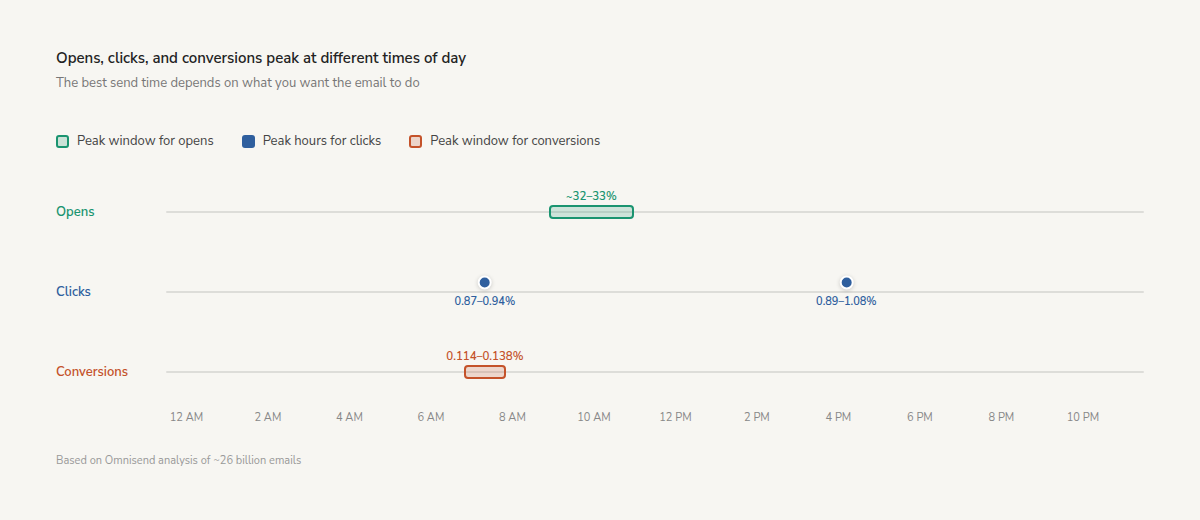 Opens, clicks, and conversions each have their own peak window
Third, performance depends on context. Constant Contact points out that engagement changes based on your audience and industry. HubSpot’s survey shows that different teams prefer different send times. In the end, timing works best when it matches the recipient’s daily routine.
Finally, every study reinforces the need for testing. None of them claims a universal best time. Instead, they all suggest using benchmarks as a starting point and refining based on your own results.
Where studies disagree
When you compare the same datasets, the results can look contradictory at first — but most differences come down to measuring different things.
Take timing. MailerLite finds that people open emails most often in the morning (8 to 11 AM), but they click more in the evening (8 to 9 PM). Omnisend’s data is different: their clicks are highest at 7 to 8 AM and again at 4 PM, while conversions peak early in the morning. Sending emails in the evening doesn’t match these results for clicks or conversions. It’s the same channel and goal, but the peak times are completely different.
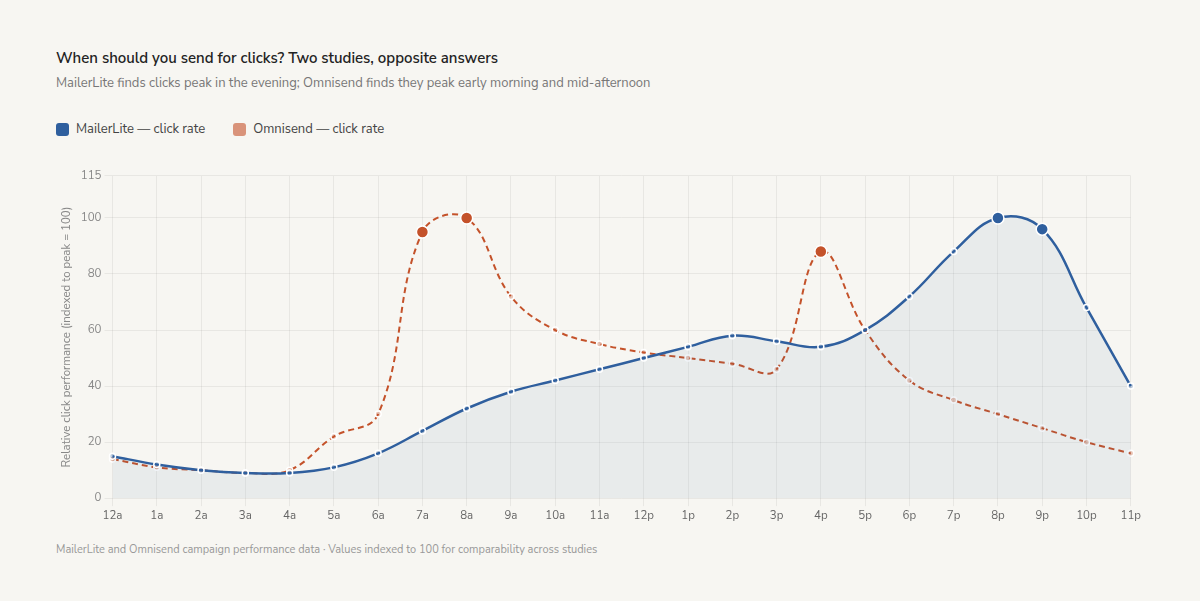 Click rates peak at opposite ends of the day, depending on the dataset
Days of the week tell a similar story. Omnisend reveals Tuesday as the best day for opens (31.27%) and clicks (0.81% click-to-sent). Meanwhile, MailerLite shows Friday generating the highest open rate (49.72%) and click rate (8.09%). Constant Contact shows something else entirely: Sunday at 10 PM is their top time for engagement.
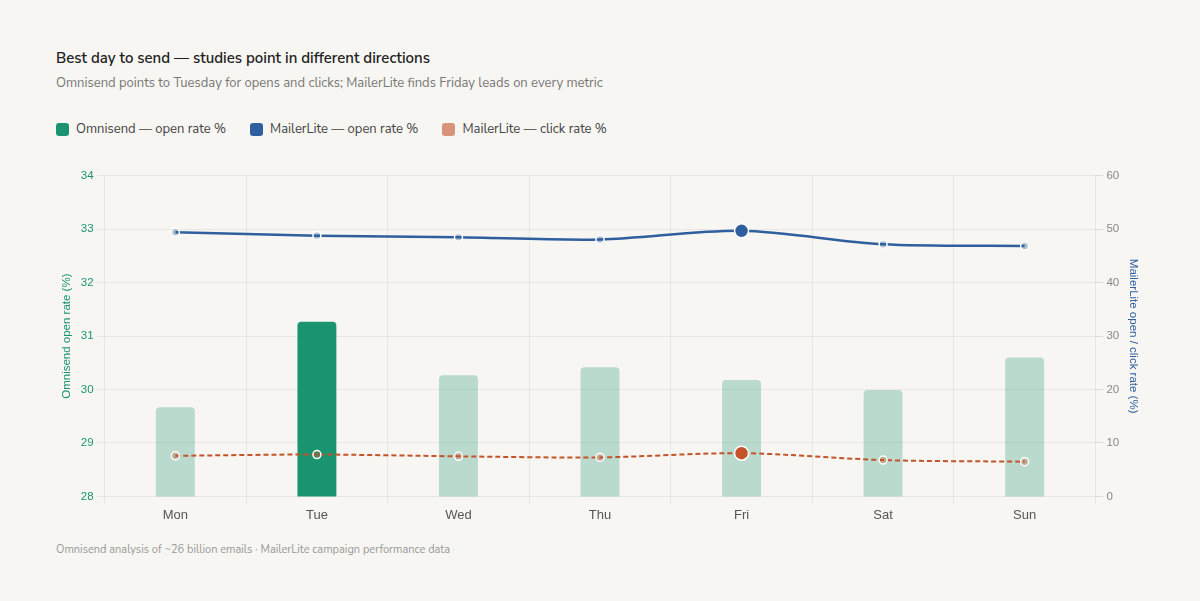 Tuesday wins in one dataset, Friday in another
Even within one day, the results don’t always match. MailerLite sees more opens in the morning and more clicks in the evening. Omnisend adds that early morning (7 AM) can bring the week’s highest conversions. This may be because there’s less competition in the inbox and people are more focused before work starts.
These differences make more sense when you consider the context:
- Different goals — opens, clicks, and conversions peak at different times.
- Different moments — work hours drive attention, while free time drives action.
- Different behaviors — people check emails out of habit, but act when they’re ready.
So the data reflects how and when people move from noticing an email to actually doing something with it. In other words, the right question isn’t “When is the best time to send emails?” Define the outcome first, then find the best time for it.
Key findings from email timing studies
Based on our analysis of 2023–2026 data from four major studies, here are the most important email timing patterns:
- Tuesday and Friday are the top-performing days. Tuesday leads for opens (31.27%) and clicks (0.81% click-to-sent) in one study, while Friday leads in another with the highest open rate (49.72%) and click rate (8.09%).
- 9 to 11 AM is the most reliable window for opens, confirmed across multiple datasets. But clicks and conversions peak at different times.
- Conversions peak early in the morning, not in the afternoon. Friday at 7 AM shows the highest conversion rate (0.138%), with Monday at 8 AM next (0.114%).
- Open rates are no longer a reliable timing signal due to Apple Mail Privacy Protection inflating open data. Clicks, conversions, and revenue per recipient are stronger indicators.
- There is no universal best time. Every study recommends using benchmarks as a starting point and testing with your own audience.
Use this table as a quick reference to understand what each source actually measures.
| Source |
Source type |
Dataset + period |
Best day for opens |
Best day for clicks |
Main caveat |
| MailerLite |
Platform data |
2.1M campaigns, Dec 2024–Nov 2025 |
Friday (49.72%), Monday (49.44%) |
Friday (8.09%) |
Open peaks and click peaks happen at different times within the same day |
| Omnisend |
Platform data |
~26B emails, 2026 |
Tuesday (31.27%), Sunday (30.6%) |
Tuesday (0.81% click-to-sent) |
Opens, clicks, and conversions peak at different hours |
| HubSpot |
Survey |
150+ U.S. marketers, 2023 |
Tuesday (27%), Monday (19%), Thursday (17%) |
Not specified (self-reported preferences) |
Based on marketer’s opinion, not actual send data |
| Constant Contact |
Practitioner insights + customer data |
2025 |
Sunday evening (around 10 PM) |
Apple MPP inflates opens, making them less reliable |
Best time to send emails by campaign type
A newsletter and an abandoned cart email land in different user contexts, so they shouldn’t follow the same timing logic either.
Instead of searching for one universal send time, it helps to match timing to the campaign’s purpose and how you expect subscribers to respond.
Newsletters
With newsletters, being consistent is more important than sending them at the exact right time. Most people don’t open newsletters because they need to act right away. Instead, they check them when they feel ready to consume content.
If your newsletter regularly arrives at the same time, your subscribers will start to notice and look forward to it.
The studies we reviewed show that newsletter emails tend to get opened most during weekday mornings. MailerLite found the best open rates between 8 AM and 11 AM, while Omnisend’s data shows that 9 to 11 AM is the most reliable window all week.
A good starting point is:
- Tuesday to Thursday;
- morning;
- recipient’s local time.
But newsletters also benefit from small timing experiments. For example, if you usually send your newsletter at 9 AM, try sending it three hours later for a month and see if you get more clicks.
Many people skim newsletters in the morning, then come back to read and interact with them when they have more time.
Promotional emails and flash sales
Promotional emails play by different rules than newsletters. Just being seen is not enough — the main goal is to get people to take action. Even if fewer people open your email, a campaign that leads to more purchases is more successful.
Studies we analyzed show that promotional and action-focused emails often do best at the beginning and end of the day. MailerLite reports that most people open emails in the morning, but click rates are highest in the evening, especially from 8 to 9 PM. Omnisend’s data, however, paints a different picture: conversions are strongest early in the morning, with Friday at 7 AM having the highest conversion rate. Clicks also peak early, from 7 to 8 AM, and again at 4 PM. Overall, Friday has the best daily average conversion rate at 0.081%.
For B2C campaigns, this makes sense: early-morning emails can catch shoppers before their inboxes fill up, while mid-afternoon clicks suggest a second decision-making window as the workday winds down.
A strong starting point for finding the best time to send your email blast is:
- early morning on weekdays for conversion-focused campaigns;
- Friday for eCommerce and weekend-driven offers;
- mid-afternoon, around 4 PM, for click-focused campaigns.
Most importantly, focus on getting clicks and conversions instead of just open rates.
Webinar and event emails
Research and surveys reveal an important pattern: timing works differently when the email is tied to a fixed moment.
For webinars and events, the timing of emails relative to the event matters more than choosing the so-called best day. The main goal is to help people remember, plan, and attend.
A series of emails is typically more effective than a single invitation. Consider sending your event emails in this order:
- the initial invitation 7 to 10 days before the event;
- a reminder 24 hours before the event;
- a last-call email 1 to 2 hours before the event begins.
The first email gives people time to sign up and add the event to their calendars. The reminder reinforces attendance, while the final message reaches those who may have forgotten or decide to join at the last minute.
Mid-morning to early afternoon is a good time to send these emails, especially on weekdays. Still, the order and timing of your emails are usually more important than finding the perfect hour.
Product launches and announcements
While none of the studies specifically look at product launch or announcement emails, the general engagement trends can still help guide your approach.
Product launch emails need to grab attention right away. If you’re announcing a new feature or a major update, it’s important that subscribers see your message early so they can respond the same day.
This is why sending emails in the morning or late morning is often a good idea. For example, HubSpot reports that marketers typically choose midweek work hours for their campaigns.
The best time to send emails also depends on your target audience:
- B2B launches tend to perform better during work hours, when people are actively planning or discussing solutions.
- B2C announcements can benefit from later-day engagement, especially if the launch is tied to shopping, entertainment, or limited-time offers.
Also, don’t just look at open rates. What really matters are clicks, signups, waitlist registrations, and purchases.
Welcome emails
Send a welcome email right after someone signs up, while your brand is still fresh in their mind and you have their full attention. If you wait for what seems like the perfect time, you might lose momentum and see less engagement before you even begin building a relationship.
That’s why trigger-based timing beats general timing benchmarks. When someone subscribes, they’ve already shown interest, so the best time to reply is right away — not at a set time like Tuesday at 10 AM.
Welcome emails are one of the few types of campaigns where open rates still matter more than usual, since subscribers are actually waiting for your message. Still, even stronger signs of engagement are:
- first click;
- account activation;
- profile completion;
- first purchase or onboarding step.
In other words, the best time to send a welcome email is simple: send it immediately while the intent is still warm.
Abandoned cart and post-purchase emails
Welcome campaigns, abandoned cart messages, and post-purchase emails are all triggered by customer actions, so their timing should match what the customer does.
For abandoned cart emails, a common starting point is sending the first reminder within 1 to 3 hours after someone adds items to their cart but leaves without purchasing. At this stage, the product, price, and buying intent are still fresh in their mind. Waiting until the next evening or best send hour often weakens that intent.
The same logic applies to post-purchase emails. Shipping updates, onboarding instructions, or review requests are most effective when they fit the customer’s journey.
Here, the key thing to test is not which day you send the email, but how long you wait after the customer’s action, for example:
- 1 hour vs 3 hours;
- same day vs next day;
- immediate follow-up vs predetermined sequence.
Re-engagement campaigns
Re-engagement campaigns are one of the few cases where non-standard timing can outperform best practice windows.
Inactive subscribers are less likely to engage during peak inbox hours, so testing later-day or lower-competition time slots is recommended. MailerLite reports that click activity peaks in the evening, especially between 8 PM and 9 PM. Constant Contact notes strong engagement on Sunday at 10 PM. Omnisend’s data shows that late-morning windows can also deliver strong results — Sunday at 11 AM posts one of the week’s highest open rates, and Sunday at 12 PM shows good conversions. These findings support the idea that unusual weekend timing can be effective for re-engagement emails.
The primary goal of re-engagement campaigns is to reactivate inactive subscribers, not just to capture their attention. So, an open alone doesn’t tell you much, especially after Apple MPP. A subscriber may technically open the email and still remain completely inactive. What actually matters is whether they resume interacting with your brand.
That’s why you should look for stronger signs, such as:
- clicking a link;
- updating preferences;
- returning to your website;
- making a purchase;
- replying to your email.
These actions indicate the subscriber has moved from passive to active and is once again reachable from a marketing perspective.
5-step framework to find the best send time for your audience
Benchmarks are a good place to start, but true value comes from learning how your audience behaves and finding out when they are most likely to engage.
By testing in a structured way, you can spot patterns that general industry studies might miss.
Audit your last campaigns
Start by looking at your own data before turning to outside timing benchmarks.
Pull campaign performance from the last 3 to 6 months and break them down by useful groups like campaign type, audience segment, location, and main KPI. Avoid averaging everything together, since that can hide important patterns.
For example, compare:
- newsletters vs promos;
- engaged users vs dormant users;
- U.S. subscribers vs European subscribers;
- click rate vs revenue per recipient.
Aim to identify the optimal days and times for each cohort, rather than seeking a single best time for all. Timing that is effective for product updates may fail for flash sales, and that difference is exactly what you’re looking for.
Segment before you test
Send-time tests often fail when the audience is not properly segmented.
Testing a single timing across all recipients can mask strong patterns within specific segments, resulting in average outcomes and missed opportunities.
At minimum, separate:
- audiences by time zone or region;
- engaged vs dormant subscribers;
- B2B vs B2C audiences;
- audiences by product/category interest.
For example, highly engaged subscribers may respond well to morning emails, while dormant segments might engage more during less busy inbox periods.
The same applies to product context. A SaaS audience checking work emails at 10 AM behaves differently from eCommerce subscribers browsing offers after work.
Effective timing analysis is rarely successful at the full-list level. Insights typically emerge when a specific segment’s behavior diverges from the average, presenting an opportunity for optimization.
After defining your segments, design a test that isolates timing as the only variable.
Run a clean A/B test
A send-time test is valid only when timing is the only thing changing. If your subject lines, offers, CTAs, or audience are different as well, the results become unreliable.
Keep everything identical except the send time:
- same content;
- same subject line;
- same segment;
- same goal.
Audience quality matters just as much. If one variant contains more engaged subscribers, the “winning” time may simply reflect a stronger audience, not better timing.
Avoid drawing conclusions too early. Single campaigns can be influenced by seasonality, pay cycles, inbox competition, or even weather. Repeating tests two or three times helps confirm whether a pattern is genuine.
Measure what actually matters
The most accessible metric is not always the most valuable. Open rates may reveal broad trends, but since Apple MPP, they are no longer reliable for timing decisions.
Metrics tied to intent and business impact are more useful:
- clicks;
- click-to-open rate;
- conversions;
- revenue per recipient;
- unsubscribes;
- complaint rate.
These metrics indicate whether the email reached subscribers when they were ready to engage.
The best timing can sometimes seem surprising at first. For example, sending a campaign later in the day might get fewer opens but a lot more clicks or sales.
Consider opens as a directional indicator, but rely on action-based metrics to determine effectiveness.
Retest regularly
Send-time performance changes over time. Audience behavior can shift throughout the year, often more quickly than you expect.
Holiday periods, sales seasons, back-to-school cycles, or even summer schedules can change when people check and buy from emails. A timing strategy that worked in February may underperform during end-of-quarter or Black Friday campaigns.
Who’s on your list matters too. If you get new subscribers from a different channel, expand to a new region, or attract a new type of customer, your previous timing patterns may no longer apply.
As a practical rule, rerun timing tests after:
- major seasonal shifts;
- rapid list growth;
- expansion into new markets;
- significant changes in audience source or behavior.

Turn conversations into conversions
Build targeted automation flows with emails, chatbots, SMS, and more — powered by CRM data and real user behavior.
Get started for free
How to send emails at the right time with SendPulse
Finding the right email timing is only half the task. The other half is executing it consistently across segments and automated flows.
SendPulse offers marketers practical tools to implement send-time strategies, including scheduled campaigns, resend logic, automation timing controls, and audience segmentation. The following features help translate timing insights into effective workflows.
Schedule campaigns by time and time zone
In SendPulse, you can schedule campaigns during the sending process. In the campaign wizard, go to the “Preview and send” step.
Select “Send on,” then specify the date, time, and time zone for your campaign.
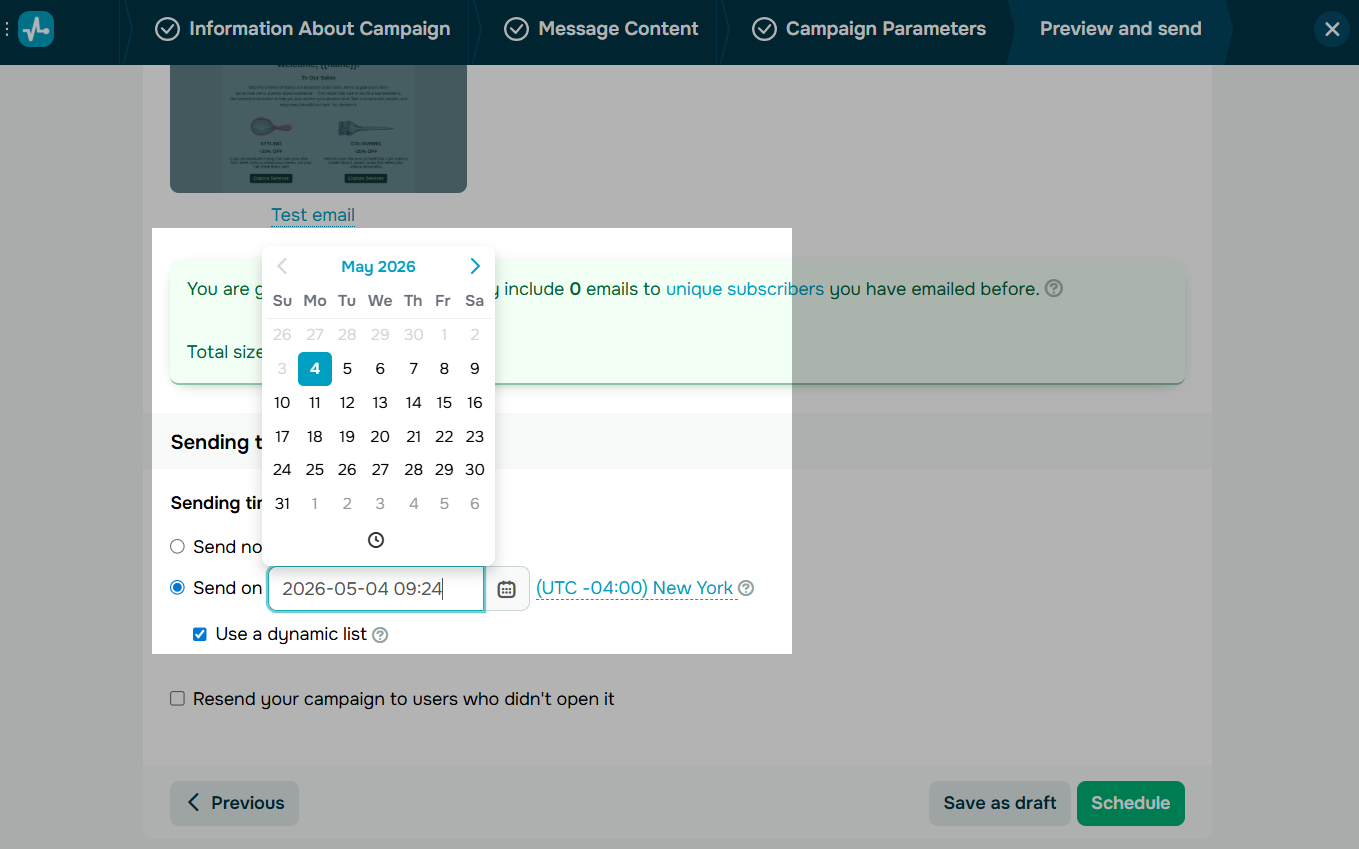 Scheduling an email campaign by date, time, and time zone
Another useful detail: scheduled campaigns support dynamic mailing lists. This means contacts who join the list before launch will automatically receive the campaign, so you do not need to rebuild or resend emails.
Resend to non-openers
To resend a campaign to subscribers who did not open it, choose the “Resend your campaign to users who didn’t open it” option while setting up your campaign. SendPulse will duplicate the campaign so you can send it again without having to create a new email.
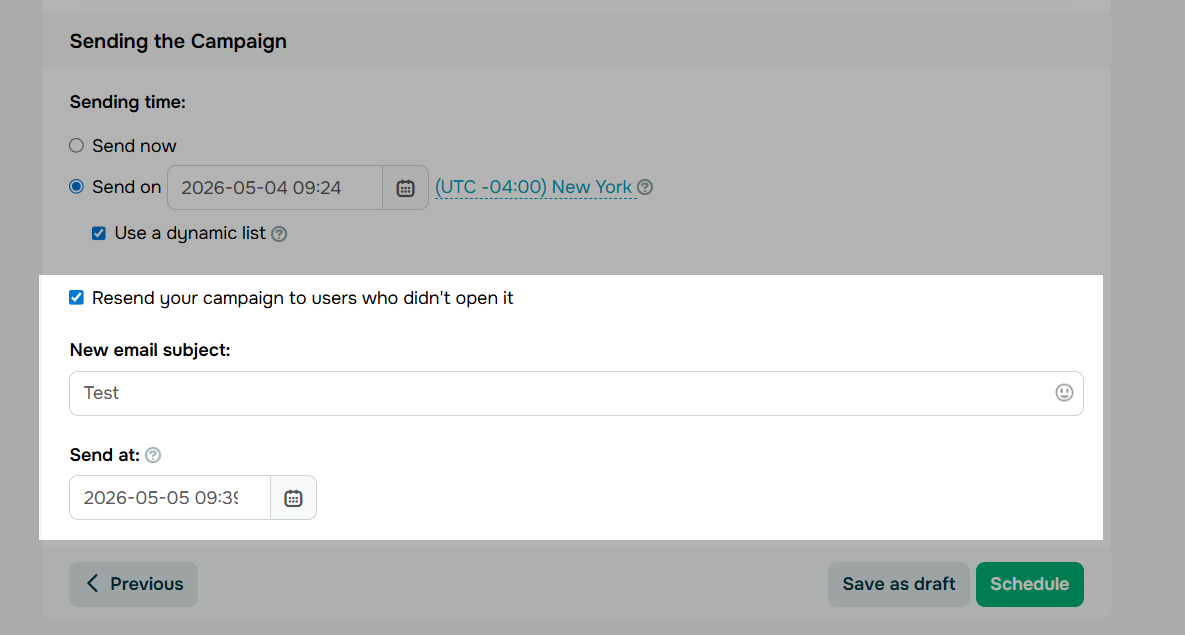 Enabling the resend-to-non-openers option during campaign setup
It’s best to wait 24 to 48 hours before resending your campaign. This allows the original email to gather engagement data and keeps your content timely.
Do not resend the email without changes, though. Keep your content, but update the subject line to provide a new hook and increase the chance of engagement.
Use automation for precise timing
Email campaigns often achieve better results when scheduled within an automated flow.
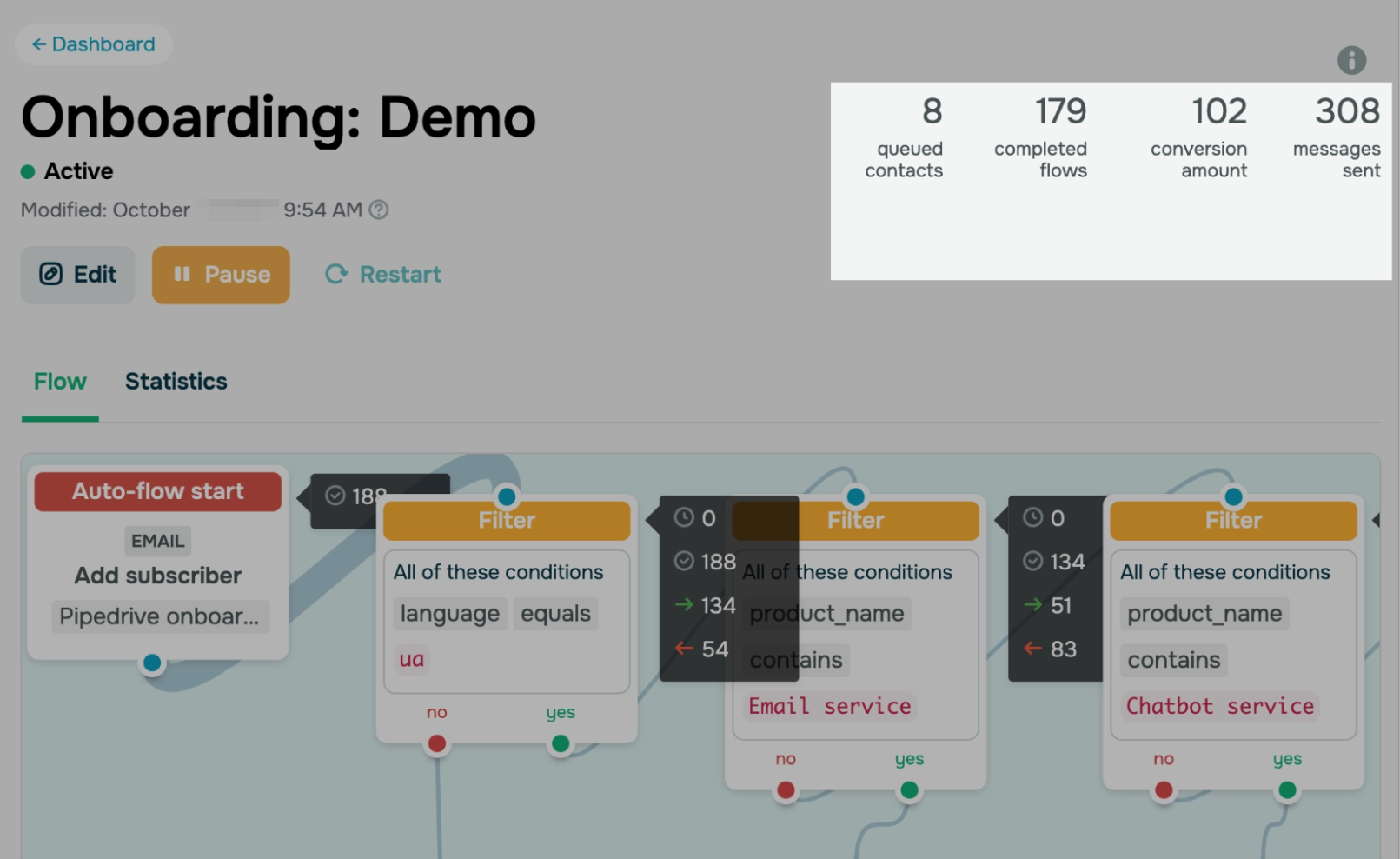
In SendPulse, you can manage email sending time within a flow. To do this, navigate to the Automation section and select “Create flow.”
You can create a flow from scratch using the blocks or choose one of the ready-made templates. Then configure the sender details, unsubscribe settings, and sending time.
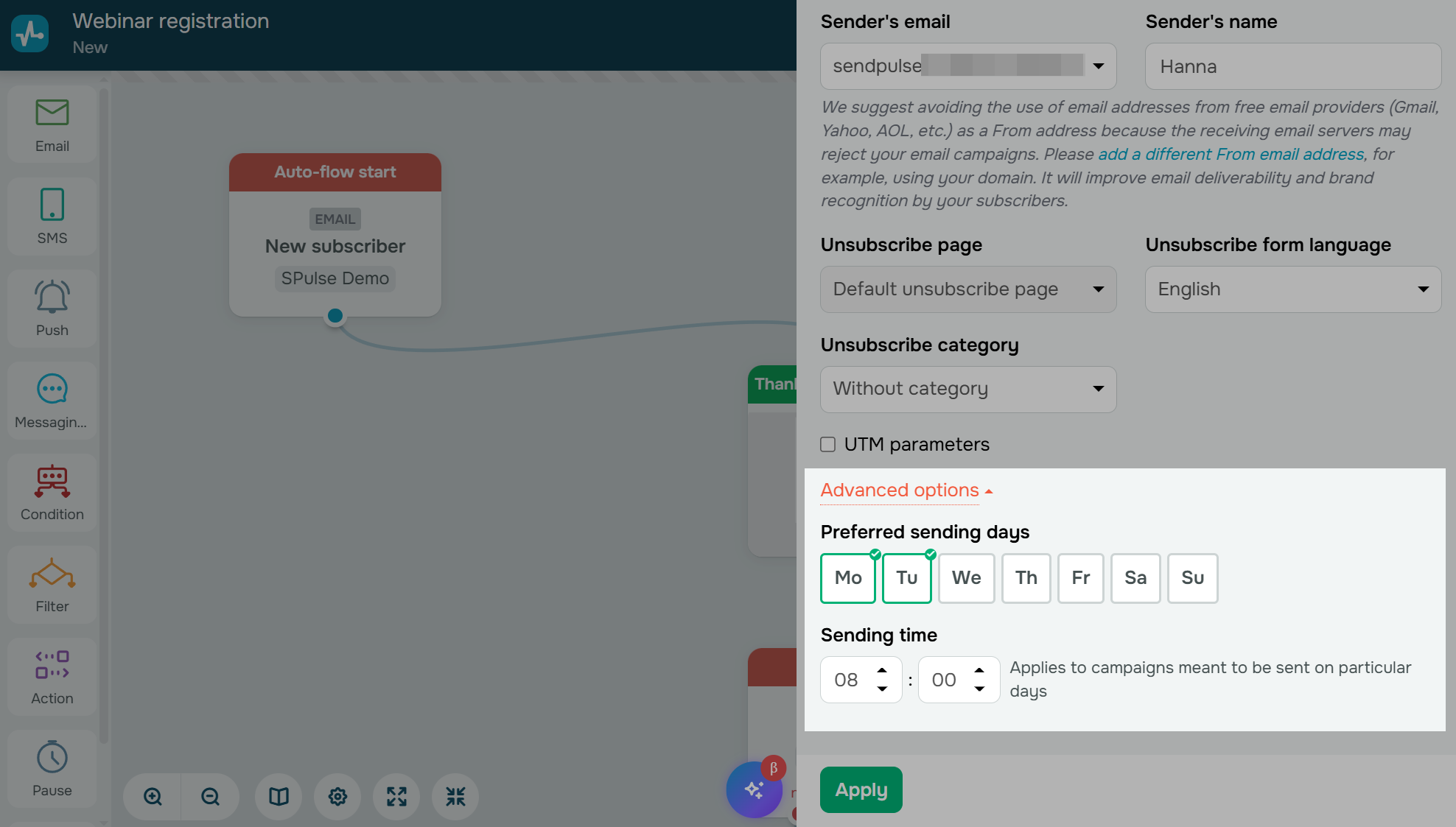 Setting sender details, unsubscribe preferences, and sending time for an automation flow
You can set priority sending days. For example, you may choose to send promotional emails only on Monday, Wednesday, and Friday at 10 AM, regardless of when a subscriber enters the flow.
Note that priority sending applies only to day-based delays and specific conditions. It does not affect emails sent immediately or those with short hour or minute delays.
For each element in the flow, you can choose different execution options:
- send immediately;
- send after a delay;
- send at an exact time;
- send at an exact date and time.
This approach allows you to align automation with actual user behavior rather than sending every email immediately.
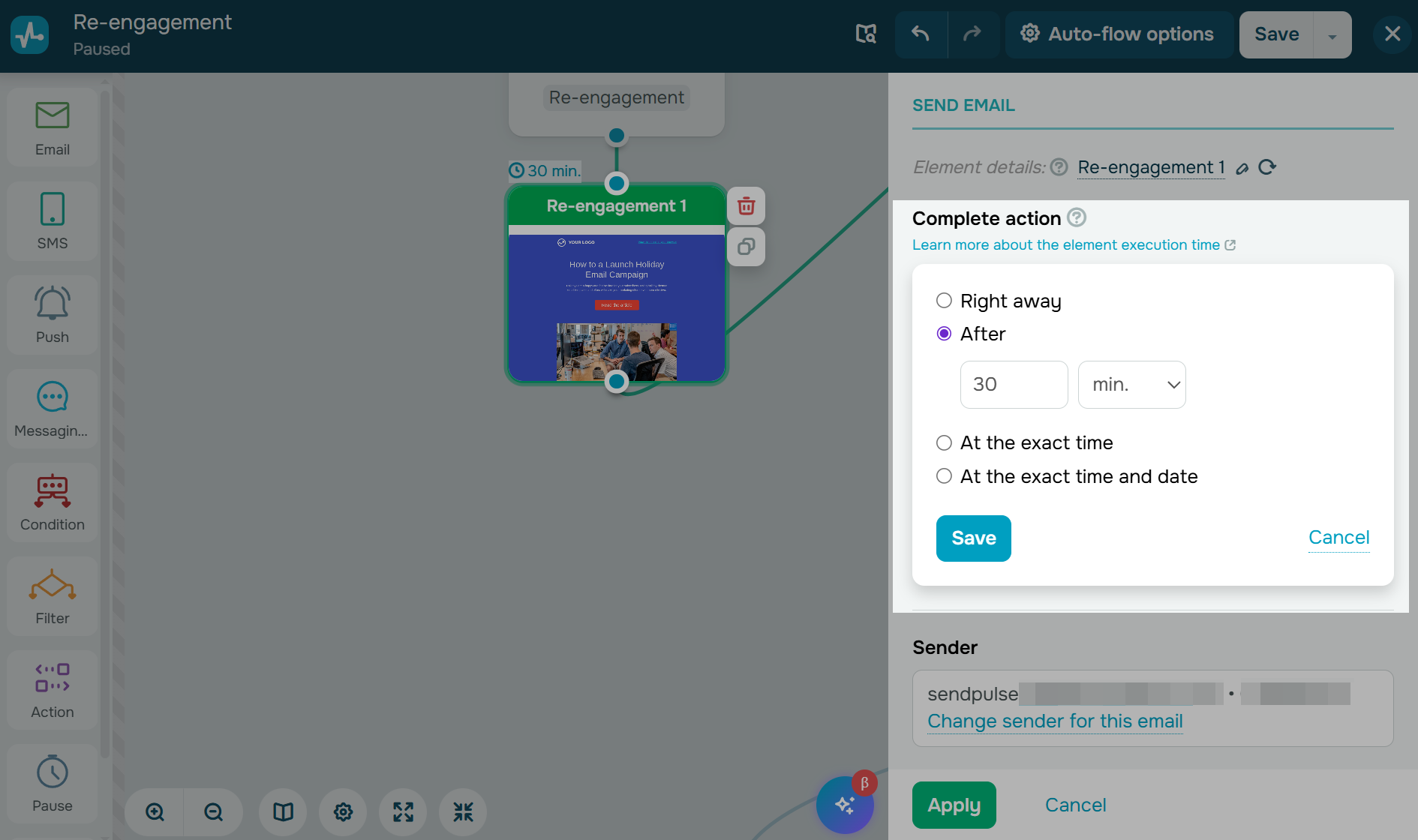 Choosing execution timing for an email element in an automation flow
Analyze and iterate
Audience behavior evolves, and campaign performance varies over time.
You can check detailed statistics to track campaign performance, including opens by location, click maps, device data, and exportable reports.
 Reviewing campaign statistics in SendPulse
These insights reveal not only if an email was opened but also when subscribers engaged.
Note that campaign statistics may update for up to 48 hours after sending. Avoid comparing results too soon to prevent optimizing based on incomplete data.
Treat each campaign as feedback for future efforts. Use the results to refine timing hypotheses, adjust segments, and revisit the first step of your testing framework.
Best practices and common mistakes in email timing
Here’s a quick summary of the main tips and mistakes to watch for when choosing the best time to send emails.
Marketers use the following practices to improve campaign performance:
- Align send times with subscriber routines rather than internal schedules. Convenience for marketers does not always align with your audience preferences.
- Test open rates and click rates separately. Recipients may open emails in the morning but engage further at a later time.
- Send triggered emails immediately after the relevant event. Delaying messages such as welcome emails, password resets, or cart reminders reduces their effectiveness.
- Retest send times before major sales periods, as audience behavior often shifts during holidays and seasonal campaigns.
- Use recipient-local time for audiences across multiple regions. A single global send time can result in inconsistent experiences.
- Resend campaigns to non-openers only while the content remains relevant. Follow-up emails are effective only if the message is still timely.
Watch out for these five issues that can lower engagement and make your tests less reliable:
- Using a single global send time for all recipients. A campaign sent at 10 AM in one region may be poorly timed in others. Without segmentation or local times, timing data will be inaccurate.
- Testing multiple variables simultaneously. Changing send time, subject line, and design together prevents you from identifying which factor influenced results. Effective tests isolate one variable.
- Relying primarily on open rates. Prioritize metrics like clicks, conversions, and revenue instead.
- Applying the same timing strategy to all email types. Newsletters, flash sales, onboarding emails, and cart reminders each require tailored timing based on user behavior.
- Declaring winners too early. One successful campaign doesn’t prove a pattern. Inbox competition, seasonality, and audience behavior can all affect short-term results. You need repeated tests for reliable timing insights.
From benchmarks to results
The best time to send marketing emails is not a fixed number on a chart. It depends on your audience, goals, and continuous testing.
Recent studies reveal useful patterns, but also show that opens, clicks, and conversions peak at different times. There is no universal “perfect” send time for every business or campaign. Marketers achieve the best results by testing, analyzing, and adapting to changes in audience behavior.
With SendPulse, you can schedule campaigns by time zone, automate sends, segment audiences, resend emails to non-openers, and track engagement data in one place. Instead of relying on assumptions, you can build a timing strategy based on actual subscriber behavior.
Start with strong benchmarks, keep testing, and turn email timing into a consistent advantage. Create a free SendPulse account to put these insights into practice.
Email timing FAQs
What is the best day to send marketing emails?
Tuesday and Friday consistently rank as the top-performing days across recent studies. Tuesday leads for opens (31.27%) and clicks (0.81% click-to-sent), while Friday leads in another dataset with the highest open rate (49.72%) and click rate (8.09%). Midweek is a reliable starting point — test from there.
What is the best time to send marketing emails?
Between 9 and 11 AM on weekdays, when open rates peak across most studies. Clicks and conversions follow different patterns, though — clicks peak at 7–8 AM and again at 4 PM, while conversions are strongest early in the morning. Choose your send time based on whether you’re optimizing for visibility, clicks, or revenue.
What is the best day of the week to send an email?
Tuesday through Thursday perform most consistently. Tuesday appears most often as a top performer for both opens and clicks. Friday is also strong for opens and clicks. Weekends generally underperform, except for Sunday.
Is it better to email on Monday or Tuesday?
Tuesday is generally the stronger choice — it has the highest open rate (31.27%) and click-to-sent rate (0.81%) across the largest dataset analyzed. Monday can also perform well for opens, but inboxes tend to be more crowded at the start of the week.
Should I send an email on Sunday or Monday?
Monday is generally the safer choice, especially for B2B emails and newsletters, since engagement is consistently strong on weekdays. Sunday shows strong open rates and solid conversions in certain time windows, so it’s worth testing for re-engagement campaigns and consumer-focused content.
Is 7 AM too early to send an email?
No. Data shows some of the week’s highest conversion rates at 7 AM, particularly on Fridays (0.138%). Early sends face less inbox competition and can reach people before the morning rush. Test it against your usual send time and compare conversions.