Facebook is still one of the biggest social platforms in the world, so it’s no surprise that brands keep using it to run campaigns, launch paid ads, and stay in touch with customers. With AI tools now built into many messaging platforms, you don’t have to handle every conversation manually anymore. Instead, you can use an AI Facebook chatbot builder to automate customer support, lead capture, and sales right inside the Messenger app.
In this post, we’ll look at the best AI Facebook bot builders that let you create a powerful chatbot without any technical skills. You’ll see how these tools can streamline your Messenger communication and make it much easier to handle customer conversations at scale.
Disclaimer: The information in this post is accurate as of December 2025.
TL;DR Best AI Facebook chatbot builders compared
To quickly compare the platforms mentioned in this post, we’ve created a table highlighting their main features and pricing details. Click on each tool to dive deeper.
| Tool |
AI features |
Free plan
+ limits |
Starting price
+ limits |
Best for |
| SendPulse |
AI reply generation; Whisper voice recognition; AI image generation; custom OpenAI Assistants; intent and sentiment detection |
✅
3 chatbots, 500 subscribers, 10k messages |
$8/mo for
500 subscribers, ∞ chatbots and messages |
SMBs needing an AI Facebook bot builder with multi-channel automation |
| Manychat |
Intention recognition; AI Steps; AI flow builder assistant; AI text improver |
✅
25 subscribers, 2 channels |
$14/mo for
250 subscribers, 2 channels + $29/mo for AI features |
SMBs and creators who want to automate campaigns across Messenger, Instagram, and WhatsApp |
| Chatfuel |
Fuely AI and ChatGPT integration, including task automation and human handoff rules |
❌
7-day free trial |
$23.99/mo for
1k messages + $0.02 for each extra message |
SMBs wanting to automate customer support, lead generation, bookings, and messaging on Facebook |
| Crisp |
AI knowledge training; multilingual support; voice-to-text feature; AI spam filter; AI site search, etc. |
✅
Facebook chatbot builder is not included |
€45/mo for
Facebook chatbot with ∞ messages |
Companies that need omnichannel support across all messaging platforms and websites |
| Chitchatbot |
Integration with OpenAI ChatGPT, Claude, Google Gemini; AI Functions; rich responses; voice automation |
❌
7-day free trial |
$29/mo for
∞ messages |
Businesses that want to build AI chatbots across Meta platforms without coding |
| Smax AI |
AI Agents based on different models; Data Tables; context-aware responses; product recommendations; interactive mini-games |
✅
1 chatbot, 1k contacts, 3k messages |
$20/mo for
3 chatbots, 10k contacts, 20k messages |
Businesses aiming to scale lead generation and sales via Messenger and other platforms |
| BotPenguin |
AI chatbot training on different types of content; customizable AI personas; memory of chat history; context-based conversations |
✅
1 chatbot, 1k messages |
$29/mo for
5 chatbots, 3k messages |
Teams that want to build a chatbot aligned with their brand’s voice through customizable AI personas |
What is an AI Facebook chatbot builder?
A Facebook bot builder is a platform that lets businesses create and manage chatbots for Facebook Messenger. These tools range from simple, no-code solutions to more advanced, low-code or developer-focused platforms.
An AI Facebook chatbot builder goes a step further by using natural language processing and machine learning. This helps the bot understand messages, interpret intent, and reply in a way that feels more natural to the user. With a visual interface, marketers can map out conversation flows, set automated replies, and connect the bot to CRM systems, eCommerce platforms, or other business tools.
As a result, a chatbot can handle tasks like answering FAQs, capturing leads, recommending products, or even guiding users through purchases. Over time, AI-powered Facebook bots can learn from real conversations and respond with more context and accuracy.
Engage users on Facebook
Use our drag-and-drop builder to create AI-powered Facebook chatbots that sell, support, and connect. Run campaigns, share updates, and convert leads hands-free.
Get started for free
Benefits of using AI Facebook chatbot builders
Different chatbot platforms offer various features, but many of the core benefits are shared across the board. Here’s what businesses can expect when using an AI Facebook bot builder:
- Integration with Facebook Ads. Many AI bot builders allow you to launch conversations directly from Facebook Ads. When someone clicks your ad, the bot can greet them instantly and turn that interaction into a lead.
- Integration across Meta platforms. Many AI Facebook bot builders also support Instagram and WhatsApp. This way, businesses can manage their communication across all primary Meta channels from one place.
- 24/7 customer support. Chatbots you build with no-code solutions can answer questions and assist customers at any time, even across different time zones. Such consistency helps users get the support they need without waiting for a human agent.
- Reduced operational costs. By automating routine workflows, such as answering FAQs, tracking orders, or scheduling appointments, you can reduce the workload on your support team and lower overall service costs.
- Increased response speed. AI bots reply instantly and can handle multiple Messenger conversations at once. This boosts customer service response times and frees your human team to focus on more complex issues.
- Scalability. As message volumes grow, a chatbot can keep up without requiring additional staff. It expands as your business does, making it easier to manage demand.
- Personalized user experience. When connected to your CRM system or paired with machine learning, chatbots can offer personalized recommendations and adapt to a user’s preferences or past behavior.
- Lead generation. Chatbots you create can ask qualifying questions and guide potential customers through the sales process automatically.
As you can see, by using AI chatbots built with dedicated platforms, businesses can provide 24/7 support, streamline workflows, and deliver personalized experiences, all while keeping operations efficient and scalable.
How to choose an AI Facebook bot builder
Choosing the right platform can feel overwhelming, especially with so many options available. To make the process easier, here are the key factors to look at when evaluating any chatbot solution.
Ease of use
When choosing an AI Facebook bot builder, start by checking how simple the platform is to work with. A no-code or drag-and-drop interface is ideal for teams without technical expertise because it lets them build conversation flows visually. On the other hand, developer-friendly tools should offer API and webhook access for deeper customization. The goal is to pick a platform that matches your team’s skill level and workflow.
Templates and pre-built flows
When searching for a no-code Facebook chatbot builder, look for software that includes ready-made templates for common scenarios such as lead capture, FAQs, eCommerce checkout, or event reminders. Templates should be fully editable so you can adjust tone, style, and branding. Pre-built flows significantly speed up setup and give you a reliable framework to start with.
Integration options
A strong chatbot builder should work seamlessly with the tools you already use. Essential integrations include CRM platforms, eCommerce tools like Shopify or WooCommerce, and automation services. Built-in payment support, such as Stripe, PayPal, or Meta’s native tools, makes it easy to collect revenue right inside the Messenger app. In short, integrations ensure your bot becomes part of your larger system, not an isolated add-on.
Pricing
Pricing models vary widely, so it’s essential to check how each platform charges. Some AI Facebook bot builders charge per subscriber, others per message, and some use flat monthly tiers. Look for a free plan or trial to test features before committing, and make sure costs stay predictable as your audience grows. Transparent pricing helps prevent unexpected expenses later.
AI and NLP capabilities
Today’s users expect bots that can understand natural language, so strong AI and NLP features are essential. Look for builders that support free-text input, learn from FAQs, and integrate with large language models like ChatGPT. These capabilities allow bots to carry out more natural conversations and handle complex questions better than simple rule-based flows.
Build your chatbots with AI
Let AI help you create a perfect bot scenario on any topic — booking an appointment, signing up for a webinar, creating an online course in a messaging app, and more. Sign up now and run up to three bots for free!
Get started for free
Compliance with Meta
Make sure the builder uses Meta-approved APIs and follows all messaging policies, including the 24-hour window and tag rules. Facebook chatbot builders with built-in safeguards help prevent spam-like behavior, reduce the risk of penalties, and protect your account from restrictions. Compliance ensures long-term deliverability and keeps your Messenger strategy safe.
Analytics and reporting
Robust analytics help you understand how your chatbot performs and where it can improve. Most platforms provide metrics like open rates, click-through rates, response times, and flow drop-offs. Many also offer A/B testing and conversion tracking. Without solid reporting, it’s difficult to optimize your bot or measure ROI effectively.
Best AI Facebook chatbot builders
To help simplify your decision, we’ve selected the best AI Facebook chatbot builders with outstanding features. Let’s take a closer look.
SendPulse
SendPulse is an all-in-one marketing and sales automation platform that offers a versatile chatbot builder for Facebook Messenger, TikTok, Telegram, Instagram, WhatsApp, and websites. Using its AI Facebook bot builder, businesses can create multi-step conversation flows, set triggers, and manage customer interactions without any technical skills. The platform also lets users build a chatbot from scratch or adapt one of its pre-made templates, as well as accept payments directly through Messenger.
SendPulse stands out for its rich ecosystem, which brings together email marketing, SMS, web push notifications, and a built-in CRM system, among many other marketing tools. This gives teams a connected workspace where chatbots, campaigns, and customer data all work together instead of functioning as separate tools.
The platform’s AI capabilities take the chatbot experience even further. SendPulse’s AI assistant can understand context, recognize user intent, and trigger relevant flows automatically. You can also connect your chatbot to ChatGPT or Claude so it can answer questions, provide tailored recommendations, or guide users through your products. Additional features include Whisper voice recognition for audio transcription and an AI image generator that helps users visualize their requests.
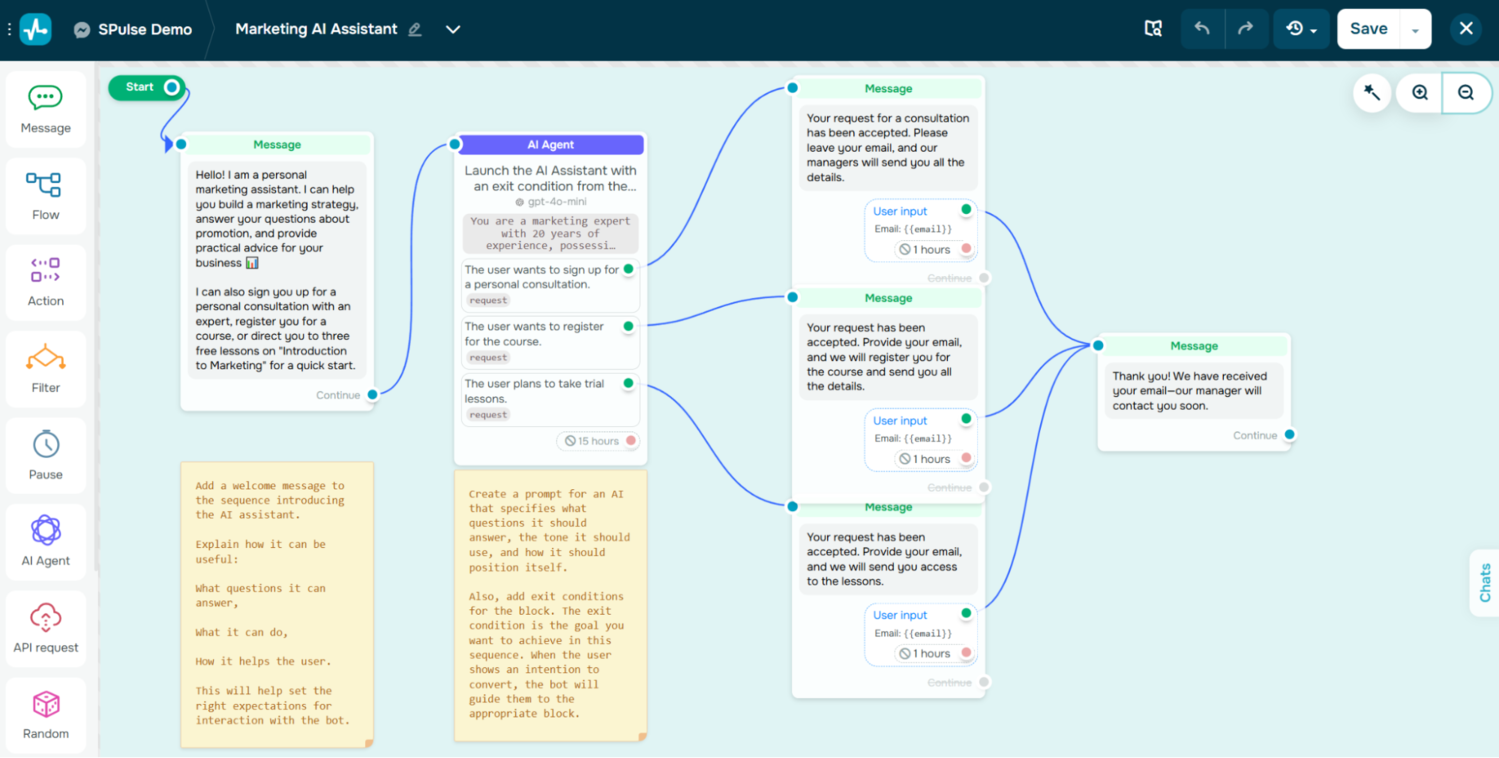 Creating an AI Facebook chatbot using the SendPulse builder
SendPulse key features include:
- no-code Facebook chatbot builder;
- pre-made chatbot flow templates;
- AI flow builder assistant;
- triggers based on keywords, events, or actions;
- personalized multi-step conversational flows;
- AI-powered response generation with OpenAI, DeepSeek, or Claude;
- Whisper voice recognition;
- AI image generation to create personalized content;
- custom OpenAI Assistant integration for complex workflows;
- intent and sentiment detection for relevant responses;
- automated replies in comments;
- AI-driven flow automation based on detected goals or behavior;
- bulk or personalized Facebook Messenger campaigns;
- payment and eCommerce integrations.
Pricing. SendPulse offers a free plan with up to 3 chatbots and 500 subscribers. This plan supports up to 10,000 messages per month across all chatbots. The platform’s most affordable paid plan starts at $8/month for 500 subscribers with unlimited chatbots and messages, and unlocks additional features such as ChatGPT integration and built-in payments.

Create your free SendPulse account
Start using powerful tools to attract, engage, and retain customers — all on one platform. Sign up for free and explore what you can build.
Get started for free
Manychat
Manychat is a robust solution that lets businesses automate conversations across various messaging channels. In addition to its AI Facebook chatbot builder, it also supports Instagram, TikTok, and WhatsApp. The platform includes a variety of pre-built templates for common workflows such as answering FAQs, responding to comments, and sending follow-up messages.
Manychat’s built-in AI can detect user intent and automatically move conversations into the right automated flow without any manual routing. Inside the platform’s flow builder, an AI assistant helps create and refine automations by suggesting steps, generating responses, and improving message clarity through text enhancement tools. Manychat can also learn a brand’s tone from previous conversations, ensuring AI-generated replies stay consistent with your voice.
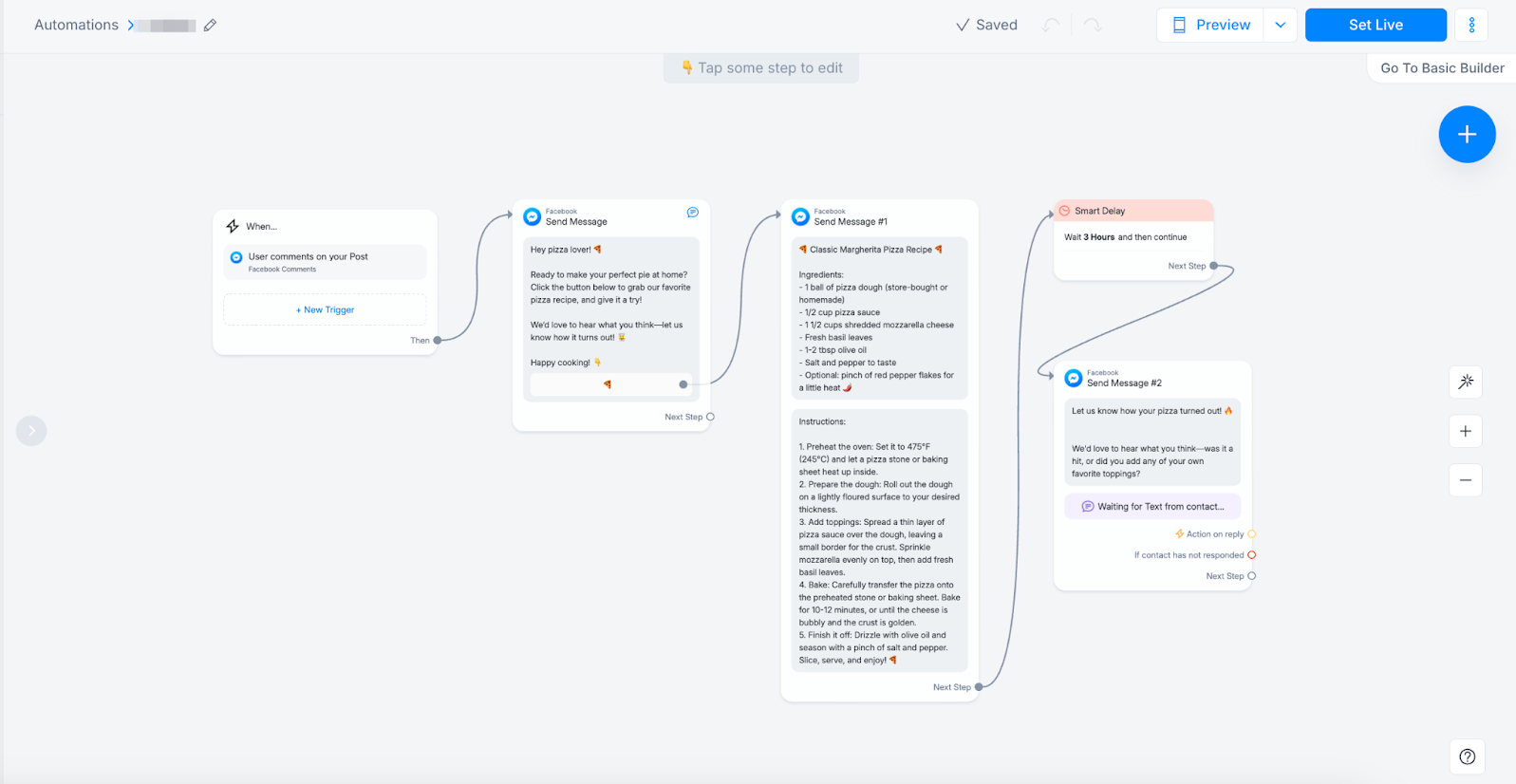 Setting up a Facebook comment-triggered flow; source: Manychat
Manychat key features include:
- visual flow builder with steps, conditions, delays, and A/B testing;
- AI flow builder assistant;
- automated user intent recognition in conversations;
- AI Step that qualifies leads and shares offers;
- AI text improver;
- Messenger broadcasts with targeting options;
- automated replies to Facebook comments;
- landing pages, QR codes, and ref URLs that drive customers to your bot;
- click-to-Messenger ads;
- PayPal and Stripe purchase buttons in Messenger;
- conversion events and metrics logs;
- Manychat Pixel that triggers conversion events.
Pricing. Manychat offers a free plan that includes Facebook Messenger functionality and supports up to 1,000 contacts and 10 customer tags. The platform’s cheapest paid plan is priced at $14/month for 250 contacts and scales based on list size. For $29/month, users can add Manychat AI to unlock its advanced AI capabilities.
Chatfuel
Chatfuel is a no-code builder that helps businesses create chatbots for Facebook Messenger, Instagram, and WhatsApp. It’s designed for users with no technical background and offers ready-made templates to speed up setup. With Chatfuel, businesses can build chatbots that reply to messages and comments, answer FAQs, guide users through simple steps, and send follow-up messages based on the choices users make during a conversation.
The platform also includes an AI system called Fuely, which works from a structured knowledge base. This library can consist of product details, business information, and FAQs, and Fuely uses it to provide accurate answers and personalized recommendations. It can follow custom instructions, use rules to decide when to automate tasks, and hand conversations to a human agent when necessary.
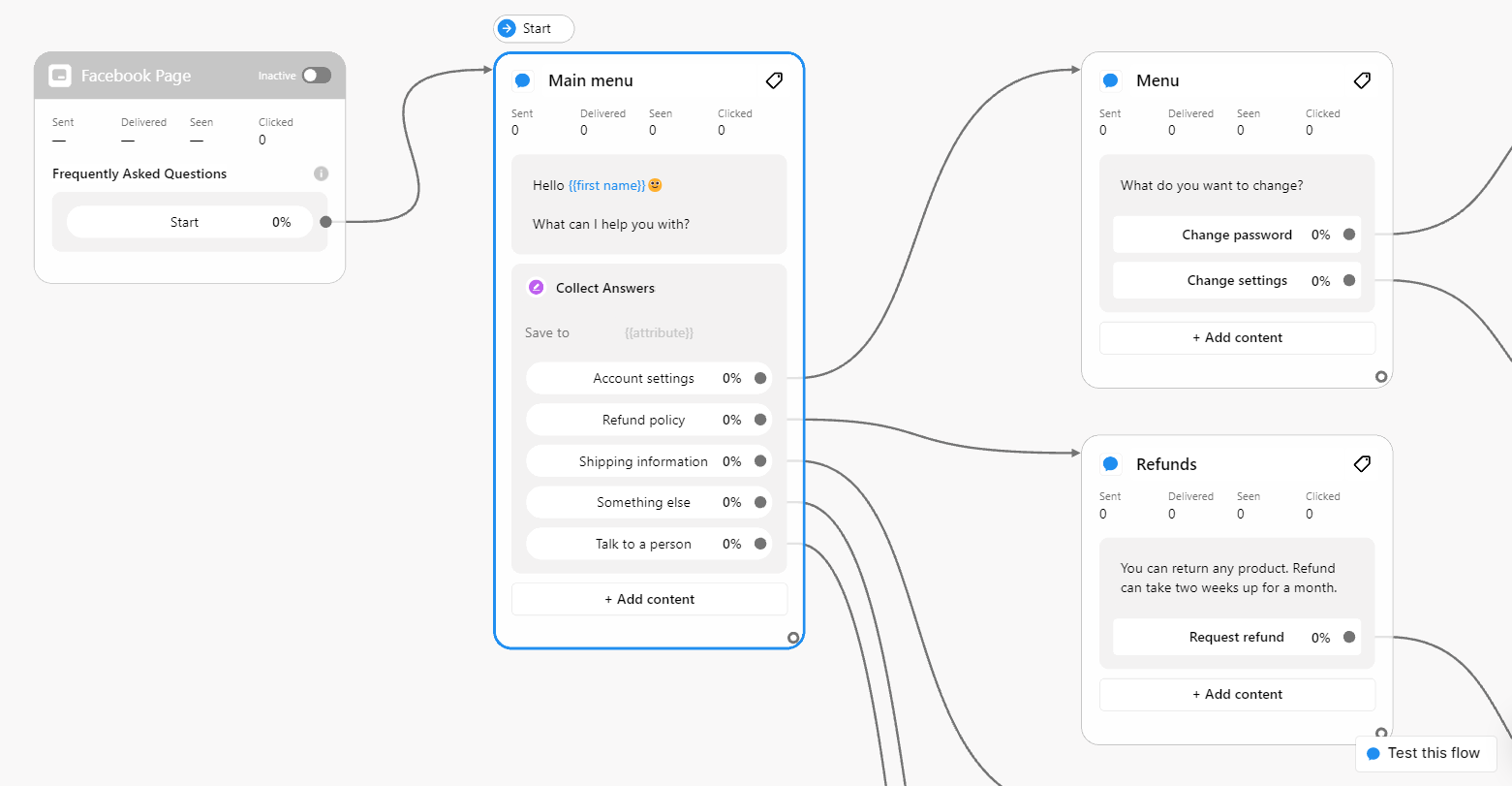 Creating a Facebook chatbot in the visual builder; source: Chatfuel
Chatfuel key features include:
- intuitive chatbot flow builder;
- 30+ templates for the most popular chatbot scenarios;
- AI-powered automated responses for messages and FAQs;
- customizable AI behavior via profile prompts and example outputs;
- multi-step tasks and automations for bookings, follow-ups, and broadcasts;
- handoff rules for routing chats to human agents;
- automated communication channels;
- lead management with a built-in CRM system;
- integration with ChatGPT, Stripe, Zapier, JSON API, etc.
Pricing. Chatfuel doesn’t offer a free plan, but it provides a free 7-day trial. The paid plan for the AI Facebook chatbot builder costs $23.99/month and includes 1,000 conversations. Each extra conversation is billed at $0.02. There’s also an option to pay for chatbot development on demand for specific use cases and integrations, starting at $100.
Crisp
Crisp is an omnichannel chatbot platform that blends AI automation with human support. Its AI Facebook chatbot builder allows businesses to create Facebook Messenger chatbots without writing any code. Using events, actions, and conditions, users can design structured conversation flows that reply to messages, route users to the right department, and share relevant information at the right moment.
Beyond standard automation, Crisp offers a range of advanced AI capabilities that make its chatbots more accurate and responsive. The AI can be trained on multiple data sources, including custom answer snippets, website content, knowledge base articles, and uploaded documents. This gives the chatbot a stronger understanding of your business and helps it deliver more precise responses. Over time, Crisp’s AI also learns from real agent interactions, making automated replies smarter and more reliable.
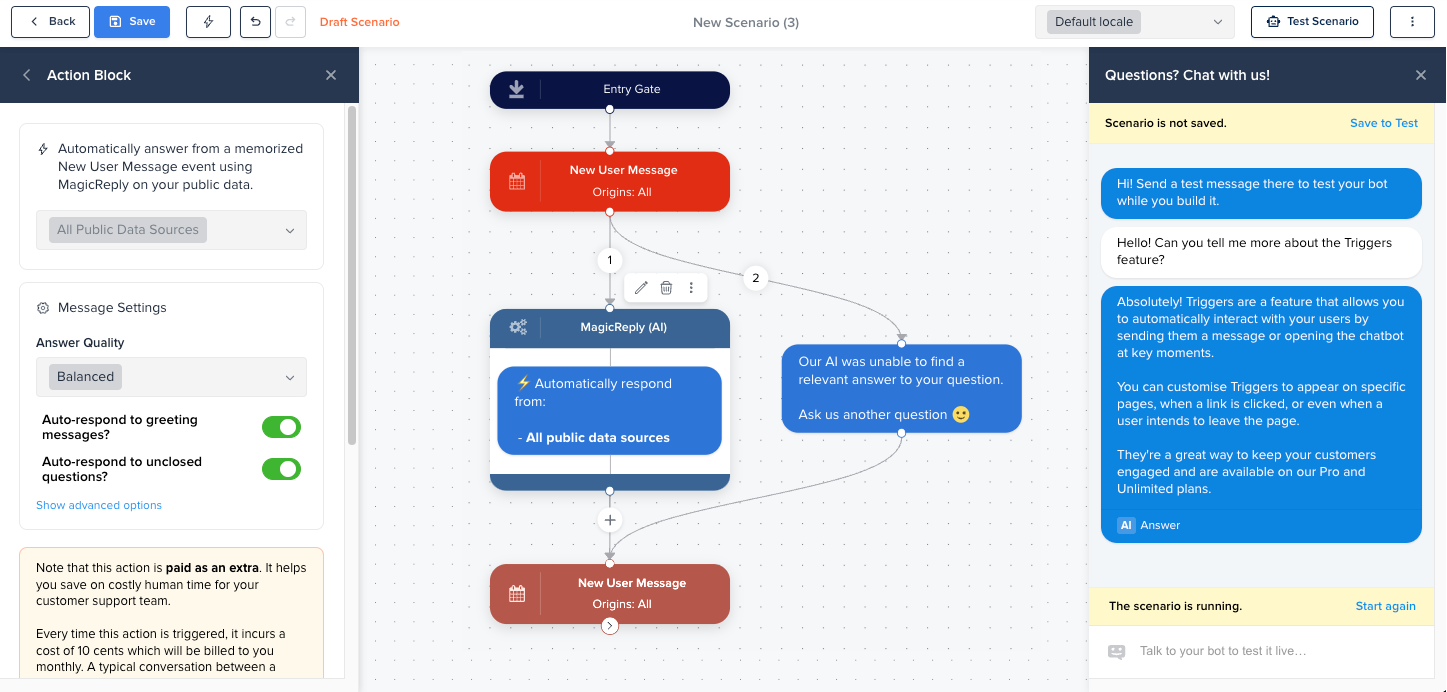 Creating an AI Facebook chatbot; source: Crisp
Crisp key features include:
- no-code AI Facebook chatbot builder;
- conversation flows based on events, actions, and conditions;
- omnichannel inbox, including Facebook Messenger, WhatsApp, Instagram, and more;
- AI knowledge training;
- voice-to-text transcription for audio messages;
- multilingual AI that translates 50+ languages;
- AI writing assistant for human agents;
- AI spam filter based on the user’s settings;
- AI-generated answers to common questions;
- workflow automation via API;
- eCommerce integration with Shopify, WooCommerce, etc.;
- insights on conversational activity, customer satisfaction, and open rate.
Pricing. Chrisp offers a free plan for creating a website chat widget. The Messenger chatbot feature is included in the entry-level paid plan, which costs €45/month. This tier also unlocks additional channels like Telegram, chat triggers, shortcuts, and more. All Crisp plans support unlimited conversations.
Chitchatbot.ai
Chitchatbot is a platform for building AI chatbots that run on Facebook and other Meta channels. It helps businesses automate lead generation, customer support, and user engagement. As a no-code Facebook chatbot builder, it allows users to design automated conversations quickly, from replying to comments and capturing leads to scheduling appointments and processing orders.
The platform also comes with advanced AI capabilities that go beyond messaging. With rich responses, chatbots can send interactive messages featuring buttons, images, videos, and carousels. Integrations with Claude Vision and Google Gemini let the bot analyze and generate images, while other AI features, such as voice recognition and ChatGPT support, enhance how the chatbot understands and assists users.
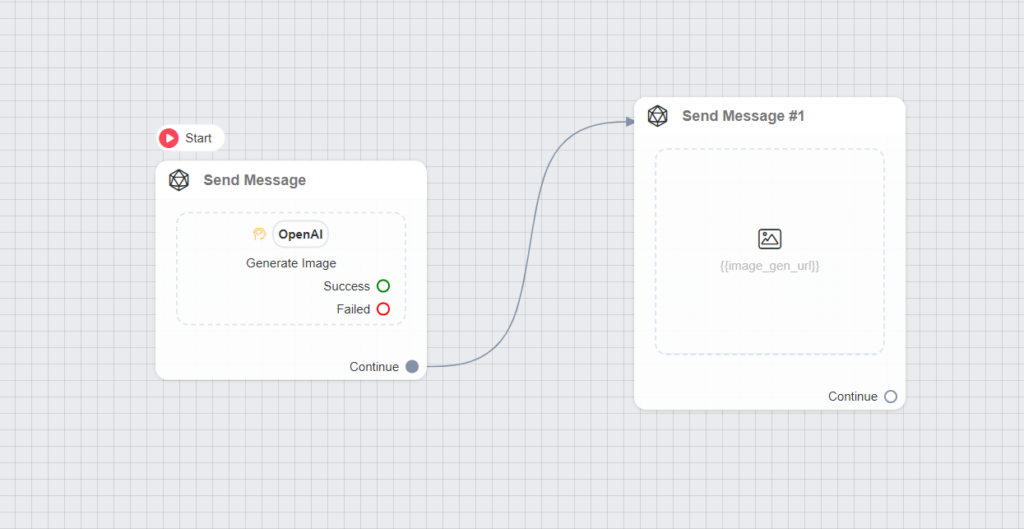 Adding AI images to a chatbot flow; source: Chitchatbot
Chitchatbot key features include:
- no‑code visual chatbot builder;
- pre-built chatbot templates for different use cases;
- support for multiple large language models, including OpenAI, Claude, Google Gemini, and xAI;
- AI functions and triggers for connecting agents to external APIs or workflows;
- AI image generation and analysis;
- voice automation with voice-driven flows;
- rich and interactive messaging options;
- social comment automation with configurable rules;
- custom fields and system variables;
- click-to-Messenger ads;
- eCommerce and sales automation chatbot flows;
- insights on response times, conversion events, and user interactions.
Pricing. Chitchatbot doesn’t offer a free plan, but users can start with a 7-day free trial. The entry-level paid plan costs $29/month and includes 1,000 contacts with unlimited messages and AI actions. Pricing increases based on the number of contacts you need.
Smax AI
Smax is an all-in-one platform that helps businesses manage customer communication across multiple channels. With its AI Facebook chatbot builder, companies can automate first comments on posts, reply to public comments via direct messages, and encourage engagement through giveaways or mini-games. The chatbot can also host a mini store inside Messenger, handle bookings through forms or direct user input, and capture leads from both comments and Messenger conversations.
Smax’s GenAI Trigger lets teams launch chatbot flows based on AI-detected user intent. This way, users can create AI agents that gather information during a conversation and trigger the most relevant next step automatically. Smax chatbots can also deliver personalized product recommendations and support an in-Messenger mini-store, where users browse items from Meta Catalogs or Shopify feeds and place orders without leaving the chat.
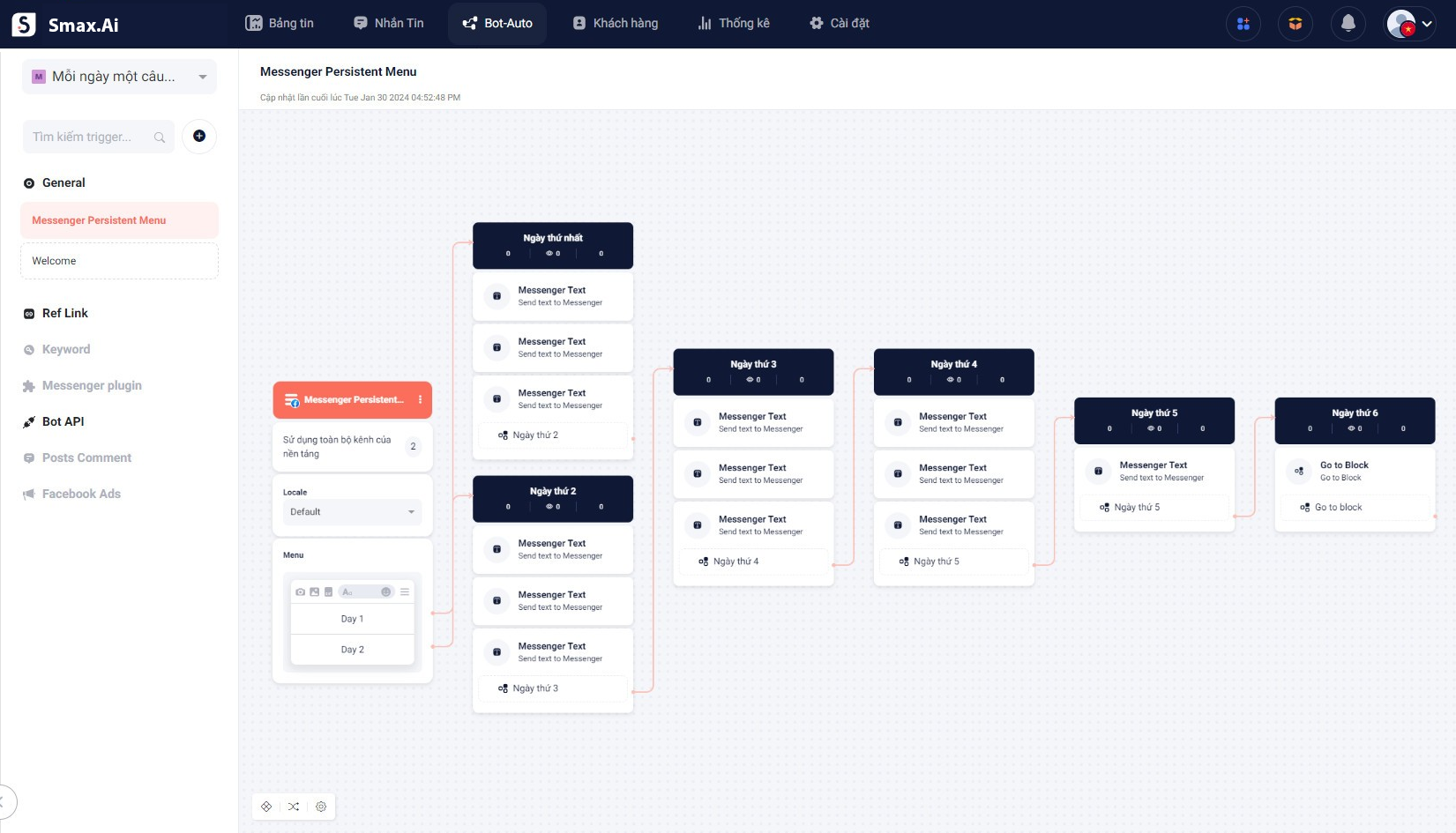 Building a chatbot flow for Facebook Messenger; source: Smax
Smax key features include:
- Facebook Messenger and multi-channel chatbots;
- 30+ chatbot templates;
- customization options, including custom images, web view sidebar, and chatbot template sharing;
- GenAI Trigger and AI Agents;
- data tables and smart automation;
- AI reply assistant;
- auto-collection of leads in the comments;
- conditional splits;
- mini-store functionality with Meta Catalogs or Shopify;
- personalized recommendations based on user behavior;
- mini-games, contests, and discount offers;
- A/B testing for conversation flows;
- AI integrations with OpenAI, Claude, Gemini, DeepSeek, Grok X, and Groq models.
Pricing. Smax offers a free plan that includes 1 chatbot for 1 channel (including Facebook), 1,000 contacts, and 3,000 messages per month. The entry-level paid plan costs $20/month, billed annually, and includes 3 chatbots, 10,000 contacts, and 20,000 monthly messages. Additional fees may apply depending on the AI provider you choose.
BotPenguin
BotPenguin is another platform that offers a no-code interface for building AI chatbots on Facebook Messenger. With its visual builder, users can create custom chat flows, set up keyword- or time-based triggers, and automate replies to comments on Facebook posts. The platform’s builder also supports conditional logic, drip sequences, and broadcast messaging, giving businesses flexibility in how they structure conversations.
BotPenguin’s AI-powered bots can be trained using website content, FAQs, documents, and past conversations, which allows the chatbot to generate context-aware replies. The platform also includes tools for creating detailed AI personas, giving users control over tone, communication style, and behavioral rules. You can choose the underlying AI model and fine-tune factors like answer length, tone, perspective, and formatting. This makes it easier to maintain a consistent experience across different chat scenarios.
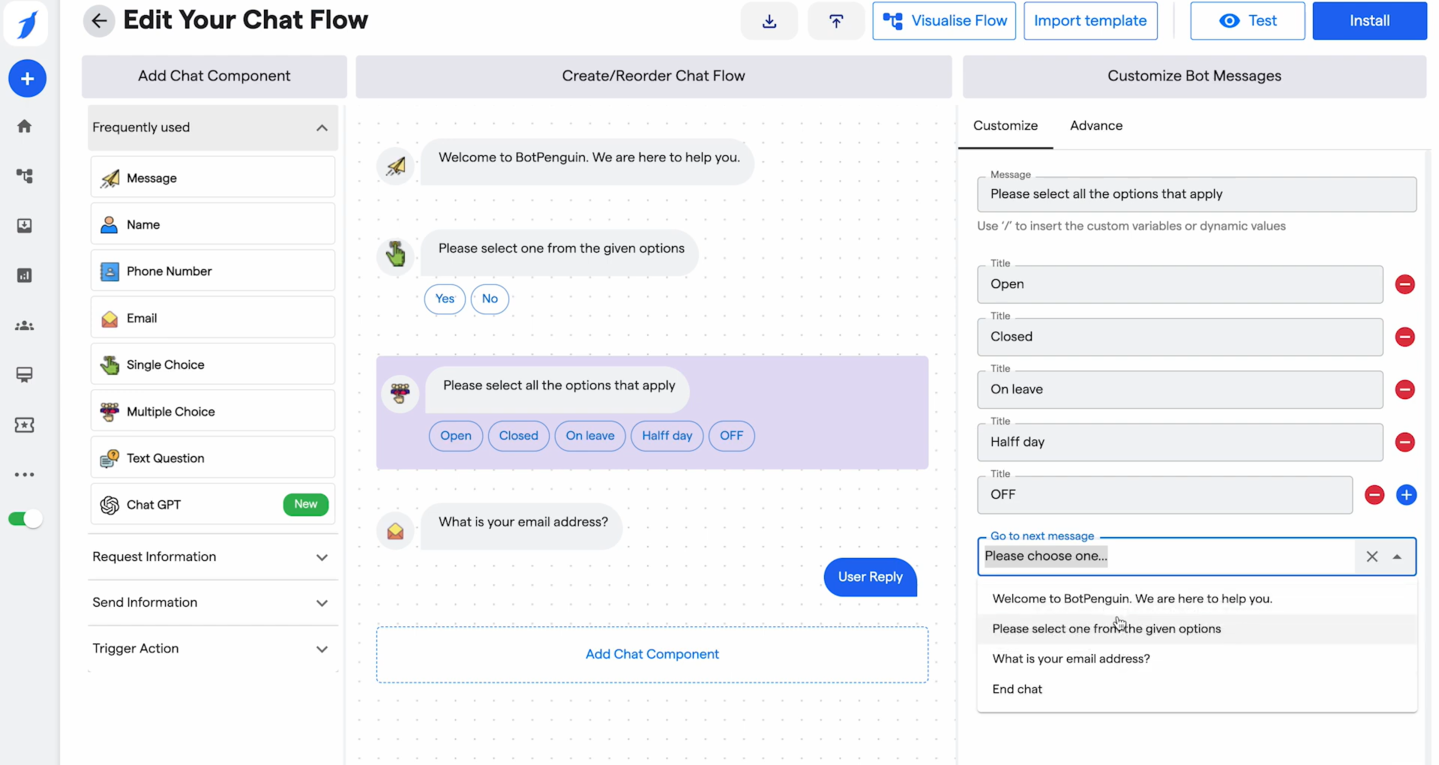 Customizing a chatbot flow in BotPenguin; source: YouTube
BotPenguin key features include:
- drag-and-drop chatbot builder;
- ready-made chat flows for various industries and use cases;
- intent-based chat routing;
- single inbox for all platform conversations;
- multilingual chatbot;
- LLM integration and knowledge base;
- AI bot personality, including tone, style, and behavior;
- AI Voice Agents;
- conditional flows based on user input;
- if/else conditions for chat flow triggers;
- chatbot training on files, FAQs, RSS, custom videos, and other sources;
- natural language processing and understanding;
- insights on the total number of messages, leads, engagement, and other metrics.
Pricing. BotPenguin offers a free plan that allows you to create 1 chatbot on a single platform, including Facebook, and send up to 1,000 messages. The platform’s entry-level paid plan starts at $29/month, billed monthly, and includes 5 chatbots and 3,000 messages, along with additional features like bulk messaging, human agent seats, and more.
Wrapping up
So AI chatbots built on dedicated platforms let businesses offer 24/7 support, simplify workflows, and personalize the customer experience, while keeping operations efficient and easy to scale. SendPulse’s Facebook Messenger bots for business do all three: they sell in chat, handle support requests, and save every conversation to a built-in CRM. Depending on your daily tasks and goals, you can build a chatbot that reduces workload and speeds up processes.
Now, you don’t need to dive into complex coding to create a fully functioning chatbot. Thanks to AI Facebook chatbot builders like SendPulse, you can set up a chatbot in minutes and train it using your own resources and materials. Beyond Facebook, SendPulse also lets you build chatbots for TikTok, Telegram, Instagram, WhatsApp, and websites. And if you want to engage your audience further via email, SendPulse offers solutions for that as well.
Start for free today and see how it works for you!