In 2026, HubSpot is a solid free CRM overall with basic AI tools included. With up to 50,000 contacts on the free plan, SendPulse is a great fit if you have a large contact list or want CRM and multi-channel marketing in the same platform. Freshsales and Capsule keep things simpler for small businesses and startups that are focused on sales. If you’re comfortable self-hosting, Twenty and EspoCRM give you open-source options without per-user fees.
That’s the short version. Now to the details.
In this guide, we’ll cover solutions you can actually keep using without paying. We’ll compare the best free CRM plans side by side, explain what each one includes, and point out exactly where the free tier runs out.
Disclaimer: This guide is published by SendPulse. Although we cover our own product alongside competitors, we aim to present each tool fairly.
TL;DR Free CRM software comparison for 2026
Not all free CRM plans are created equal. The table below compares the key limits and features of the best free CRM platforms, including how many users and contacts you can manage without paying, so you can quickly shortlist the tools that fit your team.
| Tool |
Free users |
Free contacts or records |
Key free features |
AI on the free plan |
Paid upgrade from |
| SendPulse |
5 |
50,000 contacts |
2 pipelines with up to 500 deals, 2 boards, 1 GB storage, Automation 360 |
Yes, 200 free AI requests shared across SendPulse tools |
$14.40/mo for 1 user; $42.40/mo for up to 10 users |
| HubSpot CRM |
2 |
1,000 contacts |
1 deal pipeline, 2,000 emails per month, 10 active and 1,000 static segments |
Yes, Breeze Assistant |
$20/mo per user |
| Zoho CRM |
3 |
5,000 records |
Contact and deal management, workflow automation, tasks, events, and call logs |
No |
$14/mo per user
(Bigin: $7/mo) |
| Freshsales |
3 |
No stated limit |
1 pipeline, contact, account, and deal management, Kanban view |
No |
$9/mo per user |
| EngageBay |
15 |
250 contacts and companies |
Contact, deal, and task management, 360-degree contact view, email tracking |
No |
$11.95/mo per user |
| Capsule CRM |
2 |
250 contacts |
1 sales pipeline, contact management, tasks and follow-up reminders, project management |
No |
$18/mo per user |
| Twenty |
Unlimited if self-hosted |
Unlimited if self-hosted |
Custom objects and fields, Kanban and calendar views, workflows |
Yes, with your own AI provider’s API key |
$9/mo per user |
| EspoCRM |
Unlimited if self-hosted |
No stated limit |
Leads and opportunities, sales pipelines, roles and permissions, REST API |
No |
$15/mo per user (3-user minimum) |
| SuiteCRM |
Unlimited if self-hosted |
No stated limit |
Sales pipelines, marketing campaigns, case management, workflows |
No |
$175/mo |
Paid prices are the cheapest plan per user per month, billed annually unless otherwise noted. Limits and prices are verified on each vendor’s official pricing page as of October 2026.
Free CRM vs free trial: what’s the difference?
A CRM is a customer relationship management system that helps you organize customer and prospect information, track interactions, and manage sales activity in one place.
When a CRM is labeled “free,” it’s worth checking what that label actually covers. Most offers fall into one of two models:
- Free plans, sometimes called free-forever or freemium plans, are free tiers of a CRM. They never expire, but they cap users, contacts, storage, or features and keep advanced tools for paying customers.
- Free trials offer temporary access to a paid plan, usually for 14 to 30 days. After that, the tool stops working or asks for payment.
Open-source CRMs are a separate case: the software itself is free, but you pay for hosting and maintenance.
Before signing up, check four things: user and contact caps, locked features, usage limits, and whether a credit card is required to start. It also pays to double-check well-known brands, since a big name tells you little about what’s free.
Salesforce is a good case in point. It’s best known for its paid editions and 30-day trials, but it also offers a free-forever plan for small businesses called Salesforce Free Suite. The plan is capped at two users and 100 email sends, with limited AI features and no commerce functionality. It also stays free only as long as you log in at least once every 60 days. That difference matters when you want a CRM you can keep using for as long as you like, at no cost.
What to look for in a free CRM system
Choosing a free CRM platform is easier when you know which limits and features actually matter. When comparing tools, focus on the following criteria:
- Free users. Most free plans cap how many people can access the CRM tool, and that cap decides whether your whole team can work in it without paying.
- Free contacts or records. Every free tier sets its own limits on contacts, companies, deals, and other records, and some run out much sooner than others.
- Core features. A useful CRM free plan covers the essentials your team relies on every day, such as deals and pipelines, tasks, email tools, and automation.
- AI features. Some free plans include an AI assistant for writing emails or summarizing records, while others keep AI for paid tiers. Free AI usually comes with usage caps, such as a set number of requests or generations.
- Integrations. The CRM delivers more value when it connects smoothly with the tools your team already uses.
- Ease of use. A generous free plan loses its value when the CRM is hard to set up or navigate.
- Paid upgrade and hidden costs. The price of the next tier shows what you’ll pay once the CRM free plan no longer meets your needs. Also, look for costs that aren’t on the price tag, such as paid add-ons, AI usage limits, or hosting for self-hosted tools, so the jump won’t catch you off guard.
Together, these criteria separate genuinely useful free CRM solutions from plans that are too limited for real work.
Free CRM software review of features, limits, and pricing
To review the free hosted CRMs below, we signed up for their free plans and checked each vendor’s official pricing page, plan comparison, and help center in October 2026 to verify user and contact limits, AI features, and upgrade cost. G2 and Capterra user ratings and reviews were last checked on the same date.
Let’s take a closer look at each free CRM: its key features, pros and cons, free plan limits, pricing details, and how users rated it on G2 and Capterra.
SendPulse
User ratings: G2: 4.6 (700+ reviews) | Capterra: 4.6 (750+ reviews)
Best for: marketing-led teams that want their CRM tied to multi-channel outreach.
SendPulse is an omnichannel marketing and sales automation platform with a built-in CRM system. It supports email, live chat, Facebook Messenger, WhatsApp, Instagram, and Telegram, so conversations from every communication channel end up in one place. Users can manage contacts and deals, assign tasks, and track sales activity from a single dashboard.
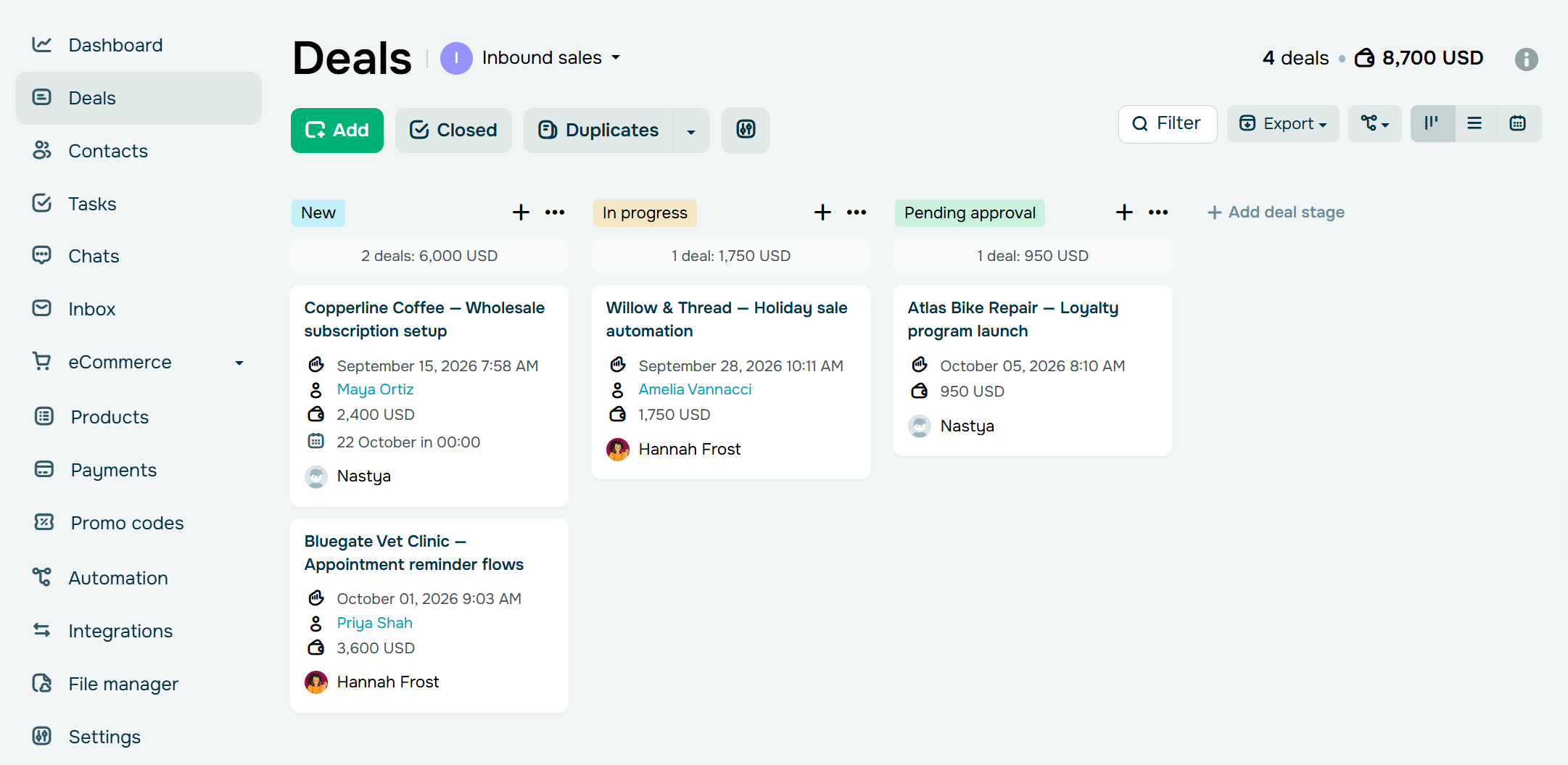 Managing deals across a sales pipeline in SendPulse’s CRM
The CRM also works hand in hand with other SendPulse tools, such as chatbots and automation flows. These connections can create deals or trigger actions automatically based on what customers do. Meanwhile, the CRM keeps customer records, sales processes, and communication organized.
SendPulse key features:
- multiple sales pipelines and boards;
- AI-generated comments for deals, contacts, and tasks;
- reusable AI prompt library;
- AI-powered email reply;
- search and saved filters;
- task priority;
- digital and physical products;
- payment and document management;
- automation flows;
- public API and built-in integrations;
- duplicate management;
- email inbox and SMS support;
- integration with OpenAI, Claude, Gemini, and DeepSeek;
- integration with Gmail, Binotel, and more.
Pros. The free plan supports up to 50,000 contacts, which is considerably more than most other hosted free CRMs on this list. Small businesses and startups can have up to 5 team members per account and set access rights for each of them.
Cons and limitations. The free plan caps added deals at 500 and limits the number of users, sales pipelines, boards, automation resources, and file storage. Some advanced CRM features and integrations also require a paid plan.
Pricing. SendPulse’s free plan includes the account owner plus up to 4 invited users, 2 sales pipelines with 500 deals, 2 boards with 500 tasks, and 1 GB of file storage. It also comes with 5 flows, 1 event, and 50 elements in the Automation system. The cheapest CRM paid plan, Lite, costs $14.40/month (billed annually) for a single user and includes 200,000 contacts, unlimited deals and tasks, and 8 automation flows. Teams that need more seats can move to Basic, which starts at $42.40/month (billed annually) for up to 10 users. Extra users cost $11/month each. Check SendPulse’s official pricing page for details.

Power up your business with smart tools
Emails, chatbots, automation, CRM, and more — everything you need to connect with your audience.
Get started for free
HubSpot CRM
User ratings: G2: 4.4 (14,000+ reviews) | Capterra: 4.5 (4,400+ reviews)
Best for: marketing-heavy teams that want a well-known free CRM system with room to grow.
HubSpot CRM brings customer information, conversations, and sales activity together in one place. Teams can manage contacts along with their full communication history and organize deals in visual sales pipelines. Built-in reporting then turns this data into practical insights for sales and customer management.
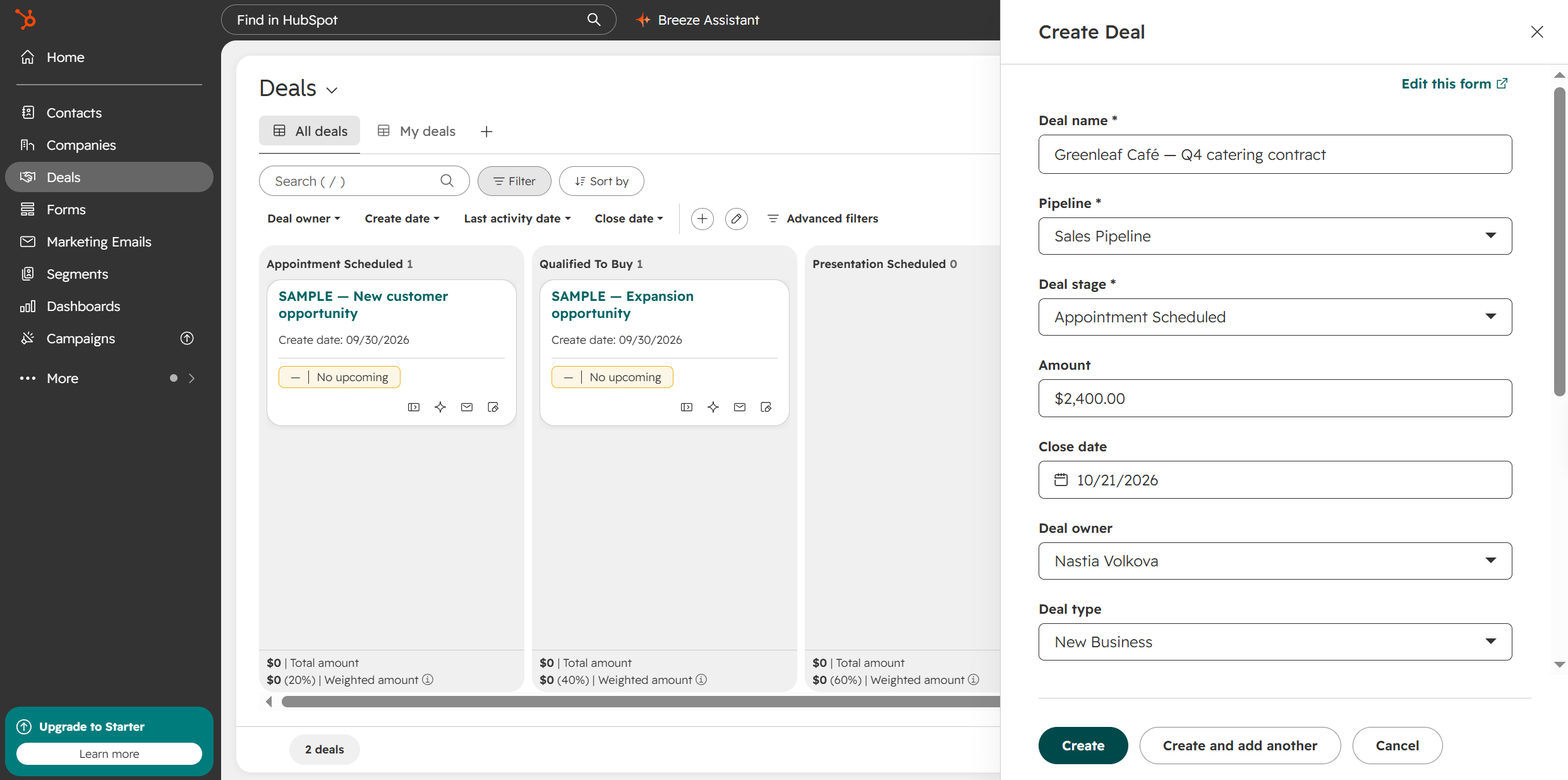 Creating a new deal with HubSpot’s free CRM
HubSpot’s key strength is how it combines CRM data with everyday communication and AI tools. A shared inbox keeps customer conversations in one place, support requests are easy to track, and integrations keep information in sync across your other business tools. AI can summarize customer records, help sales reps prepare for calls, and take care of routine tasks. There’s also a chatbot builder for qualifying leads, answering questions, and booking meetings.
HubSpot CRM key features:
- contact management with customer details, communication history, and sales activity;
- deal and pipeline management;
- visual sales stages;
- Breeze Assistant;
- AI-powered CRM summaries, company research, and sales call preparation;
- shared inbox for managing customer conversations;
- chatbot builder;
- email tracking and reusable email templates;
- customer support ticketing;
- payment links;
- reporting dashboards for sales, marketing, and customer data.
Pros. HubSpot CRM is a free-forever tool. It also includes Breeze Assistant, HubSpot’s AI helper, which works across your whole HubSpot account. It can give you insights and recommendations about your leads, customers, and engagements, draft content, and summarize records, with up to 100 content generations per minute per account.
Cons and limitations. The free plan includes only 1 sales pipeline and up to 2,000 emails per month. Some features such as multi-step automation, custom reporting, and HubSpot branding removal require a paid plan. Creating AI agents or workflows with Breeze Assistant requires a Professional or Enterprise subscription, and HubSpot’s AI agents run on HubSpot Credits, which free users can’t use.
Pricing. HubSpot’s free CRM includes 2 user seats, 1 pipeline, 1,000 contacts, and 2,000 emails per month. The cheapest paid plan, Starter, costs $20/month per seat (billed annually). New customers can get a promotional price of $7/month per seat with upfront annual payment, or $10/month per seat paid monthly. The Starter plan includes 500 HubSpot credits and raises the limit to 2 pipelines and 5,000 emails per month. Check HubSpot’s official pricing page for details.
Zoho CRM
User ratings: G2: 4.1 (2,900+ reviews) | Capterra: 4.3 (7,000+ reviews)
Best for: small teams that want a customizable CRM and plan to build out their sales process over time.
Zoho CRM is a full-featured sales CRM for managing leads, contacts, deals, and follow-ups from one platform. It combines sales automation with tools for email, reporting, data management, and integrations. Its AI agents can also help with sales tasks and offer contextual support.
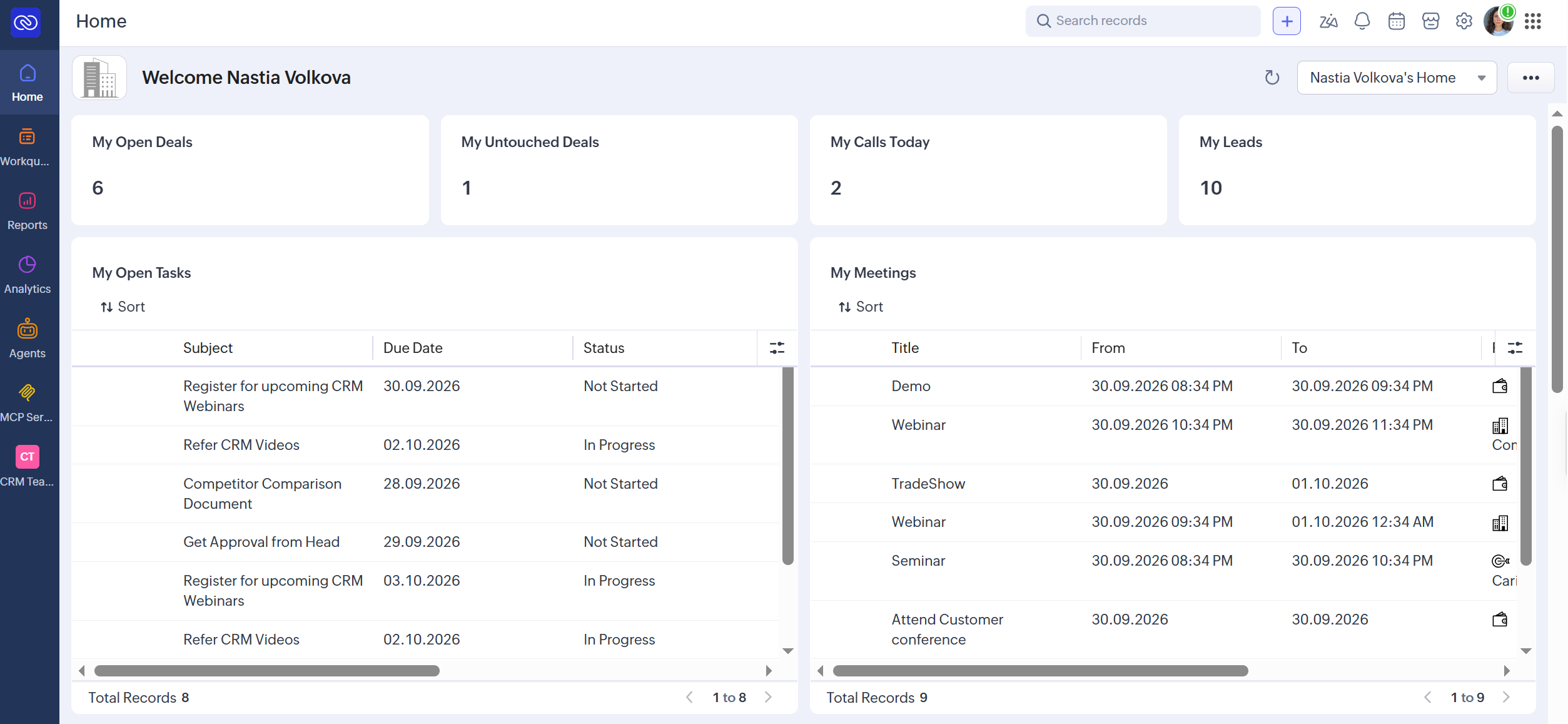 Tracking deals, calls, leads, tasks, and meetings from the Zoho CRM home page
For small businesses that want something simpler, Zoho offers Bigin. It’s a lightweight CRM built specifically to bring customer information, conversations, and follow-ups into one workspace. It covers the essentials small teams need, including visual sales pipelines, multi-channel communication, workflow automation, appointment scheduling, and mobile access.
Zoho CRM key features:
- contact and lead management;
- follow-up reminders and task management;
- workflow and sales automation;
- custom email templates and email integration;
- tasks, meetings, and built-in calling;
- multiple sales pipelines;
- sales forecasting and predictive intelligence;
- custom modules and customer portals;
- AI agents and AI-powered sales assistance;
- customer journeys and process management;
- APIs and developer tools;
- integrations with Gmail, Outlook, Slack, Zoom, Teams, Google Ads, and more.
Pros. Zoho CRM’s free edition supports 3 users and up to 5,000 records, giving a small sales team enough room to manage its pipeline. You also get workflow rules for basic automation, web-to-lead and web-to-contact forms, and access to the Zoho CRM mobile app.
Cons and limitations. The free plan covers the CRM basics but leaves out multiple sales pipelines, sales forecasting, custom fields and modules, dashboards, and custom reports. There are also usage limits: 5,000 API credits per day, 150 email notifications per day, and 1,000 records per import batch. Zia, Zoho’s AI assistant, is reserved for the Enterprise and Ultimate plans.
Pricing. Zoho CRM’s free plan includes 3 users, 5,000 records across all CRM modules, 1 GB of file storage, and the essential CRM features. The cheapest paid plan, Standard, costs $14/month per user (billed annually). It adds multiple sales pipelines, sales forecasting, up to 10 custom fields per module, and a 100,000-record limit. Check Zoho CRM’s official pricing page for details.
For small businesses, Bigin by Zoho has a free plan for 1 user with 1 pipeline and up to 500 records. Paid plans start at $7/month per user (billed annually) and raise the limits to 3 pipelines and 50,000 records while adding email and WhatsApp integration, among other features. Check Bigin’s official pricing page for details.
Freshsales
User ratings: G2: 4.5 (1,200+ reviews) | Capterra: 4.5 (600+ reviews)
Best for: small sales teams that want a straightforward CRM with built-in phone, email, and chat, plus automation and AI on paid plans.
Freshsales is Freshworks’ cloud-based CRM designed to help sales teams manage leads and customer relationships in one place. It brings together contact information, sales activities, conversations, and deal pipelines so teams can track opportunities from the first interaction to the deal closure. The platform also includes automation features that help teams reduce repetitive administrative work.
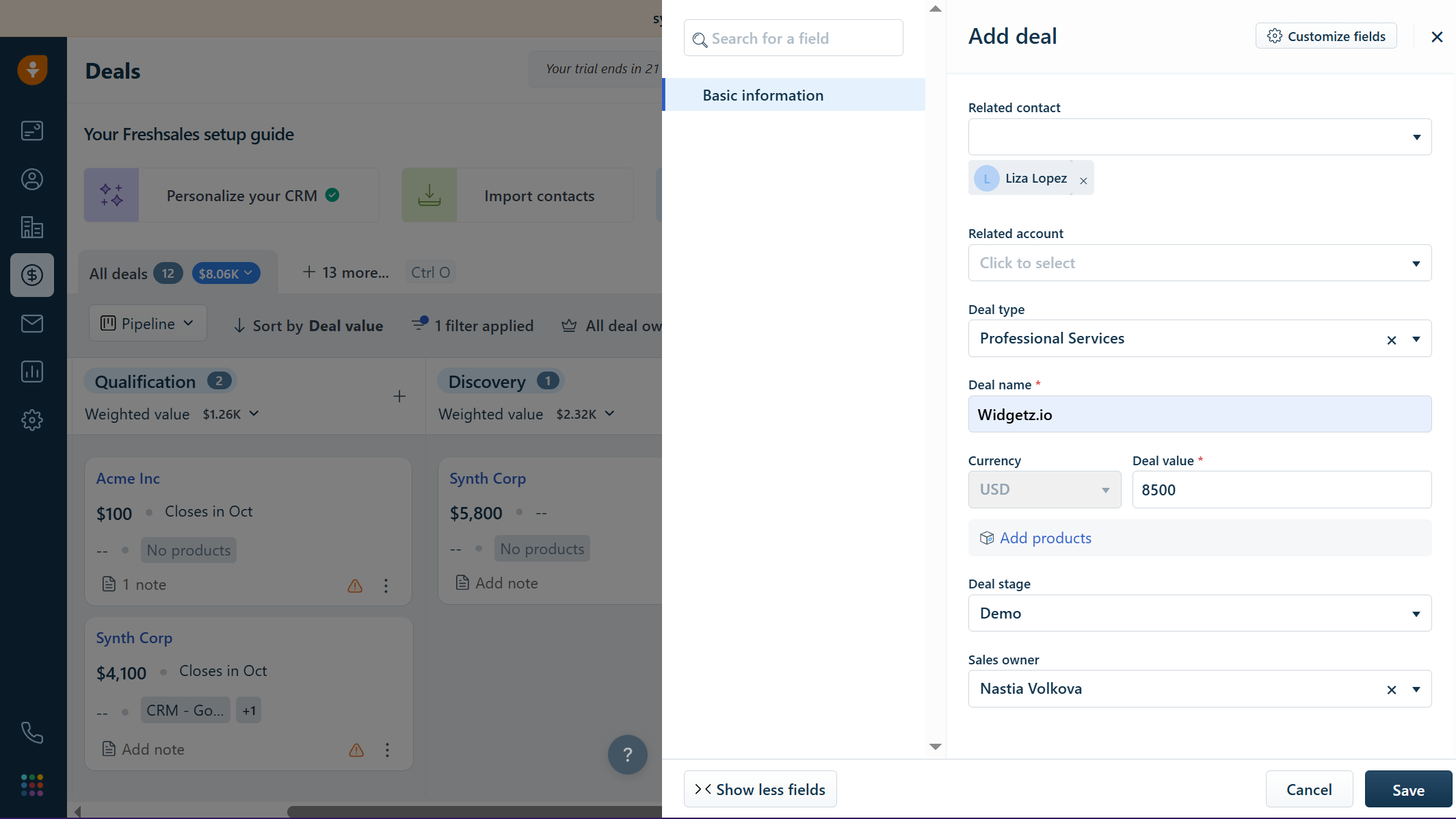 Adding a new deal in Freshsales
On higher-tier paid plans, Freshsales uses Freddy AI to support sales activities. It can flag promising leads and deals based on customer data, surface insights, and help write emails. Teams that also need marketing tools can move to Freshsales Suite for a shared view of customer interactions across sales and marketing.
Freshsales key features:
- Kanban sales pipeline and deal management;
- contact lifecycle stages, scoring, and deal insights;
- email, chat, and phone communication;
- email templates and sales sequences;
- workflows for sales automation;
- custom fields and sales activities;
- territory management;
- Freddy AI for lead and deal insights;
- AI-assisted email writing;
- sales forecasting insights;
- sandbox environment for testing;
- integrations with other tools through the CRM ecosystem.
Pros. Freshsales CRM is free for up to 3 users. It includes a built-in phone with inbound caller ID and a chat widget for your website, so small teams can talk to leads without extra tools. The free plan also includes contact lifecycle stages and a chatbot builder.
Cons and limitations. Freddy AI isn’t included for free, and neither the free plan nor the cheapest paid plan supports multiple pipelines: those start on Pro, with up to 10. Chatbot sessions only come with paid plans, and advanced features like custom fields and canned responses are locked behind higher tiers. On top of that, to make calls with the built-in phone, you need to buy a local or toll-free number.
Pricing. Freshsales’ free plan supports up to 3 users and 1 pipeline. It covers core CRM tools such as Kanban views, built-in phone, and live chat. Any paid plan can be tested free for 21 days, with 500 AI sessions included as a one-time allowance. Before or after the trial ends, you can switch to the free plan. The cheapest paid plan, Growth, costs $9/month per user (billed annually) and includes 1 pipeline, 20 basic workflows, 250 emails per user per day, and more. Check Freshsales’ official pricing page for details.
EngageBay
User ratings: G2: 4.6 (750+ reviews) | Capterra: 4.7 (900+ reviews)
Best for: SMBs that want an all-in-one CRM with basic sales, marketing, and customer support tools.
EngageBay is an all-in-one CRM for managing contacts, companies, and deals in one place. It offers tools for tracking customer interactions and managing sales activities throughout the pipeline. Users can also capture leads through web forms and organize them with contact segmentation.
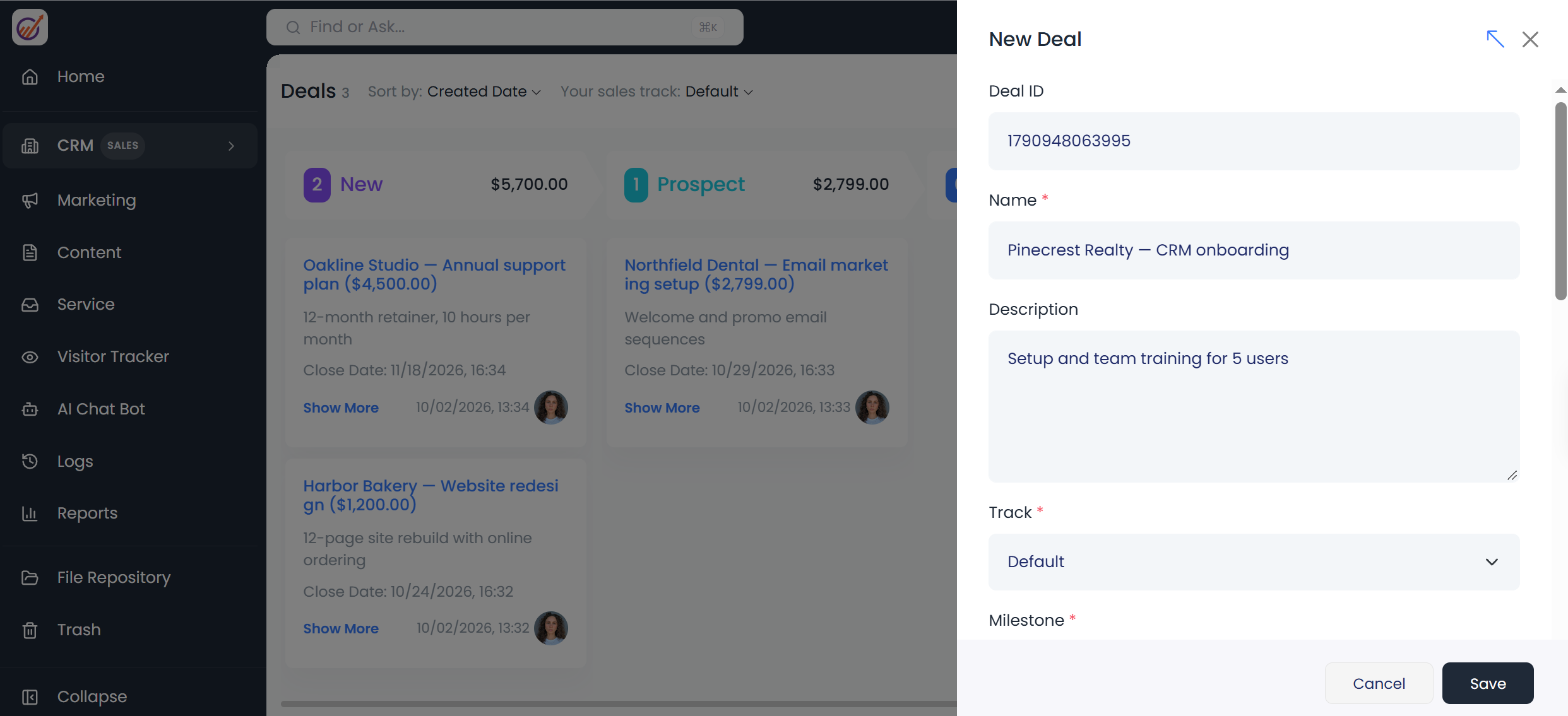 Adding a new deal in EngageBay, where every deal moves through milestones
EngageBay also covers customer outreach with email marketing and automation, including email sequences and broadcast campaigns, appointment scheduling, and calling. Task management and reporting tools come built in. Live chat and a help desk round out the package, so teams can run sales, marketing, and customer service from a single platform.
EngageBay key features:
- contact and company management;
- 360-degree contact views;
- deal and sales pipeline management;
- tasks and activity tracking;
- email tracking and scheduling;
- appointment scheduling;
- predictive lead scoring;
- email sequences and sales automation;
- calling and auto-dialing;
- proposals and proposal analytics;
- custom fields and deal milestones;
- lead capture through pop-ups and web forms;
- reports and custom reporting;
- conversational inbox, including live chat;
- Gmail, Outlook, and Office 365 integration.
Pros. EngageBay is free for up to 15 users, the most free seats among the hosted tools on this list. The free plan covers sales and support basics in one place: contact, deal, and task management, plus email tracking, appointment scheduling, and live chat.
Cons and limitations. The free plan leaves out several sales features, including multiple deal tracks, calling, sales automation, and email sequences. Custom reporting, proposal analytics, and auto-dialing are reserved for the Pro plan. The 250-contact cap is also tight for a team of up to 15 users.
Pricing. EngageBay sells separate products, called Bays, for specific functions, as well as an all-in-one suite. The free CRM & Sales Bay plan includes 250 contacts and companies, 1,000 branded emails per month, deals, tasks, and a 360-degree contact view. The cheapest paid plan, Basic, costs $11.95/month per user (billed annually). It includes 500 contacts and companies and 2,500 branded emails per month, and adds calling. Check EngageBay’s official pricing page for details.
Capsule CRM
User ratings: G2: 4.7 (500+ reviews) | Capterra: 4.5 (150+ reviews)
Best for: solopreneurs, freelancers, and very small businesses that need a simple, easy-to-use CRM.
Capsule CRM is meant for managing customer information, sales activity, and relationships in one place. It keeps contact details and conversations together, while its sales pipeline shows exactly where each deal stands. It also includes task and calendar management, with Gmail and Outlook calendar sync.
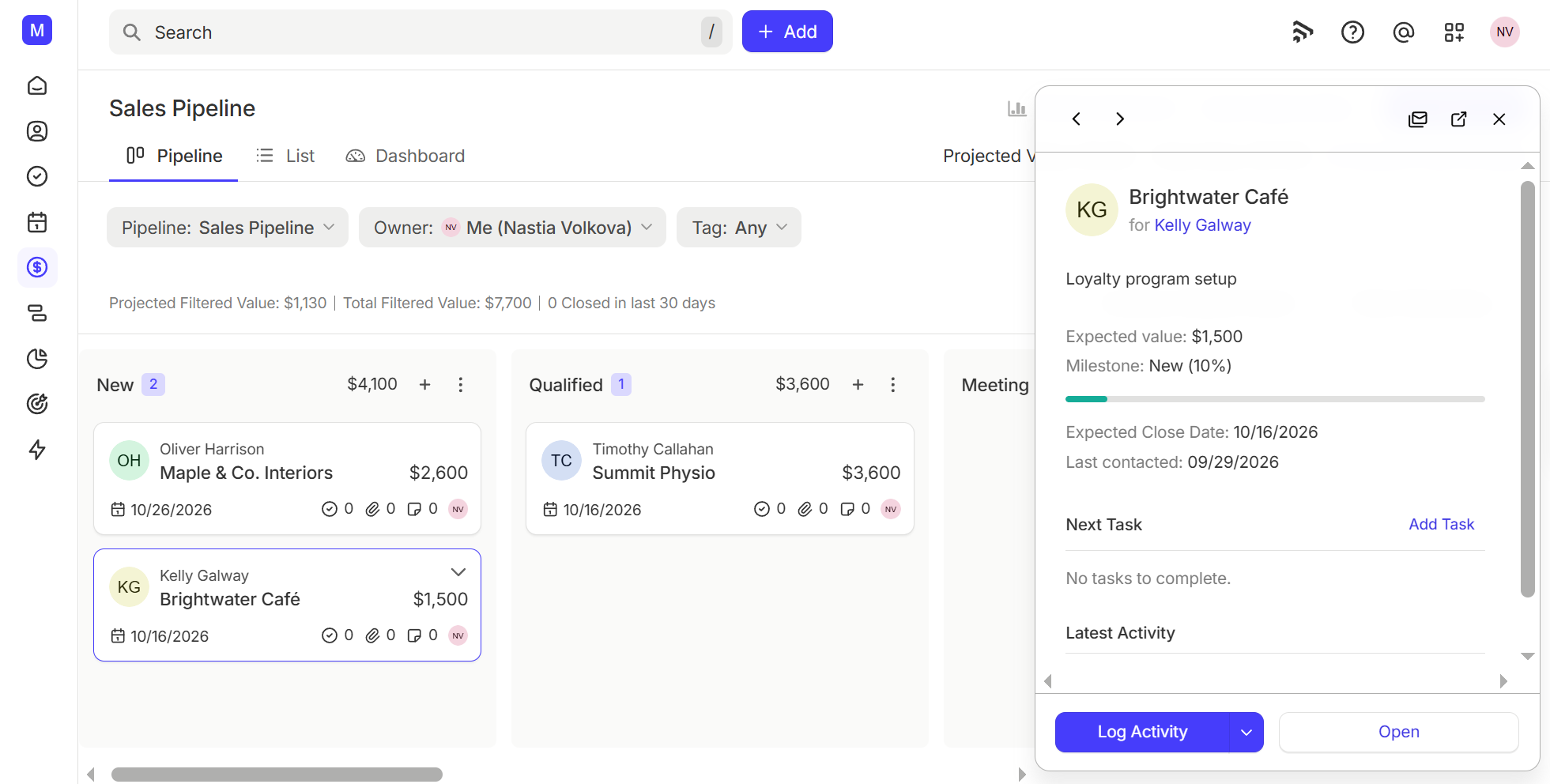 Tracking opportunities across milestones in Capsule’s free sales pipeline
Capsule goes a step beyond sales with project management features for handling work after a deal closes. Its AI tools can summarize recent emails, calls, and notes for contacts, opportunities, and projects. The AI Pipeline Generator can even build sales pipeline stages from a short description of your business and sales process. Capsule also connects with Xero, QuickBooks, Slack, Google, and Microsoft services, as well as automation platforms such as Zapier and Make.
Capsule CRM key features:
- contact and customer management;
- contact history and interaction tracking;
- tags, custom fields, and filtered lists;
- Kanban sales pipeline;
- opportunity management;
- multiple sales pipelines with sales milestones;
- deal tracking, stale opportunity alerts, and lost-reason recording;
- email templates and follow-up reminders;
- custom activity types and CRM workflows;
- sales dashboards, forecasting, goals, and CRM reporting;
- team-based contact, opportunity, and task assignment;
- AI contact and business enrichment;
- AI-generated sales pipelines, email assistance, summaries, and meeting preparation.
Pros. Capsule is simple and quick to learn, so a small team can start tracking contacts and deals right away. The free plan covers the core of a sales CRM: a Kanban sales pipeline with stale-deal alerts and lost reasons, tasks with calendar views, a project board for post-sale work, and Gmail and Outlook add-ons.
Cons and limitations. The free plan is fairly limited for growing sales teams. It caps you at 50 opportunities and 50 MB of storage per account, and it has no reporting, workflow automation, email templates, or shared mailboxes. You also can’t customize sales milestones or add a second pipeline. Even Starter keeps you to 1 pipeline, so multiple pipelines and automation start on Growth at $36/month per user (billed annually). AI tools are on paid plans only.
Pricing. Capsule’s free plan includes 2 users, 250 contacts, 50 opportunities, and 1 sales pipeline. The cheapest paid plan, Starter, costs $18/month per user (billed annually) and includes 30,000 contacts, email templates, basic reporting, and the AI Pipeline Generator. Check Capsule CRM’s official pricing page for details.
To review the free open-source CRMs below, we checked each project’s documentation, extensions, and hosting prices in October 2026. Self-hosted CRMs get far fewer reviews on G2 and Capterra than hosted ones, so we’ve left user ratings out of this section.
Open-source CRMs are usually license-free and give you more control over how the software works and how you customize it. If you host the CRM yourself, customer data stays on servers you control, which can help with privacy and data-residency requirements such as GDPR. The trade-off is that you’re responsible for hosting and maintenance, or you pay for managed hosting and related infrastructure. They’re a harder fit for teams without in-house technical skills, unless you pay for managed hosting.
Here are the best open-source options for businesses that want to avoid traditional CRM licensing costs.
Twenty
Best for: technical teams and developers that need a highly customizable CRM and want control over their data, workflows, and infrastructure.
Twenty is a newer open-source CRM for businesses that need more control and customization than off-the-shelf platforms offer. It covers core CRM functions for managing companies, people, opportunities, tasks, notes, and sales pipelines. On top of that, technical teams can customize the data model, interface, workflows, and other parts of the CRM to match their processes.
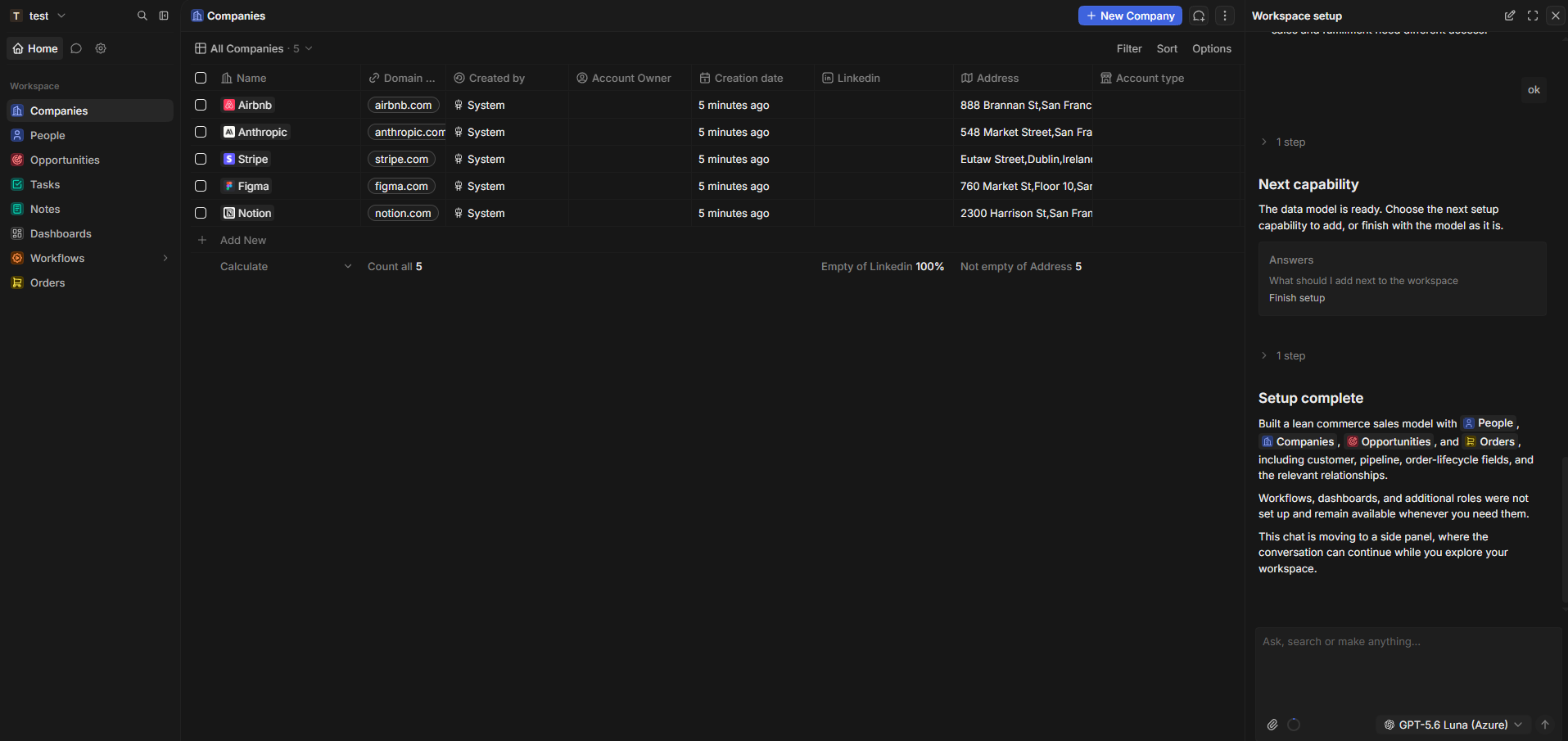 Setting up a Twenty workspace through its AI chat, which builds the data model from a short brief
Flexibility and self-hosting are Twenty’s biggest advantages. Teams can adapt the CRM as their needs change, connect it to existing systems, and keep full control over their data and infrastructure without being locked into a proprietary ecosystem. AI features work with the free self-hosted edition too: you connect your own AI provider, such as OpenAI, Anthropic, Google, Mistral, or xAI, with an API key.
Twenty key features:
- custom objects, fields, views, layouts, and records;
- table, Kanban, and calendar views;
- workflow automation and AI agents;
- user roles and granular permissions;
- field-level and row-level access controls;
- REST and GraphQL API access;
- webhooks and MCP server support;
- custom subdomains and domains;
- two-factor authentication, SSO, encryption key rotation, and audit logs;
- self-hosting and production environments.
Pros. You can self-host Twenty with no licensing fees and unlimited user seats and records. The free self-hosted version includes workflows, plus AI agents that use your own AI provider’s API key, so you don’t need paid add-ons for either. The interface is modern and built on a flexible data model with custom objects and fields. All plans give you full access to REST and GraphQL APIs.
Cons and limitations. Setting up and maintaining Twenty can take more effort, especially if you self-host. Features like SSO, row-level permissions, and audit logs are only available with the paid Organization plan ($19/month per user, billed annually), even for self-hosted users. If you use the cloud version, you can’t use your own AI key — AI actions use Twenty’s models and count against your workflow credits.
Pricing. There is no ongoing free cloud plan for Twenty, but you can self-host the open-source edition for free and get the same core features as the lowest-priced cloud plan. The cloud version offers a 30-day free trial. After that, the Pro plan is $9 per user per month (billed annually) and includes 50 workflow credits per year. Check Twenty’s official pricing page for details.
EspoCRM
Best for: businesses that need a flexible CRM and want control over their data and infrastructure.
EspoCRM is a web-based CRM that centralizes information about a company’s relationships with customers and other business contacts. It covers sales, customer support, marketing, communication, and activity management. Sales teams can manage leads, contacts, accounts, and opportunities across the pipeline. Calendar and email tools make it easy to schedule meetings, manage tasks, and link emails to the right CRM records.
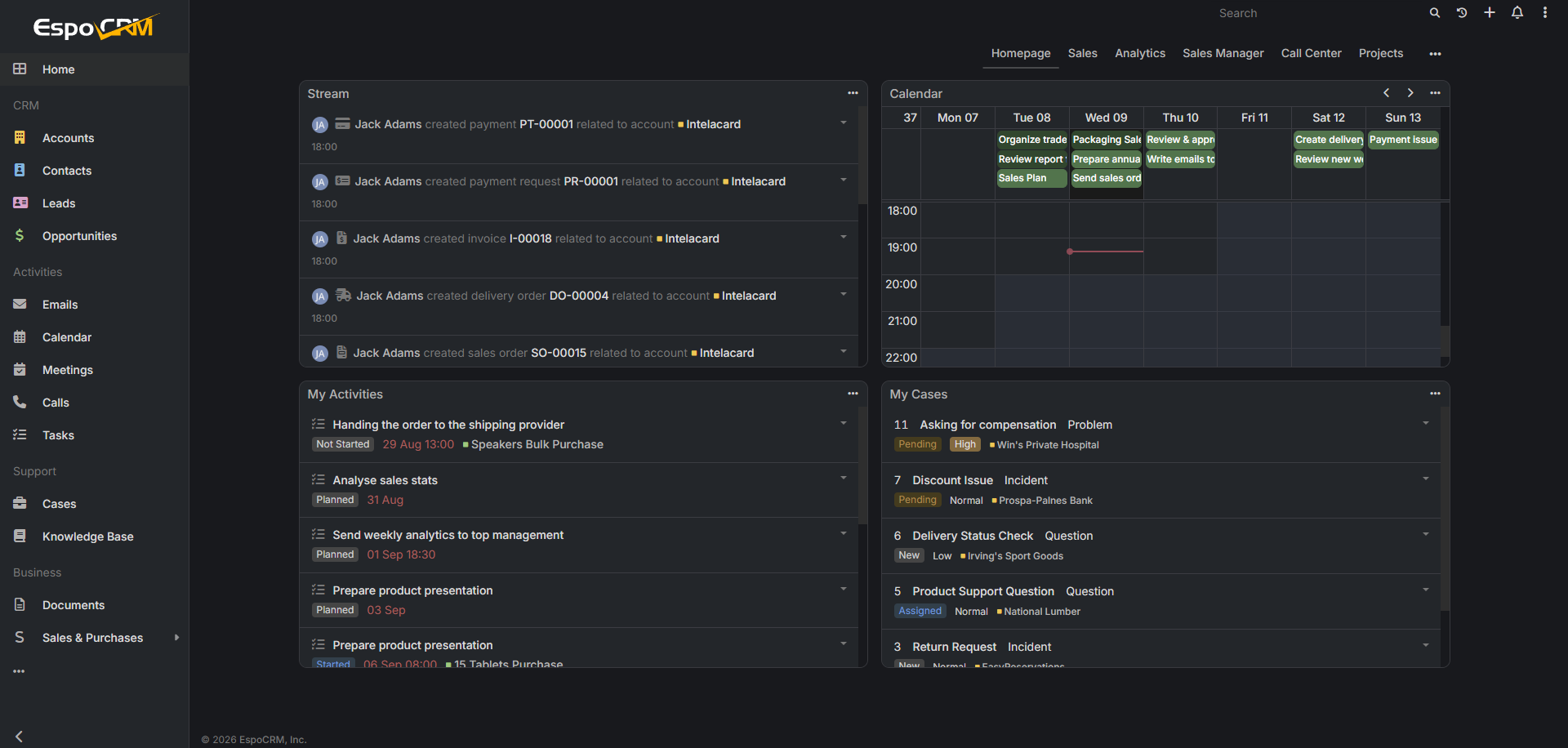 EspoCRM’s online demo with official extensions installed, including paid ones
The platform also includes support and marketing tools. Support teams can manage cases, while the customer portal and knowledge base give customers access to case updates and self-service resources. On the marketing side, EspoCRM offers web-to-lead forms and campaigns with target lists, email templates, and automated sending.
EspoCRM key features:
- centralized management of customers;
- customizable sales pipelines;
- email, calendar, meetings, calls, tasks, and customer interactions;
- workflow and business process automation;
- customer support through cases, customer portals, and knowledge bases;
- marketing tools and email campaigns;
- customizable entities, fields, layouts, relationships, and business logic;
- role-based and field-level access controls;
- REST API integrations;
- self-hosted deployment;
- analytics for monitoring business performance.
Pros. EspoCRM’s self-hosted core is free, with no per-user fees and no cap on user seats. It covers sales, customer support, and marketing in one CRM, including cases, a customer portal, a knowledge base, and email campaigns. Role-based and field-level access controls let you decide who can view and edit each type of record and field.
Cons and limitations. Many advanced features are paid extensions, each licensed per instance. Workflows, business process automation, and reports require the Advanced Pack, while project management, VoIP telephony, and Google or Outlook calendar sync each need their own extension. AI also requires the paid Intelligence extension, which connects EspoCRM to OpenAI, Gemini, Claude, or other compatible providers with your own API key.
Pricing. The self-hosted core is free and includes contact and account management, leads and opportunities, sales pipelines, and more. The cloud version offers a 30-day free trial, then starts at $15/month per user with a 3-user minimum, billed every 6 or 12 months. It includes 3 GB of storage per user, 100,000 records, SSL encryption, and all official extensions. Check EspoCRM’s official pricing page for details.
SuiteCRM
Best for: teams with the technical resources to manage their own hosting, updates, and security.
SuiteCRM is an open-source CRM system that covers sales, marketing, and customer service. It supports contact and account management, lead and opportunity tracking, sales pipelines, quotations, and more. Custom dashboards and reports help you keep an eye on sales activity and other business data.
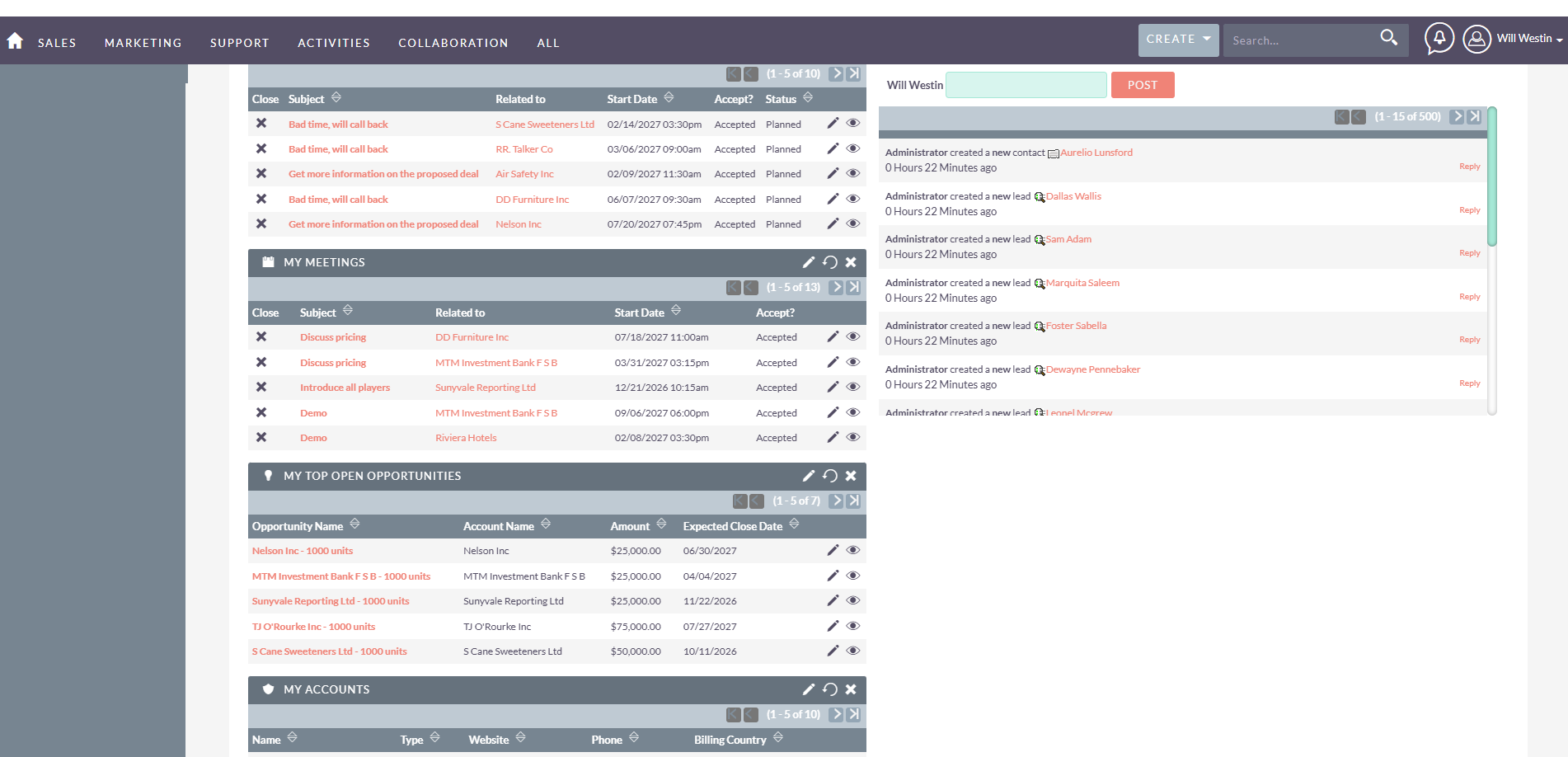 The SuiteCRM home dashboard with calls, meetings, and top open opportunities
For marketing, SuiteCRM offers target lists, campaigns, customer segmentation, and marketing automation. Workflow automation handles routine processes, and configuration tools let you customize fields and modules. Its REST API and integrations connect it with external apps, and as an open-source CRM, it can run entirely on your own infrastructure.
SuiteCRM key features:
- centralized management of accounts, contacts, leads, etc.;
- sales pipeline management;
- quotations and opportunity tracking;
- marketing campaigns and automation;
- customer service case management;
- calls, meetings, tasks, notes, and shared calendars;
- workflow automation for routine actions;
- customizable fields, layouts, and modules through Studio;
- REST API and integrations with external business apps;
- open-source, self-hosted deployment;
- real-time business insights.
Pros. SuiteCRM has no per-user license fees and covers sales, marketing, and customer service in one CRM. Unlike EspoCRM, workflows, reports, quotes and invoices, and project management are part of the free core rather than paid add-ons. Two-way sync with Google Calendar or a CalDAV server is built in too, and the Studio tool lets you customize fields, layouts, and relationships without code.
Cons and limitations. If you self-host, you’re responsible for the hosting infrastructure, and updates, security, backups, and technical support aren’t included. Other integrations come as add-ons in the SuiteCRM Store, many of them built by third parties. The official Outlook plugin, for example, costs $60 per user per year. There’s no built-in AI either; AI features come only from paid third-party add-ons.
Pricing. SuiteCRM’s self-hosted version is free to download and use, and has no per-user license fees. Official managed hosting includes a 30-day free trial and then starts at around $175/month (£130, excl. VAT), billed annually, for up to 10 users. It covers hosting, updates, backups, security, and support. If you self-host, paid support starts at around $1,600 per year (£1,200 for 10 support hours). Check SuiteCRM’s official pricing page for details.
“Free” CRMs that are actually free trials
Not every CRM system advertised as “free” actually gives you the full product for free. Some offer only a time-limited trial. Others lead with trials of their paid plans and keep their free plan in the background with much tighter limits. Freshsales, covered above, works this way: its free plan isn’t on the pricing page, and you switch to it from the trial. Either way, it’s worth checking what’s left once the trial ends.
- Pipedrive. It has no permanent free plan. New users get a 14-day free trial. The cheapest paid plan, Lite, costs $14/month per user (billed annually).
- Close. It doesn’t offer a free plan either, only a 14-day trial. The cheapest paid plan, Solo, costs $9/month (billed annually) but is limited to 1 user, so teams start on Essentials at $35/month per user (billed annually).
- monday CRM. It also has no free plan, only a 14-day trial. The free plan on monday.com belongs to its work management product: it’s free forever for up to 2 seats and 3 boards, but it doesn’t include monday CRM’s sales tools. The cheapest paid CRM plan, Basic, costs $12/month per user (billed annually), with a 3-user minimum.

Stay on top of your sales
Track deals, automate updates, and stay in control of every customer interaction with a CRM system designed for growing businesses.
Get started for free
How to choose the best free CRM for your needs
The best free CRM depends less on the length of the feature list and more on what your team actually needs. Some free plans are generous with contacts but strict with users, or the other way around. Others are built around marketing tools or self-hosting, where the software is free but hosting and add-ons may not be.
Best free CRM for most teams
HubSpot is a solid all-around option if you want a CRM you can start using without paying. Its free plan covers the essentials, including contact and deal management, email integration, tasks, and reporting, and there’s no time limit. You also get Breeze Assistant, HubSpot’s AI helper, on the free plan.
The catch is that the limits are fairly tight. You get 2 users, 1,000 contacts, 1 deal pipeline, and 2,000 emails per month. That’s usually enough for a solo user or a very small team, but not much beyond that. If you need an extra seat or more room for data, Zoho CRM gives you 3 users and 5,000 records for free, although dashboards and custom reports aren’t included.
Best free CRM for large contact lists
If contact limits are your main concern, SendPulse gives you much more room than most hosted free CRMs. Its free plan supports up to 50,000 contacts. For comparison, HubSpot allows 1,000 contacts, Zoho CRM 5,000 records, and EngageBay and Capsule 250 contacts each. On top of that, SendPulse comes with 500 free deals, ten times Capsule’s 50 opportunities.
Best free CRM with unlimited users
EspoCRM makes sense if you want to avoid seat limits altogether. Its open-source edition can be self-hosted for free with no cap on users, and it covers sales, support, and marketing in one CRM.
If self-hosting isn’t for you, EngageBay is the most generous hosted option on this list when it comes to seats, with up to 15 users on the free plan.
Best free CRM for multi-channel marketing
SendPulse is a good fit if you want your CRM to sit alongside email marketing, chatbots, automation, and other communication tools.
The free CRM plan includes the account owner plus up to 4 invited users and 2 sales pipelines. There’s also a free email marketing plan for up to 500 subscribers and 15,000 emails per month.
That setup can work well for small businesses that would rather keep CRM and marketing in the same platform.
Best free CRM with AI features
HubSpot is one of the easier options if you want access to AI without upgrading right away. Breeze Assistant is available on the free plan, with up to 100 generations per minute per account. More advanced tools, such as Breeze agents and AI-powered workflows, are reserved for Professional and Enterprise plans.
SendPulse also includes AI on free accounts, with up to 200 requests for features such as AI comments.
If you’re comfortable self-hosting, Twenty takes a different approach. Its free edition supports AI agents once you connect your own AI provider’s API key.
Best free CRM for self-hosting
Twenty is worth a look if control over your CRM infrastructure and data matters more than having everything managed for you. Its self-hosted edition is free, supports unlimited users and records, and includes workflows and AI agents without requiring paid add-ons.
SuiteCRM is another option if you want more business tools in the free core. It includes quotes, invoices, project management, workflows, and reports.
Self-hosting still comes with costs, though. You’ll need somewhere to run the CRM and someone to handle setup, updates, backups, and security. Twenty also keeps features such as SSO and row-level permissions for its paid Organization plan, even if you host the software yourself.
Its cloud version isn’t free either. After a 30-day trial, pricing starts at $9 per user per month when billed annually.
Best free CRM for small businesses and startups
If you mainly need a simple sales CRM, Freshsales, Capsule, and EngageBay are all worth considering. The right pick mostly comes down to how many people will use it.
Capsule is the most stripped back. Its free plan supports 2 users, 250 contacts, and 50 opportunities, which can be enough if you want basic contact and opportunity management without a lot of extra features.
Freshsales gives a small team a bit more room, with up to 3 users on the free plan. It covers contact, account, and deal management in 1 pipeline, along with a built-in phone and chat widget.
EngageBay suits teams that need more seats. It allows up to 15 free users, which is unusually generous, but the 250-contact limit can become restrictive fairly quickly.
In summary
There’s no single free CRM that’s best for everyone. The right choice depends on what each free plan includes and where the provider draws its limits. Some cap users or contacts. Others restrict pipelines, features, storage, or marketing tools. Before you commit, compare those caps with your team size and contact list, and estimate how soon you’re likely to outgrow them.
The limits and prices in this guide are current as of October 2026, but providers update their plans regularly, so check the official pricing pages before signing up.
If you want a free CRM with room for a large contact list and built-in marketing tools, SendPulse is worth a closer look. Its free plan supports up to 5 team members, 50,000 contacts, and 500 deals, all connected to email, chatbots, and automation. Create a free account and see whether it’s the right fit for your business.
Free CRM software FAQ
What's the best free CRM for small businesses and startups?
It depends on your team size. Capsule is the simplest one, with 2 free users; Freshsales gives a bit more room with 3 users; EngageBay offers up to 15 users but caps contacts at 250. For marketing automation or a wider set of sales and marketing tools, HubSpot or SendPulse may be a better fit.
What's the best open-source free CRM?
Twenty is the most modern option, and its free self-hosted edition includes workflows and AI agents. SuiteCRM is a strong alternative, with workflows, reports, quotes, and invoices in its free core. EspoCRM is lightweight, but workflows, reports, and AI require paid extensions.
How do the HubSpot vs Zoho CRM vs Freshsales free plans compare?
HubSpot allows 2 users and 1,000 contacts and is the only one of the three with free AI through Breeze Assistant. Zoho CRM allows 3 users and 5,000 records but leaves out dashboards and custom reports. Freshsales also allows 3 users, with 1 pipeline plus a built-in phone and chat widget.