Calendly’s free plan looks generous until you hit its limits — one event type, one calendar, and no reminders. Need more? Teams get pushed to $20/seat/month for features like routing forms and round-robin meetings, and even then, you’re capped at six calendar connections. Whether you’re a freelancer who needs more from a free plan or a team that can’t justify the per-seat pricing, don’t assume Calendly is the default choice. It often isn’t.
In this article, we tested better-value Calendly alternatives. We selected seven scheduling tools, created accounts on each, and compared them on what actually matters: what you get for free, what the upgrade costs, and where each tool falls short.
Disclosure: All features, pricing, and positioning below are accurate as of June 2026. Our team created accounts and tested each platform firsthand. All screenshots in this article were taken during that testing.
TL;DR Best Calendly alternatives for 2026 compared
If you’re scanning, here’s the short version. The table below summarizes all seven tools by free plan, starting price, and who each one suits best.
| Tool |
Free plan |
Starting price
(monthly billing) |
Key advantage |
Best for |
| 42min |
✅
All features without limits |
Free |
Routing forms, round robin, SMS reminders, and webhooks on a free plan |
Teams that want advanced scheduling features without paying for a subscription |
| Cal.com |
✅
Unlimited event types and calendars for 1 user |
$16/user/mo |
Open-source, self-hostable, and highly extensible |
Developers and privacy-focused teams |
| TidyCal |
✅
Unlimited event types and bookings; 1 calendar |
$29 one-time |
Lowest lifetime cost with no recurring subscription |
Solopreneurs who want to avoid monthly fees |
| Zoho Bookings |
✅
1 service and 1 calendar |
~$9/user/mo |
Deep integration with the broader Zoho ecosystem |
Businesses already using Zoho tools |
| Google Appointment Schedules |
✅
Included with a personal Google account |
$16.8 /user/mo
(Google Workspace Standard) |
Built directly into Google Calendar with virtually no setup required |
Individuals and small teams already working in Google Workspace |
| Acuity Scheduling |
❌
7-day free trial |
$20/mo |
Strong intake forms, questionnaires, and class scheduling tools |
Service-based businesses managing appointments and bookings |
| SimplyBook.me |
✅
50 bookings/mo and 1 provider |
~$15/mo |
Industry-specific booking features and modular add-ons |
Salons, clinics, fitness studios, and other service providers |
A few things worth noting: 42min is currently the only tool on this list that offers team features that other tools charge for. On the flexibility side, Cal.com is the only open-source option you can self-host. And if you’d rather pay once and never think about it again, TidyCal’s $29 lifetime deal is hard to beat. More on each in the tool reviews below.
Reasons users may look for Calendly alternatives
Calendly is the category leader in meeting scheduling, and for good reason — the booking experience is clean, calendar sync is reliable, and integrations are plentiful. It earns strong scores on review platforms (G2 and Capterra both hover at 4.7/5 stars across thousands of reviews). So why are so many people looking for alternatives?
If you look beyond the star ratings, you’ll notice the same issues keep coming up:
- Limited free plan. You get one active event type, one calendar connection, and no reminders or workflows. If you deactivate your event type to make a new one, all shared links tied to it stop working. And as several Capterra reviewers confirm, the moment your scheduling needs go beyond the basics, you hit a paywall.
- Aggressive feature gating. Routing forms, including the ability to screen and route invitees based on their answers, as well as round robin, are only available with the Teams plan at $20/seat/month. The Standard plan at $12/seat/month unlocks webhooks and automated reminders, but team distribution and inbound routing are still unavailable. CRM integrations with tools like Salesforce also require a more expensive plan.
- Per-seat scaling pain. At $20/seat/month, a 10-person team on the Teams plan pays $2,400 a year for a scheduling tool. That math gets harder to justify when not everyone on the team books meetings daily. The common complaint: pricing climbs too quickly as you add seats, and paying full price for occasional users feels disproportionate.
- Single-calendar conflict checking on the free plan. The free plan connects only one calendar, so personal appointments on a second calendar stay invisible to Calendly — and open slots get booked over them. Users report the friction of juggling two calendars when Calendly only sees one, forcing manual workarounds to block unavailable times.
- Branding lock-in. Calendly’s logo appears prominently on every free booking page, and removing it requires a paid plan. For client-facing digital businesses, that’s a problem — reviewers flag that the branding takes up too much space, looks unprofessional, and makes it clear to prospects that you’re on a free plan.
None of this makes Calendly a bad product, but it does mean you hit a ceiling fast, whether that’s the free plan’s one-event-type cap or the $20/seat price tag for team features. The alternative tools below approach that ceiling from different angles.

Power up your business with smart tools
From solo creators to global brands, thousands of customers trust SendPulse to run email campaigns, chatbots, automations, and more — all in one place.
Get started for free
Best Calendly alternatives that won’t break the bank
We signed up for seven free and affordable Calendly alternatives and tested them against the pain points above. Each review covers what worked, what didn’t, and what it’ll cost you.
42min
Why it’s on this list: the only Calendly alternative that offers routing forms, round robin, SMS reminders, and webhooks at no cost.
42min is a scheduling tool, and its pitch is quite simple: take the team features Calendly locks behind its $20/seat plan and offer them for free. That means routing forms, round-robin assignment, SMS reminders, and webhooks — all at no cost. For teams that have been priced out of Calendly’s Teams tier, that’s a real alternative, not just a cheaper clone.
While testing, we built a routing form to qualify incoming leads by region and budget, set up a round-robin pool across team members, and connected a webhook to send bookings to an external system. This free Calendly alternative also includes automation tools, so booking events can trigger follow-up sequences without any third-party connectors.
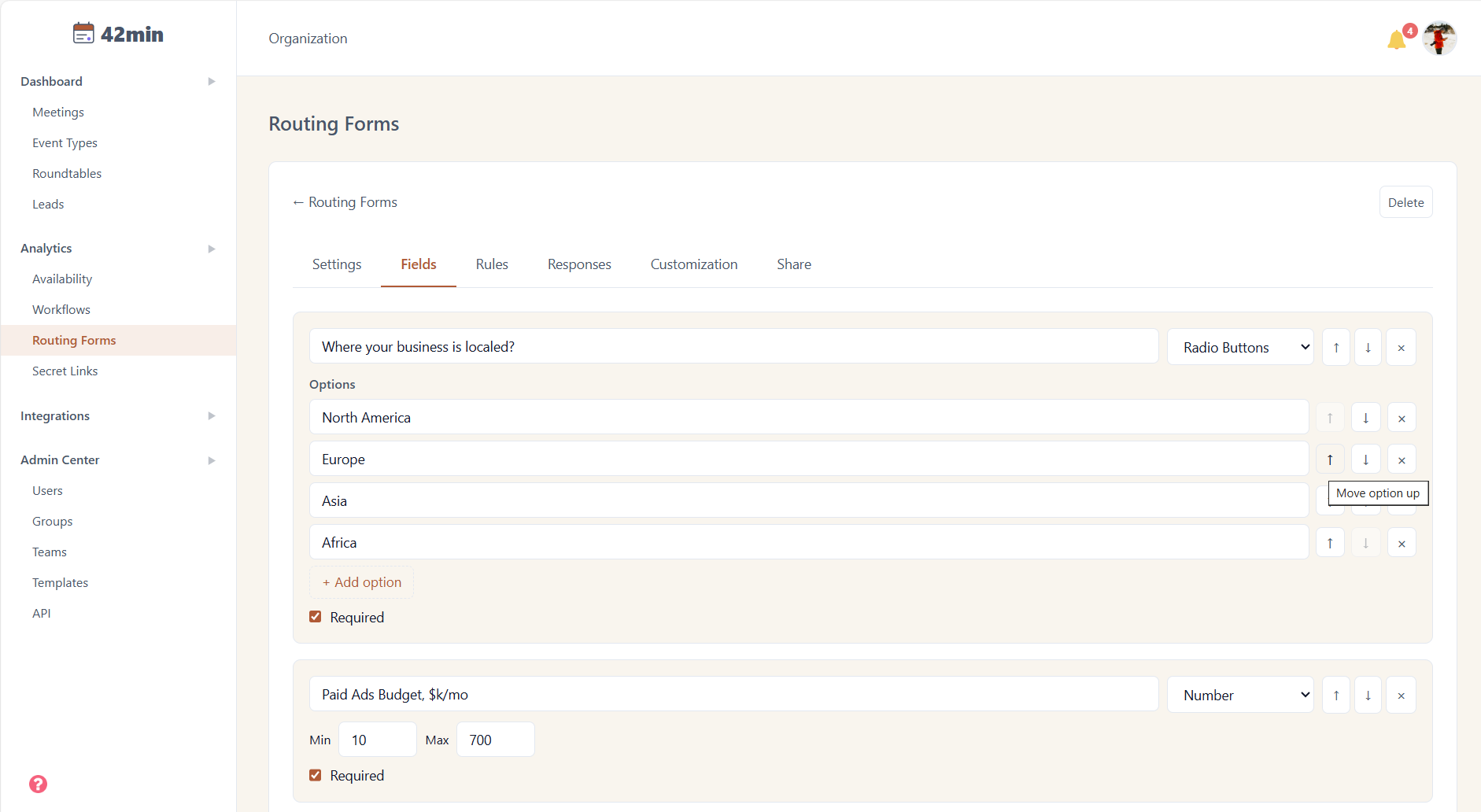 Setting up a routing form to qualify leads by region and ad budget with the 42min free account
Key features on the free plan:
- advanced routing forms with specific rules, UTM tracking support, and fallback options;
- round-robin and group events;
- SMS and email reminders;
- webhooks for custom integrations;
- built-in workflows;
- customizable booking pages.
Limitations. 42min is newer than other established tools and is still building out its feature set. Some integrations available in more mature products, like certain calendar or video conferencing connections, might not be available yet. There are also fewer user reviews online compared to Calendly or Acuity. If you need a tool with a long track record and a large integration marketplace right now, this is something to keep in mind.
Pricing. 42min is a true free Calendly alternative with all features included and no paid tiers.
Cal.com
Why it’s on this list: one of the most generous free plans for solo users with unlimited event types, unlimited calendars, and payment collection included.
Cal.com stands out as the leading open-source alternative to Calendly. You can choose the hosted version or run it on your own servers, which is great for teams with strict data-residency or privacy requirements. The developer-friendly architecture shows — the app store, API, and webhook ecosystem make it easy to extend the platform beyond its defaults. The free plan is also generous, covering basic emails and SMS notifications, payments, and two-way CRM sync at no cost.
When we tried the platform, the booking experience felt nearly as smooth as Calendly’s, and the app store included the common video and calendar integrations. Self-hosting works if you have the dev resources to maintain it; most teams will find the hosted plan simpler.
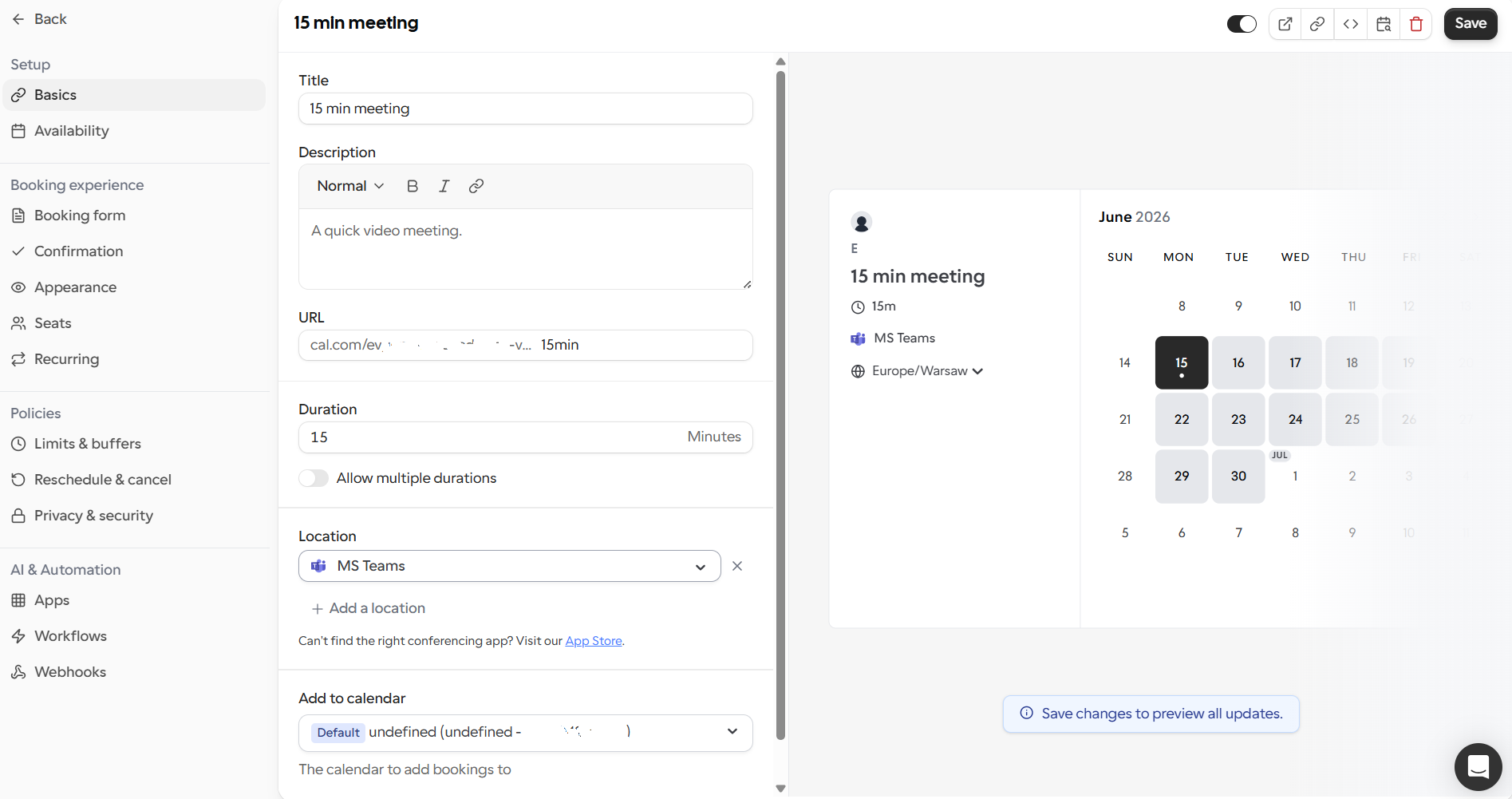 Building a 15-minute booking event in Cal.com with MS Teams and calendar sync
Key features on the free plan:
- open-source and self-hostable;
- unlimited event types and multiple calendars for a single user;
- payment collection;
- webhooks and workflows;
- HubSpot and Salesforce sync.
Limitations. Team features, namely round robin, routing forms, and managed events, require the paid Teams plan. Self-hosting needs real engineering support, and some advanced features feel less polished than those from hosted-first competitors. The free plan is also limited to a single user, so you can’t try team workflows before upgrading.
Pricing. The platform offers a 14-day trial and a free plan for individuals with no feature cap. The cheapest paid plan for Teams starts at $16/user/month (billed monthly).
TidyCal
Why it’s on this list: compared to Calendly’s recurring per-seat billing, TidyCal’s $29 one-time payment eliminates the subscription model entirely.
TidyCal‘s hook is its pricing model: a one-time payment of $29 for lifetime access instead of a monthly subscription. The free plan covers unlimited booking types and bookings, plus recurring and package appointments, subscriptions, and even a digital storefront. If you’re a solopreneur keeping an eye on expenses, paying once and moving on is an easy call.
When we tried it out, the interface was simple and quick to set up. Team features are only available if you upgrade. TidyCal doesn’t claim to be a team platform with its free plan, and that’s okay. It’s a clean, affordable booking page, and it does that well.
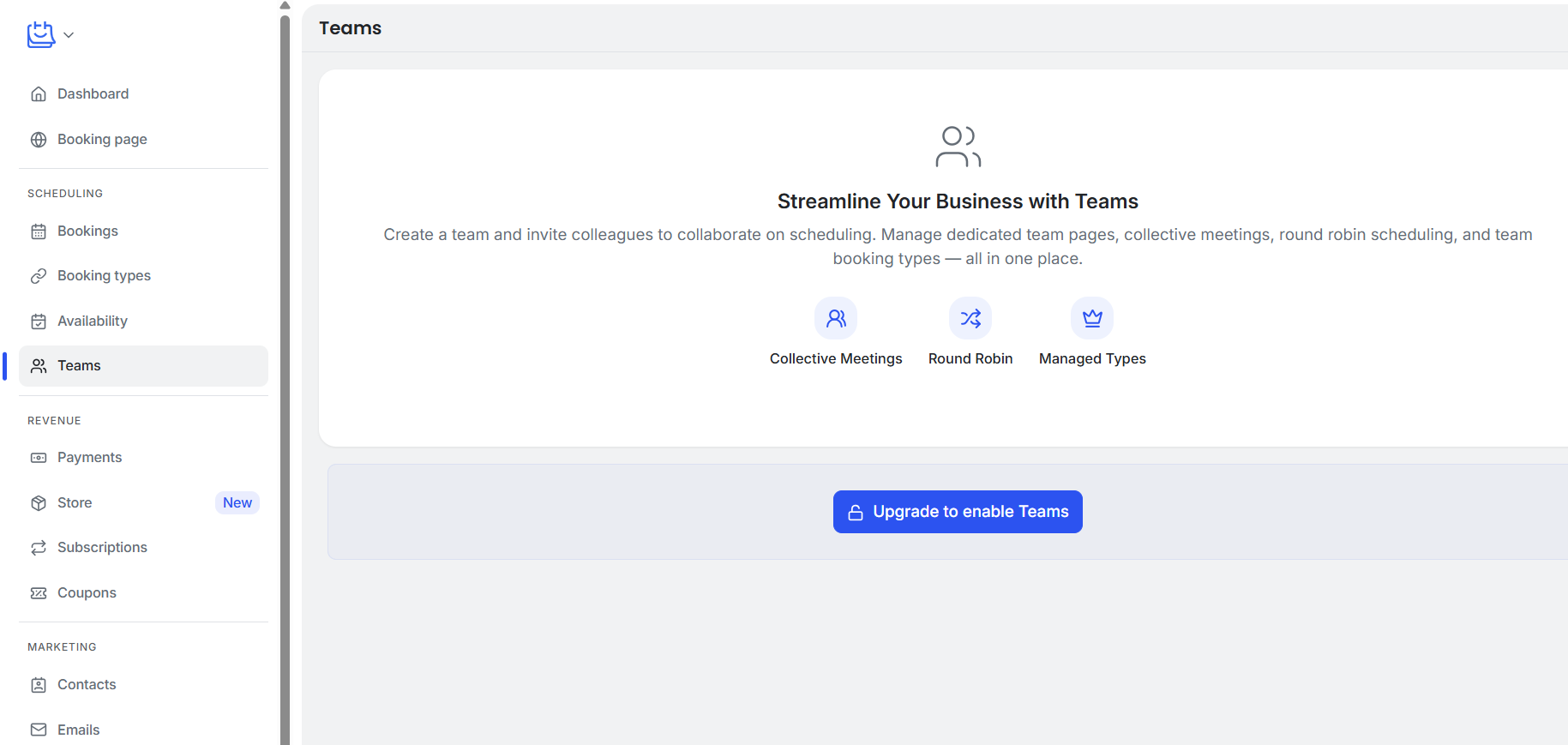 TidyCal’s Teams section, with collective meetings and round robin, requires an upgrade from the free plan
Key features on the free plan:
- unlimited booking types and unlimited bookings;
- paid bookings via Stripe and PayPal;
- recurring, package, and subscription bookings;
- digital storefront for selling digital products alongside bookings;
- booking page with localization support;
- basic integrations.
Limitations. The free plan lets you connect only one calendar and includes basic integrations with Google, Office 365, and Apple Calendar. Team features like round robin, collective meetings, and a dedicated team page are reserved for higher-tier plans. Also, there are no routing forms on any plan.
Pricing. TidyCal offers a free plan with 1 connected calendar. The lowest-priced plan for teams, Agency Lifetime, costs $79 one time through AppSumo. It adds video conferencing links, group bookings, collective meetings, custom emails, analytics, and 25 calendar connections. There is also an individual lifetime plan at $29 one-time (via AppSumo) and a Pro plan with advanced features at $12/month (billed monthly).
Zoho Bookings
Why it’s on this list: the cheapest paid Calendly alternative at ~$9/user/month, with deep ecosystem value if you’re already on Zoho.
Zoho Bookings has the lowest entry price of any paid tier on this Calendly alternative list and plugs directly into the broader Zoho ecosystem with CRM, Meeting, Desk, Flow, and more. The free plan is limited to a single user, one event type, and one calendar connection, but it still includes video conferencing integrations, custom booking form fields, QR codes, and API access.
We found the setup intuitive if you already know the Zoho admin patterns; if you don’t, there’s a short learning curve common to the whole Zoho platform. While testing, we set up a meeting, and the scheduling rules were straightforward to configure.
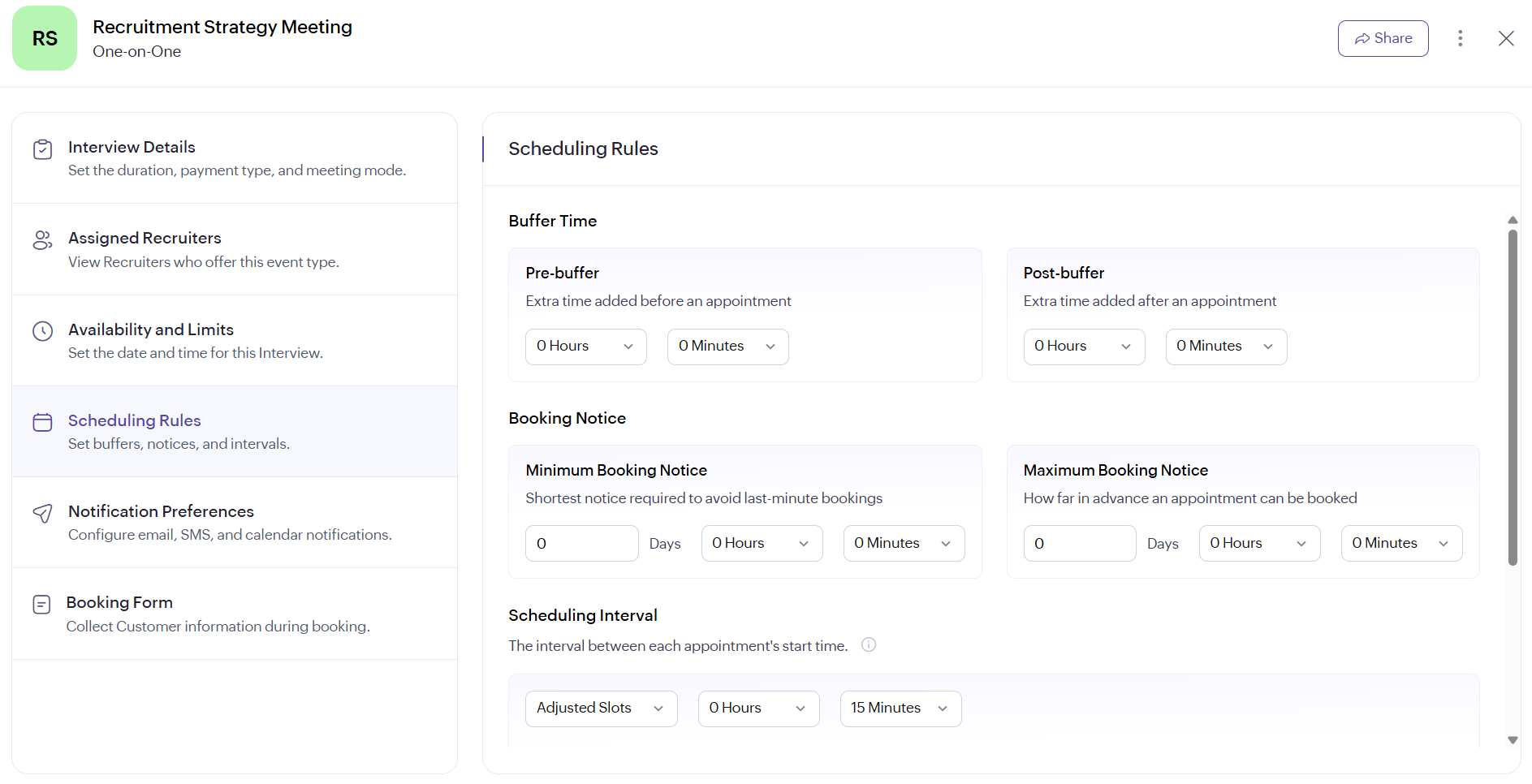 Configuring buffers, booking notice, and slot intervals for a one-on-one meeting in Zoho Bookings
Key features on the free plan:
- one-on-one bookings with video conferencing (Zoho Meeting, Google Meet, MS Teams, Zoom);
- custom fields on the booking form;
- calendar sync (Google, Microsoft 365, Zoho Calendar);
- admin-side scheduling, QR codes, and shareable time slots;
- reminders, no-show emails, and other notifications;
- API access, browser extension, and mobile app.
Limitations. Collective bookings, appointment distribution (round robin, load balancing), customizable email templates, and Zapier integration all require a paid plan. Online payments, SMS reminders, Zoho CRM sync, recurring bookings, group events, and branding removal are reserved for the highest-tier plan. The tool’s real strength is the Zoho ecosystem integration — as a standalone product outside that ecosystem, it’s less compelling.
Pricing. Zoho Bookings has a limited free plan for 1 user with 1 connected calendar. The cheapest paid plan costs around $9/user/month (billed monthly) and unlocks unlimited event types, collective bookings, round-robin distribution, and more. To accept payments, get access to Zoho CRM, and be able to create group and recurring bookings or remove branding, you’ll need a higher tier (around $13/user/month).
Google Appointment Schedules
Why it’s on this list: zero signup, zero cost — anyone with a Google account already has a booking page ready.
If you have a Google account, you already have a basic Calendly alternative built into your Google Calendar. Appointment Schedules lets you create a bookable page directly from your calendar with zero additional setup or signup. For someone who just needs a “book a 30-minute call with me” link, this is the lowest-friction option on our list.
While testing, we created a booking page in under a minute — straight from the calendar’s “Create” menu. It covered the essentials without any of the advanced routing or workflow features power users expect.
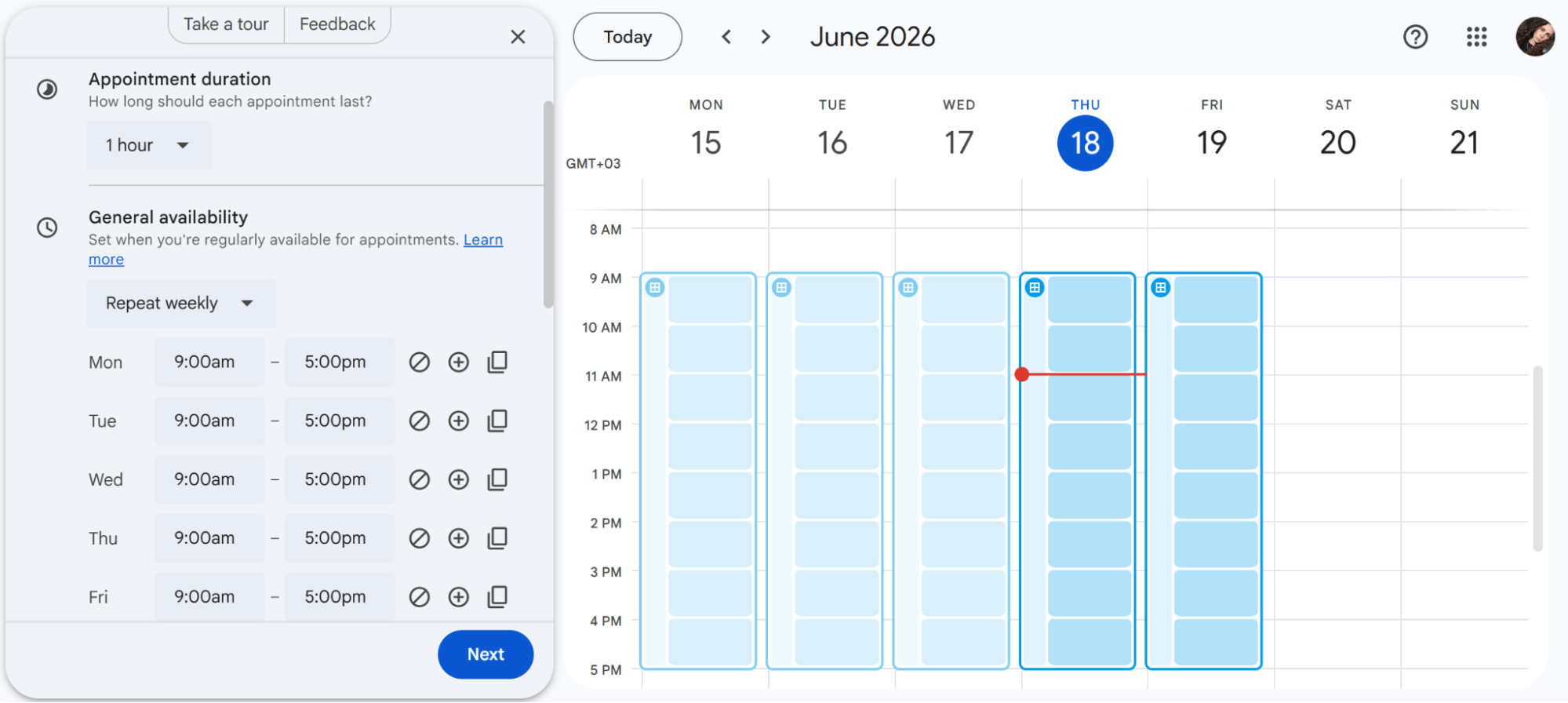 Setting up appointment duration and weekly availability in Google Calendar
Key features on the free plan:
- built directly into Google Calendar, no separate account needed;
- shareable booking page for one appointment type;
- buffer times between meetings and daily booking caps;
- custom questions on the booking form;
- automatic Google Meet links.
Limitations. The free version supports only one booking page. There are no email reminders, no spam protection via email verification, and conflict checking works against a single calendar only. Routing forms, round robin, team distribution, and any meaningful customization are all absent. Upgrading to Google Workspace Business Standard unlocks more features, but at that point you’re paying for the full Workspace suite.
Pricing. Appointment Schedules is free with any Google account (1 booking page, basic features). Advanced scheduling features, including multiple booking pages, reminders, and multi-calendar conflict checking, require Google Workspace Business Standard for $16.8/user/month (billed monthly) without discounts.
Acuity Scheduling
Why it’s on this list: compared to Calendly, Acuity offers deeper intake forms, class scheduling, and payment handling for service businesses.
Acuity (owned by Squarespace) is built for appointment-based and service businesses rather than internal team meetings. While it isn’t the most affordable Calendly alternative, it stands out for its detailed intake forms, class and group scheduling, package and membership handling, and payment collection. If you run a studio, clinic, or consultancy that books clients instead of coworkers, Acuity’s depth in that niche is hard to match.
The downside is that Acuity only offers a 7-day trial, and its pricing is on the higher side. When testing the tool, the intake form builder and class scheduling features were the most impressive.
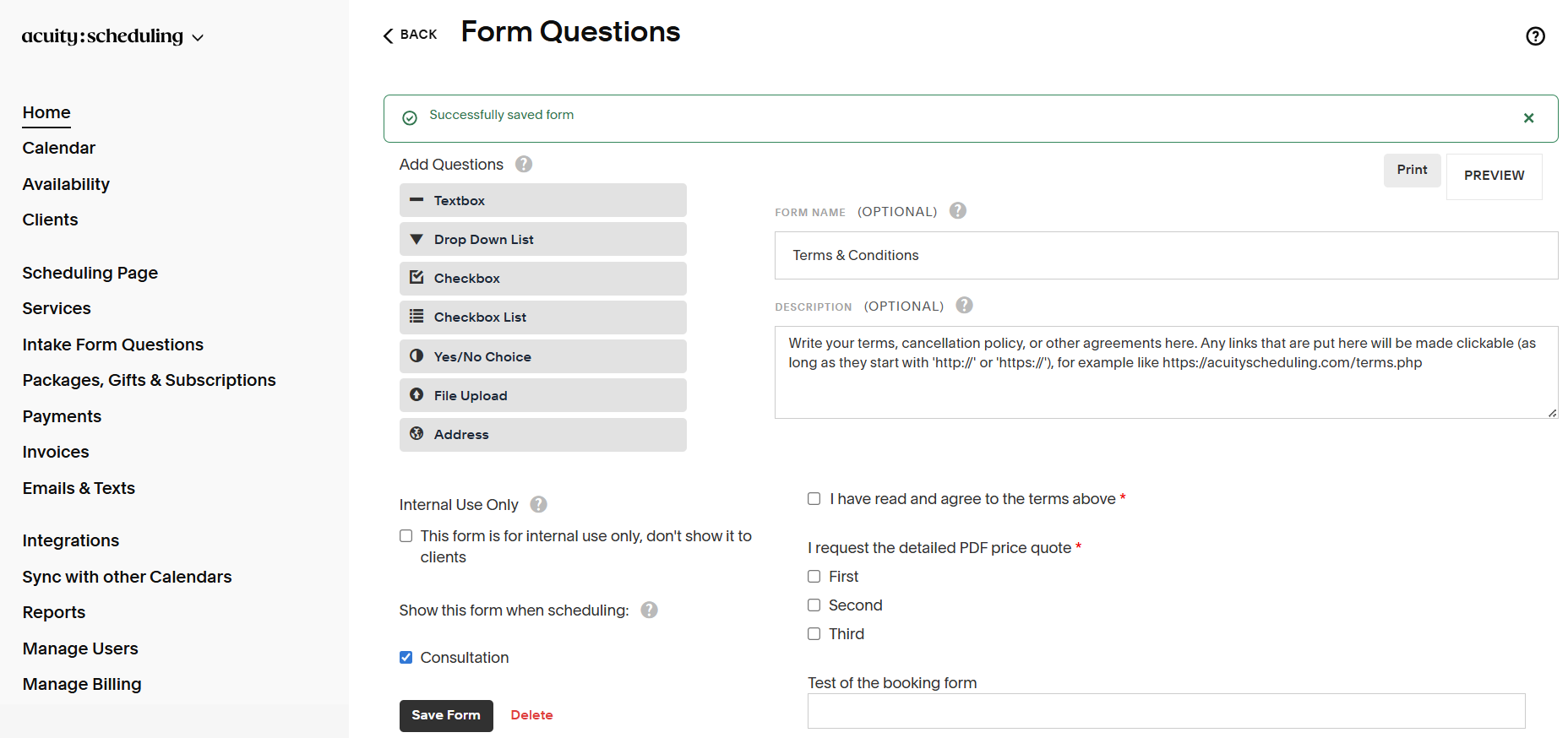 Acuity’s intake form builder with custom fields, checkboxes, file uploads, and terms acceptance
Key features on the most affordable paid plan:
- unlimited appointments with one calendar;
- customizable intake forms with multiple field types;
- email reminders;
- integrated payments via Stripe, PayPal, and Square;
- Zoom integration and customizable booking page.
Limitations. Acuity does not have a free plan, and the number of calendars (one per staff member) is limited by your plan, ranging from 1 to 36. This means growing teams have to upgrade to more expensive plans. If you only need a simple meeting link, Acuity will likely cost more than it’s worth.
Pricing. There is no free plan. The lowest-priced option is $20/month (billed monthly) for 1 calendar with unlimited appointments, reminders, and payments. The most expensive plan costs $61/month (billed monthly) and supports up to 36 calendars (one per staff member), API access, and advanced workflows.
SimplyBook.me
Why it’s on this list: industry-specific booking features for salons, clinics, and fitness studios that Calendly doesn’t offer.
SimplyBook.me is aimed at service-based businesses, particularly salons, healthcare providers, fitness studios, and other appointment-driven operations. Rather than forcing every customer into the same feature set, it offers 77 optional add-ons that can be switched on as needed, covering everything from intake forms and group meetings to POS functionality and AI voice booking. The free plan allows 50 bookings per month with one custom feature enabled, which is enough for a small business to get started.
We tested the booking widget — it was flexible, and the industry templates saved real setup time. The custom features panel makes it easy to add exactly what you need; however, the sheer number of toggles can feel overwhelming at first.
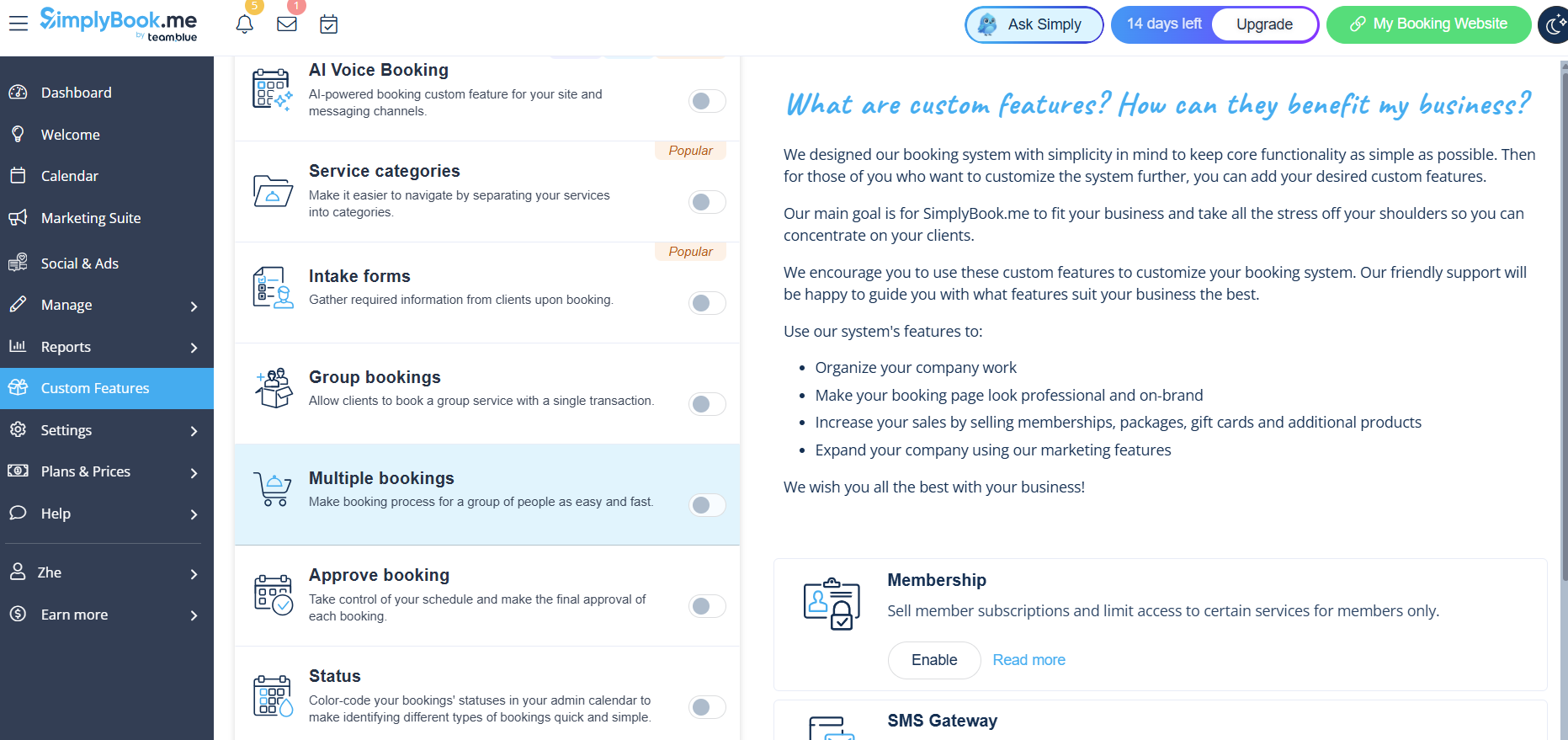 Navigating SimplyBook.me’s custom feature panel
Key features on the free plan:
- 50 bookings/month with 1 provider;
- booking website with design customization and Facebook integration;
- recurring appointments and event bookings;
- email confirmations, reminders, and cancellation notifications;
- admin app for iOS and Android and Zapier integration;
- one custom feature of your choice from 77 available.
Limitations. The free booking cap is low for busy businesses. The modular pricing can get complicated as you add features. Besides, it can be unpredictable since SMS credits, WhatsApp credits, and a custom domain are all sold separately on top of the subscription.
Pricing. SimplyBook.me offers a free plan with 50 bookings/month, 1 provider, and 1 custom feature. The most affordable paid plan costs around $15/month (billed monthly) and includes 100 bookings, 5 providers, 3 custom features, payments, POS, and other advanced features.
Free plan showdown — what $0 actually gets you
What each free plan actually includes matters more than the headline price. Here’s how the free Calendly alternatives’ tiers (and Acuity’s cheapest paid plan) compare on the features that usually get paywalled.
| Feature |
42min |
Cal.com |
TidyCal |
Zoho Bookings |
Google Appointment Schedules |
Acuity* |
SimplyBook.me |
| Events |
Unlimited |
Unlimited |
Unlimited |
1 |
1 |
Unlimited |
Unlimited |
| Bookings |
Unlimited |
Unlimited |
Unlimited |
Unlimited |
Unlimited |
Unlimited |
50/mo |
| Calendars |
Multiple |
Unlimited |
1 |
1 |
All Google calendars |
1 |
1 |
| Routing forms |
✅ |
❌ |
❌ |
❌ |
❌ |
❌ |
❌ |
| Round robin |
✅ |
❌ |
❌ |
❌ |
❌ |
❌ |
❌ |
| Team features |
✅ |
❌ |
❌ |
❌ |
❌ |
❌ |
❌ |
| Email reminders |
✅ |
✅ |
❌ |
✅ |
❌ |
✅ |
✅ |
| SMS reminders |
✅ |
✅ |
❌ |
❌ |
❌ |
❌ |
Paid add-on |
| Webhooks / API |
✅ |
✅ |
❌ |
✅ |
❌ |
❌ |
✅ |
*Acuity has no free plan; the corresponding column reflects its cheapest tier ($20/month).
The team-oriented features, routing forms, round robin, and automated reminders are paywalled on most tools, including Calendly (Teams at $20/seat/month). 42min is the tool that bundles all of that into a free plan, which makes it worth a look for teams outgrowing Calendly’s free plan. The trade-off: it’s a newer platform with a shorter track record.
The short version
No single tool replaces Calendly for everyone — but each one on this list does something Calendly either charges for or doesn’t do at all.
42min offers the most complete free plan with advanced team features, Cal.com provides unmatched flexibility for developers, TidyCal removes subscription fatigue with its one-time payment options, and Zoho Bookings fits naturally into a broader business ecosystem. Google removes the learning curve, while Acuity and SimplyBook.me serve appointment-heavy businesses that Calendly was never really built for.
Start with the tool that addresses your biggest pain point — all of them offer a free plan or trial, so there’s nothing to lose by testing it.
And if you’re already using SendPulse, most of these tools connect through Zapier or webhooks, so new bookings can feed straight into your workflows or CRM system.
FAQs
Is there something like Calendly but free?
Yes. Cal.com, TidyCal, Zoho Bookings, Google Appointment Schedules, SimplyBook.me, and 42min all offer free plans. Google Appointment Schedules is the fastest to start with a Google account. Cal.com gives solo users unlimited event types and calendars at no cost. For teams, 42min is the only free option with routing forms, round robin, and automated workflows.
Is there a better alternative to Calendly?
It depends on what Calendly isn’t doing for you. For free team features, 42min covers what Calendly paywalls. For appointment-heavy businesses, Acuity offers advanced intake forms and class scheduling. If per-seat pricing is the issue, TidyCal eliminates recurring fees with a one-time payment.
Is Calendly free worth it?
For a single user who needs one meeting type and basic booking, Calendly’s free plan is reliable and clean. But with only one active event type, one calendar, no reminders, and no team features, it quickly becomes limiting, and the upgrade path is expensive.
What is the best Calendly alternative?
For service businesses that book clients all day, Acuity or SimplyBook.me handles intake forms, classes, and packages better than Calendly. For developers who want full control, Cal.com is open-source and self-hostable. For solopreneurs watching expenses, TidyCal’s lifetime deal eliminates recurring fees. For teams that need routing and round robin without a paywall, 42min is worth a look.