For businesses, timing is everything. Reaching customers when it suits them can be the difference between a missed opportunity and a sale. As users expect instant access to information, they also expect quick and timely responses from brands. Of course, it’s not always physically possible to reply to every message right away. But automation and scheduling tools can help.
In this post, we’ll talk about how to schedule messages on WhatsApp, one of the world’s most popular messaging platforms, so you can stay connected with your audience even when you’re not online.
What are WhatsApp scheduled messages?
Scheduled messages on WhatsApp are messages you create in advance and set to be delivered at a specific date and time. In other words, they let you plan communication instead of reacting in real time.
For marketers, this WhatsApp message scheduling feature offers an advantage to reach your audience exactly when they’re most likely to engage, without staying glued to your phone to monitor the chats.
This strategy makes your message hit at the perfect moment:
- a promo when leads are ready to buy;
- a reminder before the deadline;
- a thank-you message right after the purchase.

Engage users on WhatsApp
Use our drag-and-drop builder to create AI-powered WhatsApp chatbots that sell, support, and connect. Run campaigns, share updates, and convert leads hands-free.
Get started for free
Can you schedule messages in WhatsApp directly?
The short answer is no, WhatsApp doesn’t have a built-in feature that lets you schedule messages to send later. The app is designed for real-time communication, not planned messaging.
But that doesn’t mean you’re out of options. There are two main ways to handle message scheduling:
- Manual scheduling – setting reminders or using third-party apps to send messages at a specific time. It’s simple but requires your phone to stay active and connected.
- Automated scheduling – available through official business solutions like the WhatsApp Business API. These tools let you plan and send messages automatically. It’s ideal for campaigns, reminders, and personalized customer journeys. SendPulse WhatsApp marketing automation service takes scheduling further by enabling time-zone-aware campaigns, behavior-triggered messages, and dynamic content personalization—transforming your scheduled sends into intelligent, adaptive customer experiences.
In this post, we’ll show you how to schedule WhatsApp messages on iPhone, Android, and desktop, as well as through third-party tools, WhatsApp Business, and the WhatsApp Business API, depending on your goals and workflow.
Why scheduled messages on WhatsApp matter for businesses
In marketing, timing often defines whether a message converts or gets ignored. Scheduled WhatsApp messages help brands stay consistent, relevant, and human even when communication is automated. By planning when your messages go out, you transform WhatsApp from a reactive chat tool into a proactive engagement channel. Here’s why that matters.
Time and resource efficiency through automation
Scheduled WhatsApp messages let your team shift from constant manual outreach to strategic planning. For instance, you can queue up launch announcements, limited-time offers, reminders, or drip messages days in advance.
This ensures your campaigns stay on track even when your team is offline. What’s more, you minimize repetitive tasks and also guarantee that your brand never misses the right communication window.

Turn conversations into conversions
Design targeted flows across email, messaging apps, and SMS — powered by CRM data and real user behavior, all in one automation hub.
Get started for free
Consistent communication with leads and customers
Consistency breeds trust, and scheduled messages make it effortless. With them, you can maintain a steady rhythm of communication, such as weekly check-ins, order updates, or customer onboarding flows, without lapses caused by workload or timing.
This reliability builds familiarity and positions your brand as attentive and organized, even during peak campaign periods. With 85% of consumers preferring to message brands directly, scheduling WhatsApp messages allows you to stay present in those high-intent conversations even when your team is offline.
Audience engagement across time zones
Global audiences demand global timing. Scheduled WhatsApp messages let you bypass the limitation of local office hours by sending messages when each segment of your audience is most likely to be active.
A brand operating across regions, for example, can schedule promotions for morning delivery in each customer’s local time zone, creating a real-time experience without the need for round-the-clock management. For campaigns that go out to your full subscriber base at once, WhatsApp bulk message campaigns handle the scale — sending a single scheduled send to thousands of opted-in contacts, with each message delivered as a private, individual conversation.
Improved open and response rates through optimal timing
Sending a message at the right moment — say, a lunchtime offer for a restaurant or a payday reminder for a subscription service — can lift engagement metrics. Instead of relying on guesswork, you can use past campaign data or CRM insights to schedule messages for moments when users are most responsive, ensuring your efforts translate into measurable results.
Since WhatsApp messages have open rates of nearly 98%, which is far above the typical 20% for email, scheduling your messages gives you near-certainty that your content will be seen.
Higher retention and reactivation rates via planned follow-ups
Retention is the product of consistent, well-timed follow-ups. With 80% of WhatsApp messages read within the first five minutes, most users open what they receive almost instantly. This makes timely delivery critical.
Scheduled WhatsApp scheduled messages help brands nurture relationships through automated yet human-like touchpoints, such as “We miss you” offers or milestone thank-you notes. This keeps your brand top of mind and brings inactive users back into the fold without heavy manual intervention.
How to schedule WhatsApp messages on iPhone (iOS)
Want to use WhatsApp message scheduler on your iPhone? Siri Shortcuts makes it simple, and here’s how to do it.
Apple’s Shortcuts app lets you automate almost anything on iPhone, including WhatsApp messages. This method works best for short-term, simple tasks like sending reminders, greetings, or follow-up messages.
To schedule WhatsApp messages on iPhone, start by opening the Shortcuts app (it’s pre-installed on iOS 13 and newer).
Head to “Automation” → + → “Create Personal Automation,” then choose “Time of Day” and set the exact moment you want your message to go out.
Next, tap “Add Action,” search for “Text,” and type your message. Tap “+ Add Action” once more, look for “Send Message via WhatsApp,” and select the contact or group you want to message.
Finally, disable “Ask Before Running” to let the shortcut send messages automatically, and tap “Done” to save your automation. Your iPhone will now send the WhatsApp message at the scheduled time. Just make sure your device stays on and connected to the internet.
Here’s what to remember before scheduling your WhatsApp message:
- Your iPhone must be on and unlocked for the automation to trigger.
- Active internet connection is required at the moment of sending.
- Some iOS versions still ask for confirmation before executing.
- Group messages may occasionally fail due to WhatsApp API restrictions.
- Updates to iOS or WhatsApp can affect automation reliability.

Power up your business with smart tools
From solo creators to global brands, thousands of customers trust SendPulse to run email campaigns, chatbots, automations, and more — all in one place.
Get started for free
How to schedule WhatsApp messages on Android
Android offers more flexibility than iOS when it comes to scheduling WhatsApp messages, but there’s still no native feature for it. The good news is that you can use automation apps to handle the job for you. These tools let you queue messages and set exact delivery times.
Start by installing a reliable third-party scheduler like SKEDit, Wasavi, or Do It Later. These apps integrate with WhatsApp and allow you to plan messages in advance.
After granting the necessary permissions for WhatsApp and notifications, open the app and create your first scheduled message. Here’s what it looks like in the SKEDit app:
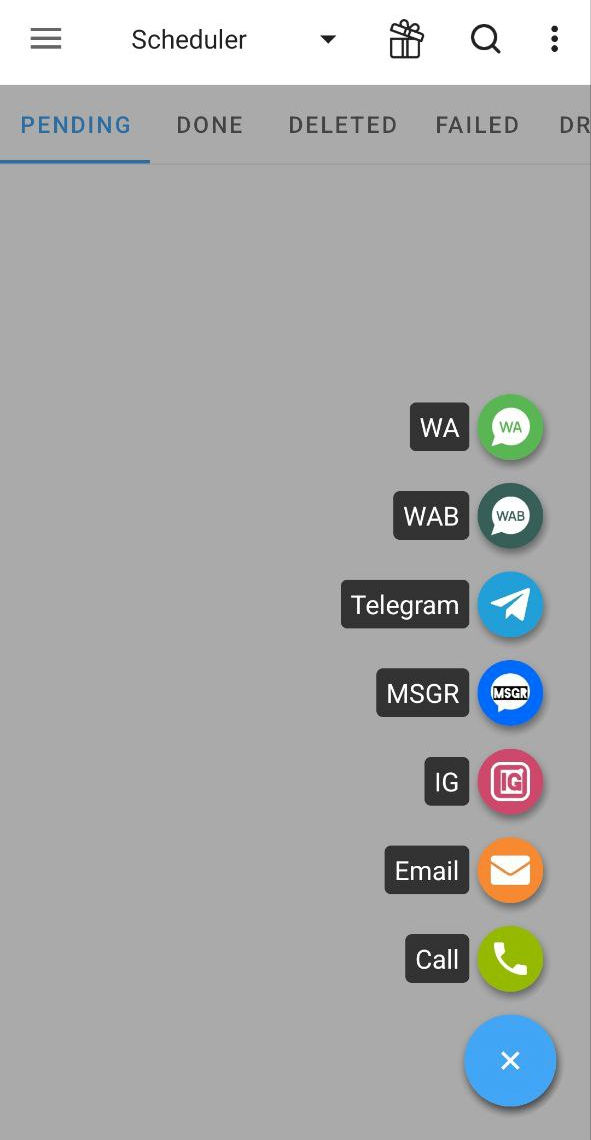 SKEDit app’s dashboard
Select WhatsApp as your platform, choose the recipient (an individual or group), and type your message.
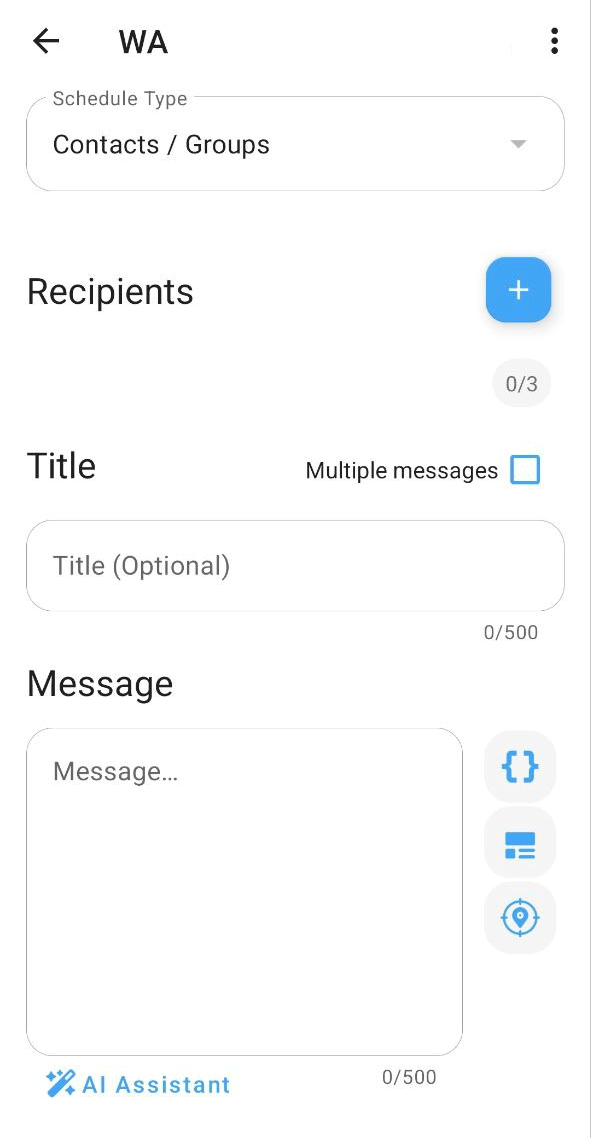 Create your message using the WhatsApp scheduler
Then, set the exact date and time for delivery and decide whether it should be sent automatically or require manual confirmation. Some apps need this due to Android’s security policies.
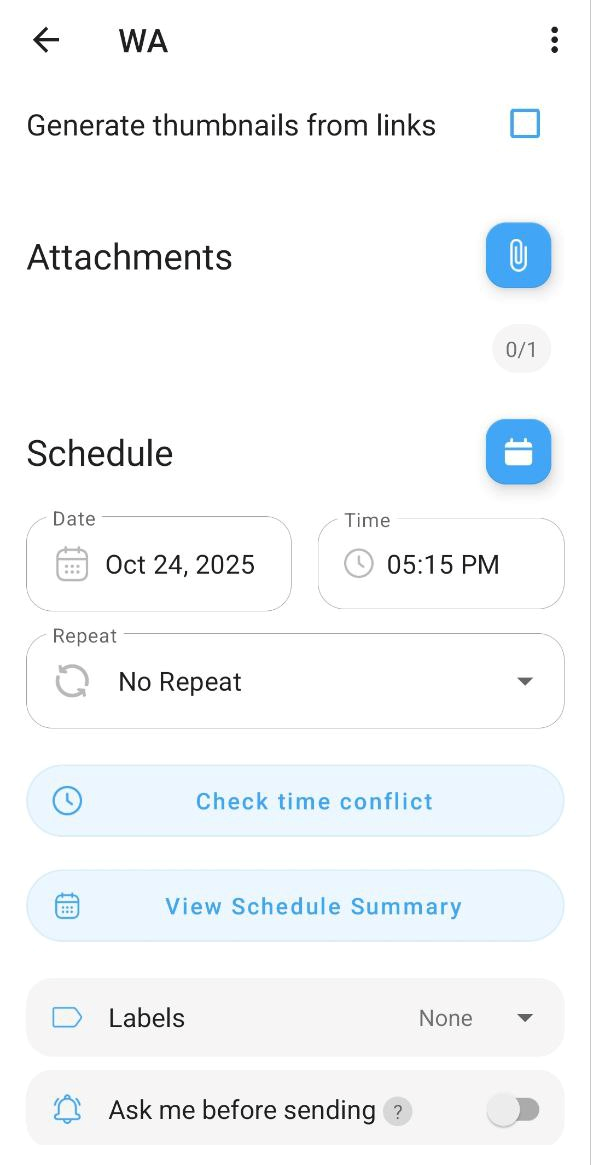 Set up your message via the WhatsApp scheduler
Finally, save your automation, and your message will be sent right on schedule.
Always verify that the app you use follows privacy and data protection standards, especially if you’re sending customer or campaign messages. Apps like SKEDit are transparent about data usage and integrate well with Android’s accessibility settings, which makes them safer options.
Keep in mind that for the scheduling to work, your phone must be turned on, unlocked, and connected to the internet at the scheduled time. This is an Android OS limitation that even the best tools can’t bypass.
How to schedule WhatsApp messages via WhatsApp Web
WhatsApp Web doesn’t include a built-in scheduling feature. Still, marketers can automate or plan their outreach using browser extensions like Blueticks or WA Web Plus. They add scheduling capabilities directly inside WhatsApp Web.
Start by opening Google Chrome and installing one of these extensions from the Chrome Web Store.
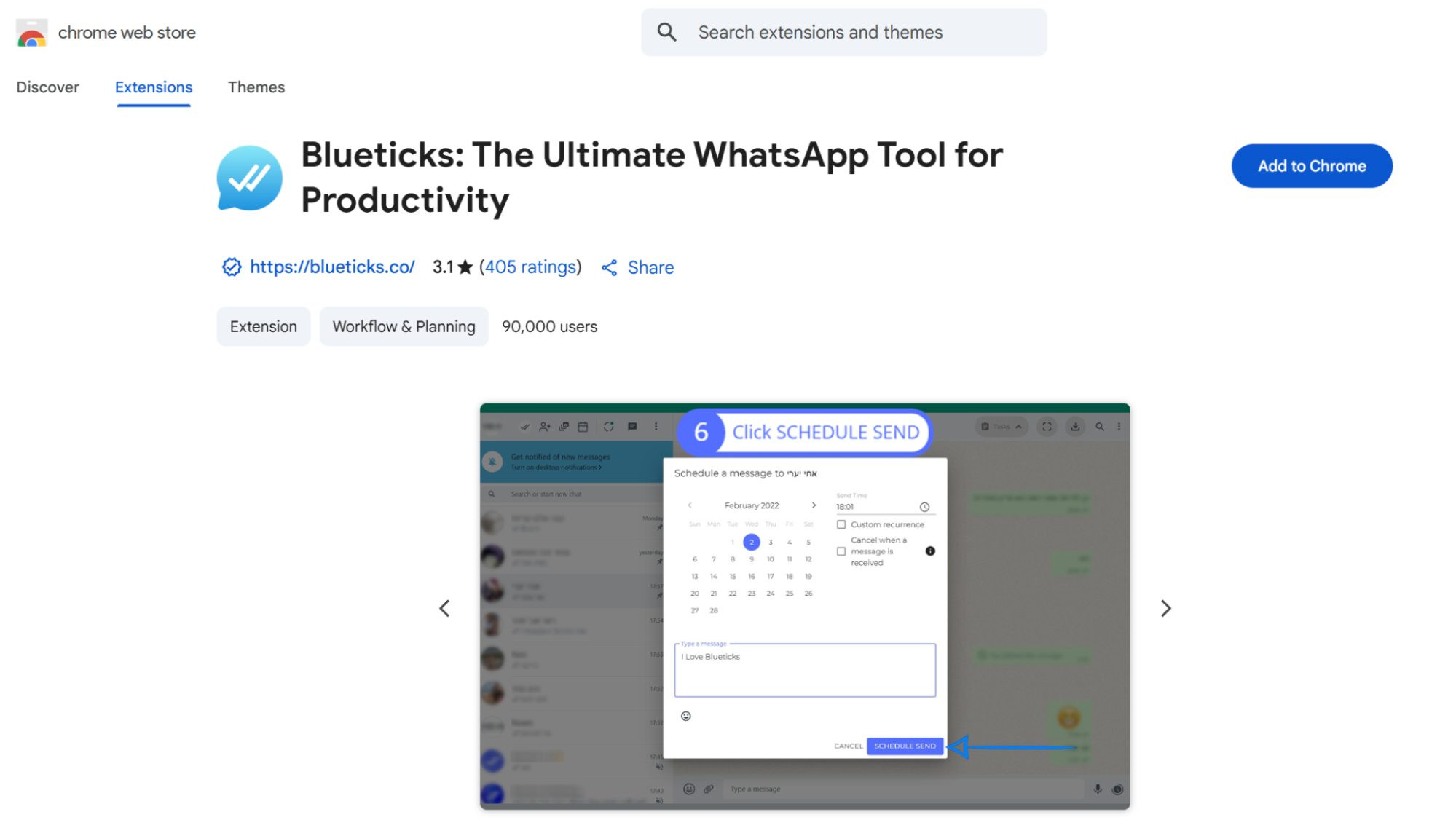 WhatsApp scheduler in the Chrome Web Store
Once added, open WhatsApp Web and sign in by scanning the QR code from your phone. You’ll see a new scheduling icon appear next to the chat bar. This is where the extension integrates its tools.
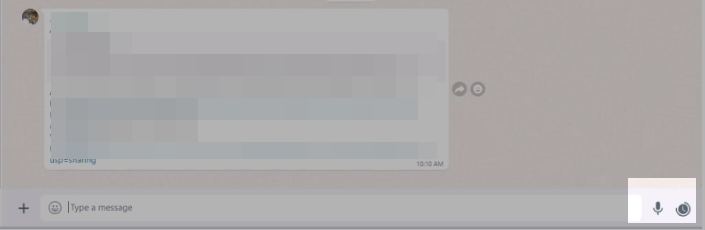 WhatsApp dashboard with installed extension
Click the icon, compose your message, and set the desired date and time for sending. Review the details, then confirm the schedule. The extension will queue your message and automatically deliver it at the specified time.
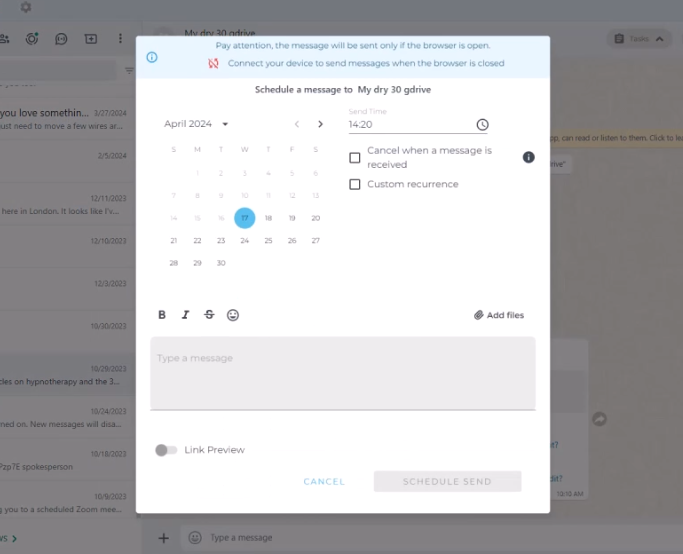 Create and schedule your WhatsApp message
Before you begin, remember that these extensions require permission to access your WhatsApp data. Always verify the extension’s credibility and privacy policy, especially if you’re handling customer conversations or sensitive information.
How to schedule WhatsApp messages in WhatsApp Business
WhatsApp Business doesn’t let you schedule messages at an exact time, but it offers semi-automated tools that help you communicate proactively without being glued to your phone. These built-in features allow you to trigger messages based on user actions, ensuring customers hear from you at just the right moment.
You can start by setting up Away messages to automatically respond when you’re offline or outside business hours. This ensures leads don’t go unanswered and helps manage expectations.
To set it up, open the WhatsApp Business app and select “Tools” → “Away message.” Enable “Send away message,” then write your automated note, for example, “Thanks for your message! We’re currently offline and will get back to you as soon as possible.”
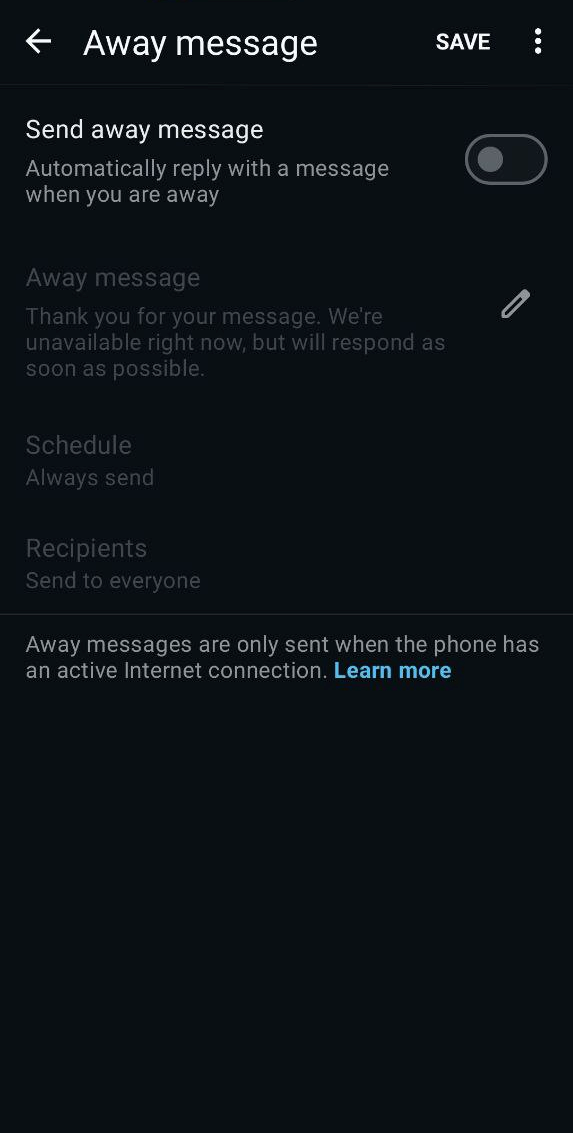 Create a WhatsApp away message
You can customize when the message is sent — always, on a custom schedule, or only outside your business hours — and decide who should receive it. Once you save your settings, your off-hours communication runs on autopilot.
Next, use Greeting messages to welcome new contacts or reconnect with inactive ones.
Greeting messages are perfect for welcoming new customers or re-engaging old ones who haven’t contacted you for a while. They automatically trigger when someone messages your business for the first time or after 14 days of inactivity.
To create one, go to “Tools” → “Greeting message,” turn on “Send greeting message,” and enter your text. For example, something like “Hi there 👋 Thanks for reaching out to [Your Brand]. How can we help today?”
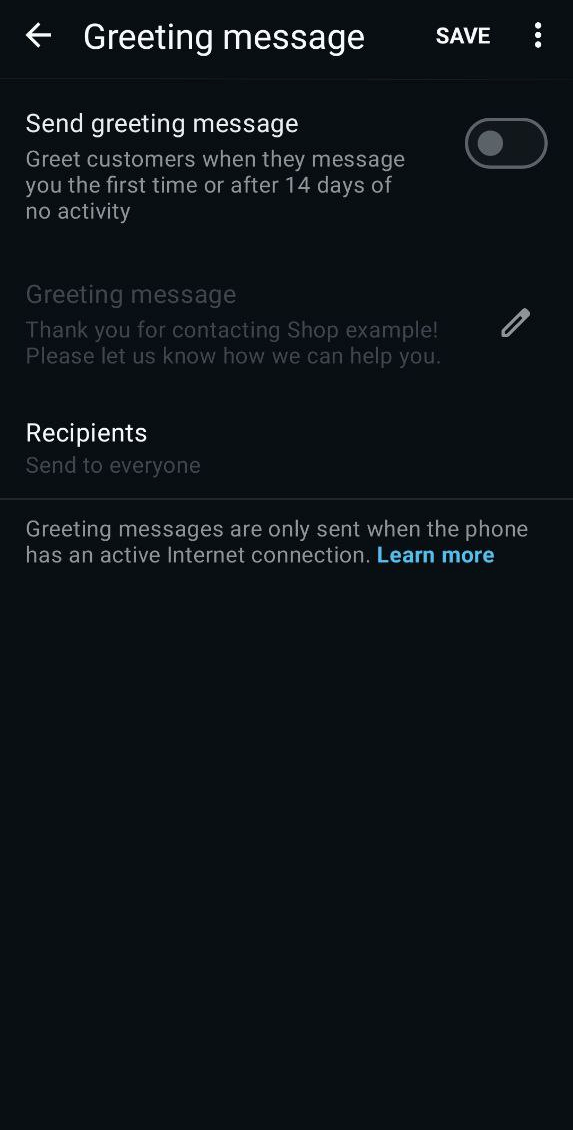 Create a WhatsApp greeting message
You can choose to send it to everyone or specific contacts, then tap Save. From that moment, every new lead or returning customer will receive a welcome message.
Finally, Quick replies are saved responses you can reuse anytime — perfect for FAQs, confirmations, or delivery updates. Instead of typing the same message repeatedly, you can send it instantly with a simple shortcut.
To set them up, go to “Tools” → “Quick replies,” tap “Add (+),” and enter your message, such as “Your order has been shipped and will arrive in 2-3 days.” Assign a shortcut like /shipping, then tap “Save.” The next time a customer asks for shipping details, type “/” in the chat, select your saved reply, and hit send.
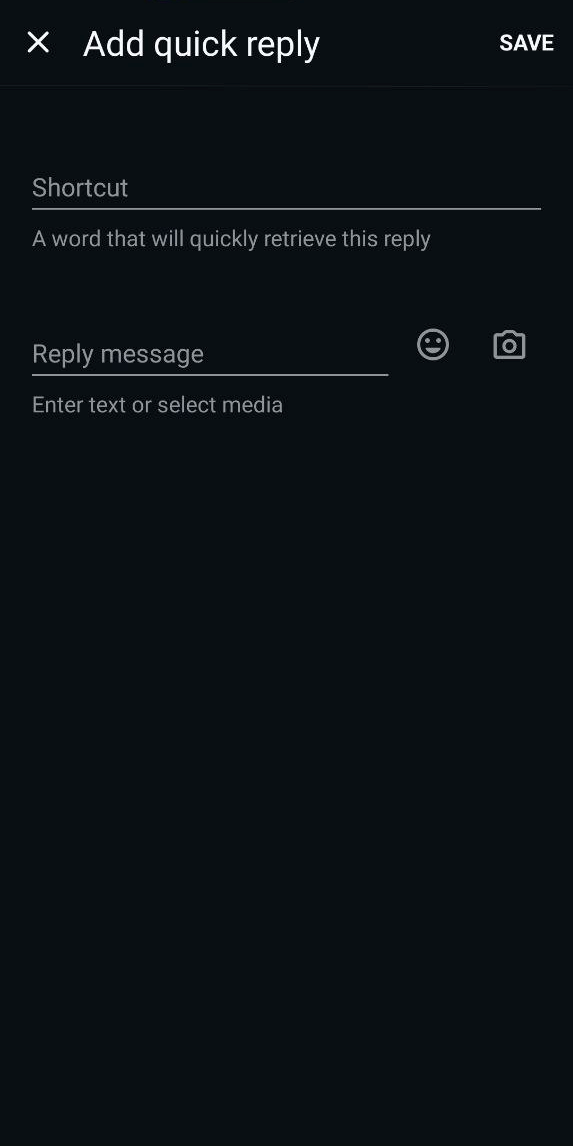 Add a WhatsApp quick reply
While these tools don’t replace a full scheduling system, they help businesses maintain consistent, timely communication to keep leads warm and customers engaged even outside working hours.
Learn how to set up
WhatsApp auto-replies and explore their practical use cases to enhance your communication strategy.
How to send WhatsApp scheduled messages via WhatsApp Business API
When it comes to scheduling WhatsApp messages reliably and at scale, the best approach is through the official WhatsApp Business API. It ensures compliance, stable delivery, and automation flexibility — everything third-party tools can’t always guarantee. SendPulse, as an official WhatsApp Business API provider, offers two easy and fully compliant ways to schedule WhatsApp messages.
Access the WhatsApp Business API — no setup or extra fees
With SendPulse, you get everything you need, from a visual editor with a library of ready-made chatbot flow templates to user-friendly analytics, to help you effectively engage your customers on WhatsApp.
Get started for free
The platform combines a visual builder, approved WhatsApp Business API access, and multi-channel marketing tools in one platform. You don’t need coding skills to build automated flows or schedule campaigns. Every step is done through a clear, drag-and-drop interface.
Plus, as an official provider, SendPulse guarantees compliance with WhatsApp policies and reliable message delivery, whether you’re scheduling a single campaign or running complex automation across channels.
Let’s see how to create scheduled WhatsApp campaigns in SendPulse.
Use the “Send later” WhatsApp feature
If you’re running WhatsApp campaigns through SendPulse, you can plan your outreach in advance using the “Send later” option.
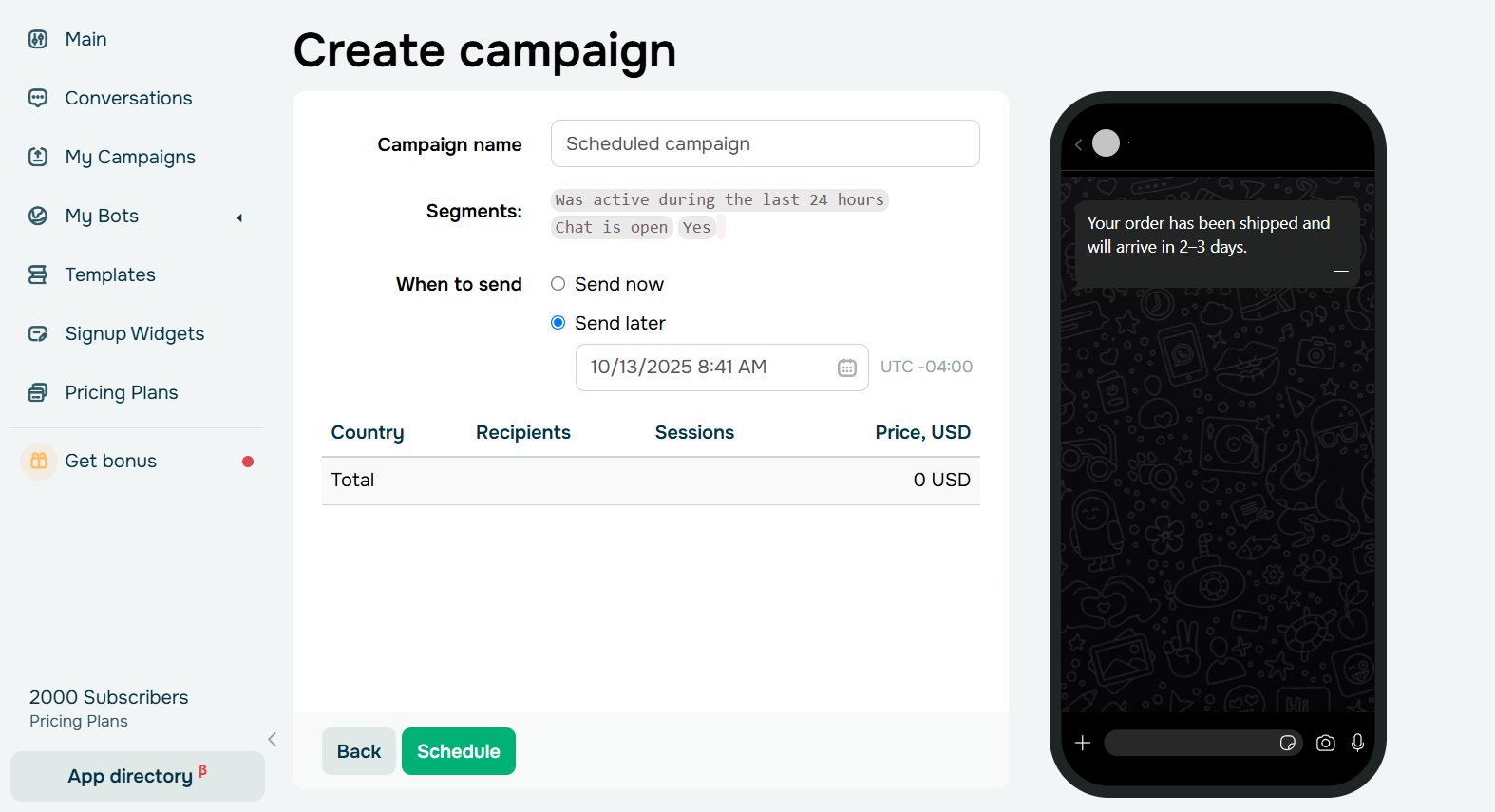 Schedule your WhatsApp campaign sending time
It lets you:
- choose the exact date and time for your message delivery;
- send pre-approved message templates or messages to audiences who interacted with your business in the last 24 hours;
- schedule multiple campaigns simultaneously to maintain consistent communication.
For example, you can prepare a “Back in stock” message today and have it delivered automatically tomorrow morning. This feature is ideal for product announcements, time-sensitive promotions, or event reminders.
Automate scheduled messages via chatbot flows
For long-term, behavior-driven communication, SendPulse WhatsApp chatbot for sales gives you full control over when and how your WhatsApp messages are sent.
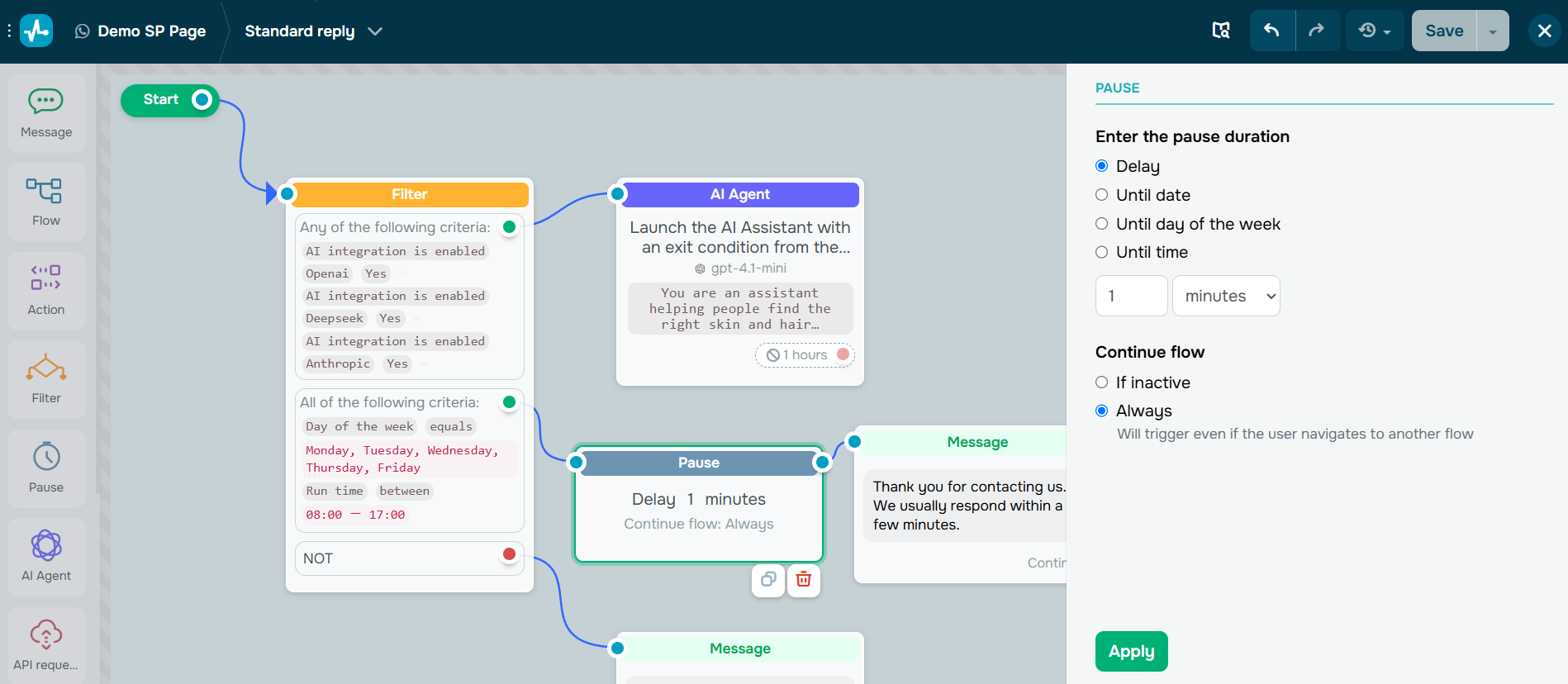 Set up the sending time in SendPulse’s visual chatbot builder
You can:
- set delays between messages (e.g., follow up two hours after a user requests information);
- add triggers that send messages based on user actions (e.g., reminder a week after a cart is abandoned);
- combine WhatsApp with other channels like email, SMS, Facebook Messenger, Instagram, or Telegram for consistent, multi-channel journeys.
This approach enables you to design personalized automated flows that nurture leads and save time.
Tips to make your scheduled WhatsApp messages more effective
Scheduling messages is only half the strategy, as timing and relevance define whether your message resonates or gets ignored. To make the most of your WhatsApp schedule message feature, focus on audience experience. Here’s how to do it.
Send at the right time
The same message can perform very differently depending on when it’s delivered. Analyze your audience’s behavior and schedule messages for moments when they’re most active or likely to respond.
For example, a restaurant might send lunch promos around 11:30 a.m., while an eCommerce brand might trigger reminder messages in the evening when people browse on their phones.
If your customers are spread across different time zones, use automation tools that adjust delivery time for each region. This ensures your messages land when they’re most relevant, not while your audience is asleep.
Segment and personalize for impact
Not every message should go to everyone. Segment your audience based on interests, purchase history, or engagement level, and tailor your messages accordingly. A “We miss you” WhatsApp delayed send campaign for inactive users should sound different from a product update for loyal buyers.
Even small touches like mentioning the customer’s first name or referencing a previous purchase can make your communication feel personal, not robotic. According to The State of Personalization Report, 89% of business decision-makers believe personalization is critical to their company’s success over the next three years.
Keep it clear, valuable, and authentic
WhatsApp is a personal space, so users expect direct, human-like communication. Keep your scheduled messages short, relevant, and genuinely useful. Instead of generic “Don’t miss our offer!” try “Your favorite sneakers are back in stock — get them before they sell out.”
Avoid overly promotional or spammy tones, which can lead to opt-outs or account restrictions. The rule is simple: if you wouldn’t want to receive it yourself, don’t send it.
Control frequency and avoid fatigue
Just because you can schedule multiple messages doesn’t mean you should. Over-communication can annoy subscribers and lead to lower engagement or even blocks.
A good rule of thumb is to maintain contextual frequency. For instance, daily reminders might work during a limited-time campaign, but regular updates should be spaced out to keep interest without overwhelming users.
Respect privacy and consent
Always make sure your scheduled communication complies with CCPA, GDPR, and WhatsApp’s Business Policy. Only message users who have given consent and offer easy opt-out options when possible.
Misusing customer data or relying on unofficial scheduling tools can lead to trust issues or even account suspension. When in doubt, use verified platforms that follow WhatsApp’s official API standards to automate and schedule messages responsibly.

Communicate with customers across multiple channels
With SendPulse, you can reach your target audience through a communication channel they prefer — be it email campaigns, SMS messages, live chats, or chatbots in WhatsApp and other messaging apps.
Get started for free
Common challenges with scheduled WhatsApp messages and how to solve them
Even though scheduling WhatsApp messages sounds simple, in practice, it comes with several pitfalls that can undermine your campaign performance or even put your account at risk. Let’s look at the most common challenges marketers face and how to avoid them with the right setup.
Using unofficial tools can get your account banned
Many businesses still rely on third-party extensions or browser-based tools to schedule messages. These tools often violate WhatsApp’s terms of service and can lead to temporary or permanent account bans. For example, browser automation or bulk-messaging tools that mimic human behavior are something WhatsApp’s anti-spam system quickly detects.
✅ Solution: Always use platforms officially connected to the WhatsApp Business API, like SendPulse. They provide secure, compliant scheduling while keeping your sender reputation safe.
Connectivity issues that block message delivery
If your scheduling method depends on keeping your phone or PC connected (for example, using WhatsApp Web with a scheduling app), your messages might never be sent if the device disconnects or loses internet access. This can easily ruin time-sensitive campaigns, such as limited offers or appointment reminders.
✅ Solution: Use cloud-based automation through the WhatsApp Business API. With SendPulse, messages are sent directly from the server, guaranteeing consistent delivery even if your device is offline.
Device dependency limits flexibility
Some small business owners try to schedule messages directly on their phones or via automation apps like Tasker or SKEDit. These options work only if the device stays powered on and connected, making it an unreliable approach for scaling communication or running global campaigns.
✅ Solution: Shift to a server-based system where messages are managed in one place, across multiple devices or users. With SendPulse, you can schedule and track messages from your dashboard without touching your phone.
Time zone confusion and overlapping messages
Global audiences often mean mixed time zones, which can result in awkward delivery times, like sending a “Good morning” campaign at midnight. Inconsistent scheduling also risks multiple messages being delivered simultaneously, causing confusion or message fatigue.
✅ Solution: When using WhatsApp Business API providers, you can set delivery times according to each user’s local time zone and create automated flows that prevent overlap. For example, you can send follow-ups only if the previous message wasn’t opened or replied to within a set timeframe.
How businesses use scheduled messages on WhatsApp
When used strategically, a scheduled message on WhatsApp helps brands connect with audiences at the exact moment their attention peaks, without demanding round-the-clock manual work. To see this in action, let’s explore a few examples.
Welcome message from Adidas
When a user messages the company on WhatsApp, they immediately receive a welcome message. As we mentioned earlier, this kind of scheduled message can be created even with basic WhatsApp Business tools.
In this message, the company informs the customer that they’ll soon receive a response related to their inquiry and also explains how to opt out of further messages.
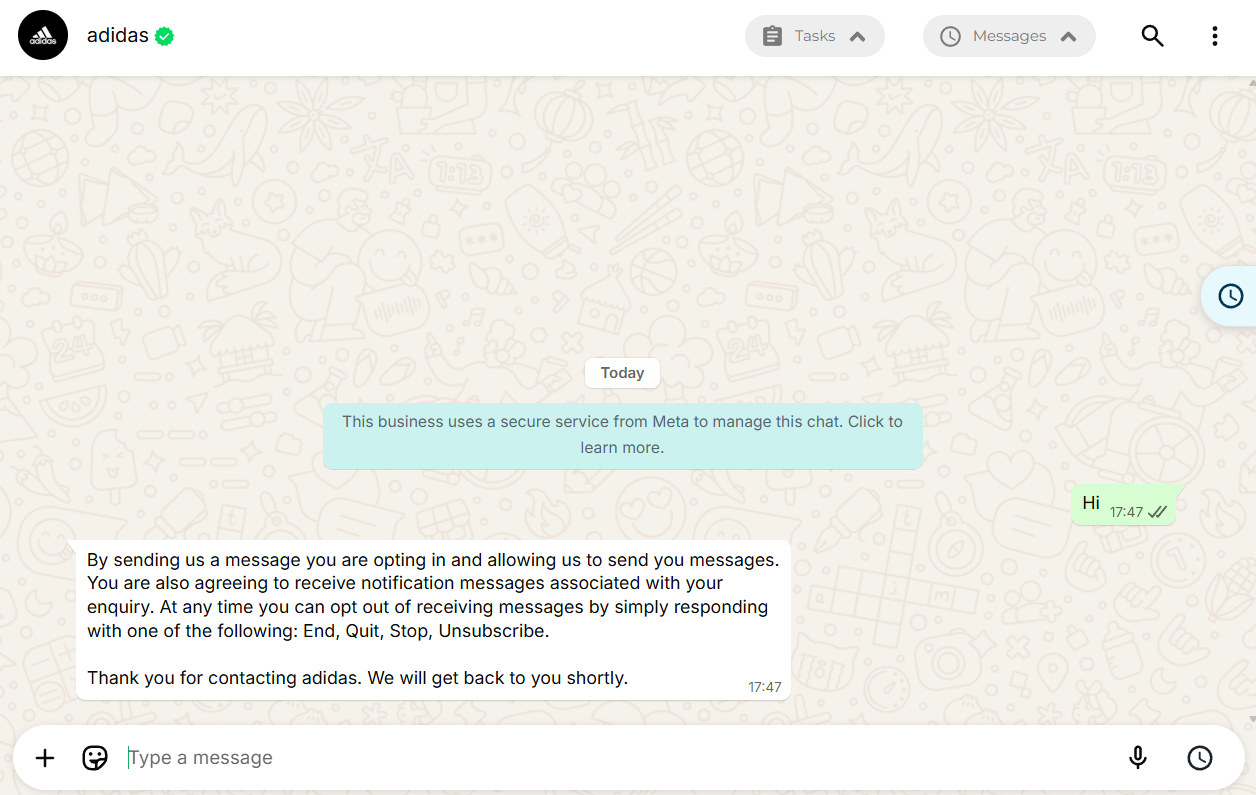 Welcome message from adidas
Exclusive content updates from Mercedes-AMG F1
Mercedes-AMG PETRONAS F1 uses WhatsApp as an official communication channel to share content with fans worldwide. The team delivers a steady stream of real-time race updates, behind-the-scenes photos and videos, pit-lane insights, driver quotes, and team announcements — all in one place where fans already spend their time.
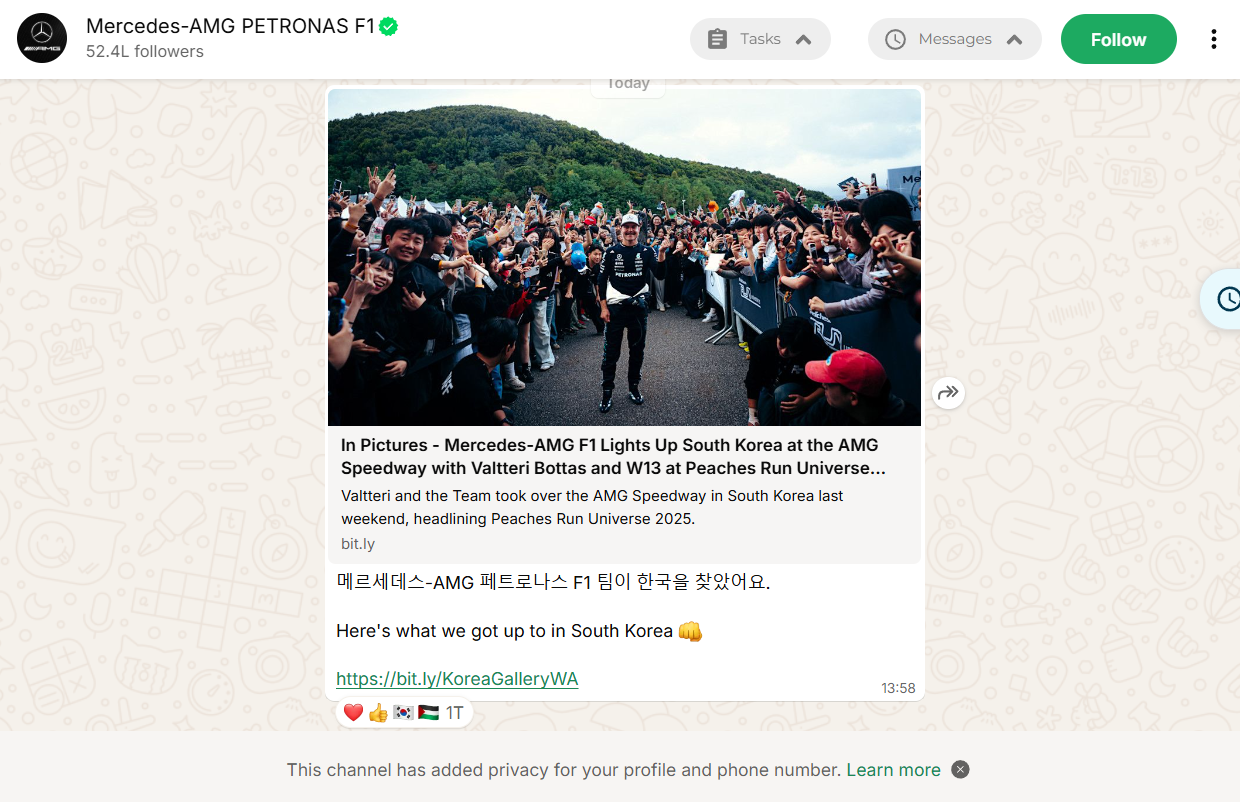 Exclusive content updates from Mercedes-AMG F1
Each message is planned around the F1 calendar — from pre-race teasers and lineup confirmations to post-race highlights and technical breakdowns. This consistent scheduling ensures audiences receive timely, relevant updates without needing to search for them elsewhere.
Scheduled deal alerts from HolidayPirates
HolidayPirates uses WhatsApp Business to send real-time, scheduled travel deals directly to subscribers. Their team curates limited-time offers and programs and message delivery so users receive notifications right when new deals go live.
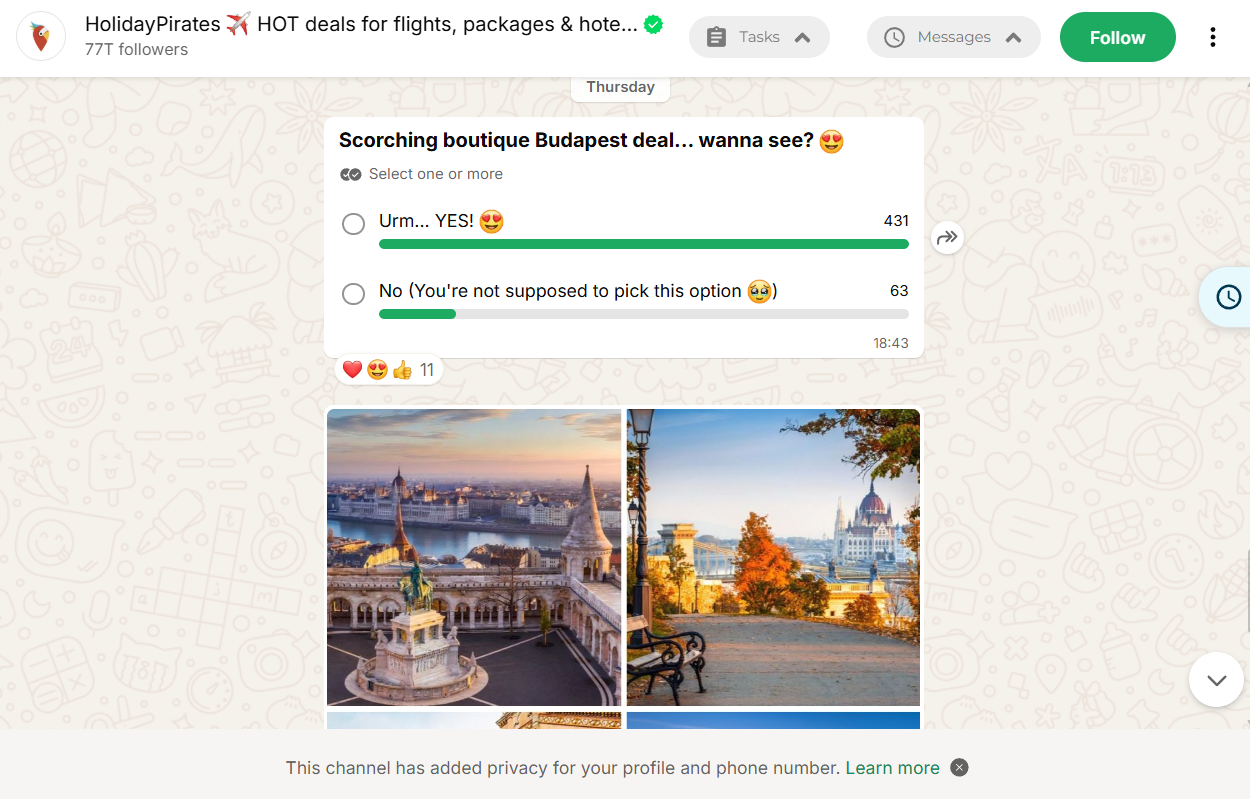 Scheduled deal alerts from HolidayPirates
Through segmentation, subscribers choose their preferred travel themes (for example, beach getaways or city breaks), and HolidayPirates automatically schedules updates that match these interests.
Conclusion
By automating and scheduling WhatsApp messages, you can ensure that every message lands at the right moment. This helps to boost engagement, response rates, and improve customer satisfaction.
While WhatsApp Business App offers only basic functionality, the WhatsApp Business API unlocks advanced automation, audience segmentation, and integration with marketing tools. It’s a smart choice for brands that aim to scale.
To make your campaigns truly effective, plan your timing carefully, personalize your content, and monitor performance to refine future sends.
Try scheduling your next WhatsApp campaign with SendPulse and experience how automation and perfect timing can make your messages successful.
Scheduled WhatsApp Message FAQ