TikTok has evolved far beyond its origins as a platform for dancing videos. Today, it stands as one of the most influential social media platforms, especially with the rise of TikTok Shop, where users not only watch content but also actively search for new products and recommendations. With TikTok’s unique algorithm, even new business accounts have the potential to go viral overnight. However, this rapid growth brings a new challenge: managing an ever-increasing number of followers effectively.
That’s where TikTok chatbots come in. These AI-powered tools help automate interactions, making it easier to manage customer communication at scale. In this post, we’ll take a closer look at the top platforms that can help you build and make the most of them.
Disclaimer: The information in this post is accurate as of December 2025.
TL;DR Best AI TikTok chatbot builders side by side
If you’re planning to get serious about TikTok automation, here’s a quick overview of the chatbot builders we’re going to discuss, along with their features and pricing details. Click on each tool to dive deeper.
| Tool |
AI features |
TikTok automation features |
Free plan
+ limits |
Starting price
+ limits |
| SendPulse |
AI Agent with ChatGPT; context-aware replies; intent detection; personalized recommendations; AI-generated flows |
Welcome and standard replies; replies to DMs; order processing; API requests |
✅
3 chatbots, 500 contacts, 10k messages |
$8/mo for
∞ chatbots, 500 contacts, ∞ messages |
| Chatfuel |
Fuely AI; context-aware responses; custom instructions for tone and goals; auto-generated replies |
Auto-reply to DMs; ad-generated messages |
❌
7-day free trial |
$39/mo for
150 contacts,
∞ messages |
| UChat |
Integration with LLMs or AI hubs; smart conversations; AI personas; smart memory; intent recognition |
Automated replies to DMs; ad-based triggers |
✅
1 chatbot, 200 contacts |
$15/mo for
1 chatbot, 1k contacts |
| Manychat |
AI Flow Builder Assistant; AI Step; intention recognition; AI text improver |
Automation triggers; auto-replies to DMs; lead capture |
✅
2 channels, 25 contacts |
$14/mo for
2 channels,
250 contacts, no AI |
| Respond.io |
AI Agents; AI features for tone adjustment, writing summaries, translation, grammar correction, draft replies |
Auto-replies for inbox messages; routing logic; messaging ad response automation; fallback handling |
❌
7-day free trial |
$79/mo for
∞ contacts,
limited AI |
What is a TikTok chatbot builder?
A TikTok chatbot builder is a tool that helps businesses automate conversations on TikTok. Instead of replying to every message manually, teams can set up a TikTok chatbot to handle routine interactions for them. This makes it much easier to keep up when messages start piling up.
Most chatbot builders come with a visual, drag-and-drop interface. You can map out conversation flows, choose when the bot should respond, and customize replies to fit your brand voice. Once everything is set up, the chatbot can respond to TikTok DMs, comments, and mentions automatically.
Many TikTok chatbot builders go a step further by using artificial intelligence and natural language processing. This allows the chatbot to understand what users actually mean, not just what they type. As a result, an AI-powered TikTok chatbot can deliver more natural, context-aware replies, support your team around the clock, and help turn TikTok interactions into qualified leads.
Engage users on TikTok
Use our drag-and-drop builder to create AI-powered TikTok chatbots that sell, support, and connect. Run campaigns, share updates, and convert leads hands-free.
Get started for free
Here are some common ways businesses use a TikTok chatbot:
- welcoming new followers with automated messages;
- answering FAQs;
- sharing product details, links, and personalized recommendations;
- collecting customer information for lead generation;
- handling basic customer support requests;
- sending follow-up messages or reminders;
- assigning conversations to human agents when needed;
- auto-replying to comments on TikTok videos;
- automating engagement during TikTok live streams.
By taking care of repetitive conversations, a TikTok chatbot reduces response times and lightens the workload for your team. This gives marketing and support teams more time to focus on complex requests while still keeping communication fast, consistent, and reliable for your audience.
How to choose a TikTok chatbot builder
With so many chatbot platforms on the market, picking the right one can feel overwhelming. Let’s break down the key factors that really matter when choosing a TikTok chatbot builder.
TikTok compatibility
Start with the basics: make sure the platform actually supports TikTok. Not every builder does, so it’s essential to choose a platform that connects directly to TikTok features such as comments, DMs, and lead forms, and can also track campaign-specific events.
AI capabilities
If you plan to use an AI TikTok chatbot, the quality of its AI features is crucial. Natural language understanding, customizable AI training, and multilingual support all make a big difference in how natural the conversations feel. It’s also important that the platform includes safety and accuracy controls so responses stay relevant, on-brand, and reliable.
Pricing
Before choosing a platform, consider its pricing model and how well it scales. Some platforms charge based on message volume, others on subscribers or feature access. The best option is one that fits your current budget but won’t hold you back as your TikTok presence grows. Flexible pricing is especially helpful if you expect engagement to increase over time.
Ease of use
Another key factor is how easy the platform is to use. Visual drag-and-drop editors and ready-made templates are a huge advantage, especially if non-technical team members will be involved. With the right interface, building an AI chatbot for TikTok doesn’t require coding or long setup times.
Automation features
A TikTok chatbot builder should offer a wide range of automated actions. Look for features like automated replies to comments and DMs, keyword detection, lead qualification flows, conversation routing to human agents, and automated follow-ups. These tools help improve response times, user experience, and overall campaign results.
Personalization
Generic replies don’t convert. To engage TikTok users effectively, your chatbot needs to feel personal. Choose a builder that supports dynamic variables like names or interests and allows you to design detailed conversation paths. This makes it easier to deliver messages that actually match each user’s intent.
Integrations with other tools
Compatibility with other software is essential for a smooth workflow. Make sure that your TikTok chatbot builder integrates with CRM systems, email marketing, eCommerce, and analytics solutions. Good integrations help sync data, automate workflows, and move leads smoothly into your existing systems.
Analytics
To improve results over time, you need clear insights. A solid chatbot builder should show you how conversations perform, where users drop off, which sources generate leads, and how well your chatbot converts. Features like A/B testing or funnel tracking can help fine-tune your TikTok chatbot for better engagement.
Compliance and security
Finally, don’t overlook security and compliance. Chatbots often handle personal data, so the platform should support GDPR compliance, secure data storage, and permission-based data collection. This protects your users and helps keep your business aligned with privacy regulations, which is especially important if you operate in or target the EU.
Build your chatbots with AI
Let AI help you create a perfect bot scenario on any topic — booking an appointment, signing up for a webinar, creating an online course in a messaging app, and more. Sign up now and run up to three bots for free!
Get started for free
Best AI TikTok chatbot builders
Creating an AI chatbot for TikTok starts with selecting a platform that offers the essential features to meet all your requirements. Let’s take a closer look at some of the top builders worth considering.
SendPulse
SendPulse is an all-in-one marketing and automation platform with powerful chatbot capabilities. With its official TikTok integration and visual builder, businesses can create automated flows, set keyword triggers, and manage conversations without any technical skills. A TikTok chatbot built with SendPulse can reply to DMs and process purchases. You can also segment your audience and personalize flows using variables, which makes it easier to run targeted campaigns based on user behavior and interests.
SendPulse also comes with built-in AI features that add another layer of automation. Through the “AI Agent” element, ChatGPT helps the chatbot deliver context-aware replies. It can understand free-form questions, detect user intent or mood, and respond in your brand’s voice. This AI TikTok chatbot can suggest products, send personalized messages based on subscriber data, and adapt content dynamically to each user’s needs.
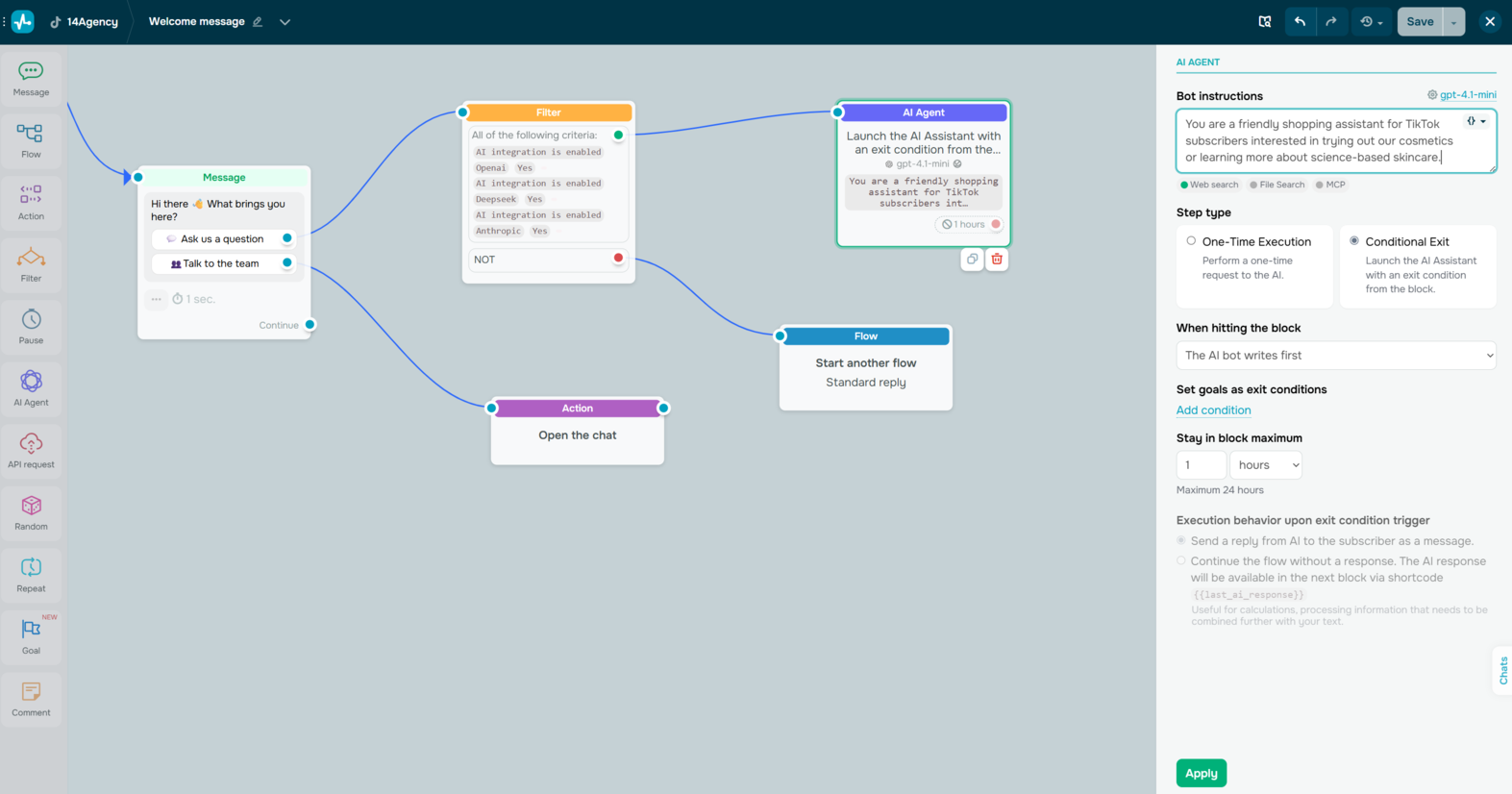 Creating an AI-powered TikTok chatbot flow in SendPulse
SendPulse key features include:
- drag-and-drop visual builder;
- default and custom triggers, including keywords and A360 events;
- conditional logic for flexible flow control;
- auto-generated flows powered by OpenAI;
- “AI Agent” element for free-form questions and context-aware responses;
- AI-driven personalization, product recommendations, and tone-aware responses;
- interactive messages with text, buttons, variables, and typing indicators;
- flow branching, reusable flow blocks, and contact-level actions;
- audience segmentation based on subscriber data and behavior;
- order processing inside TikTok;
- automated replies to DMs.
Pricing. SendPulse offers a free plan that allows users to create up to 3 chatbots across different channels, including TikTok, and includes up to 10,000 messages for 500 subscribers. Paid plans start at $8 per month and include unlimited chatbots and messages. The base tier covers 500 subscribers, with the option to scale as your audience grows.

Create your free SendPulse account
Start using powerful tools to attract, engage, and retain customers — all on one platform. Sign up for free and explore what you can build.
Get started for free
Chatfuel
Chatfuel is a no-code chatbot builder that helps users automate conversations across multiple platforms, including TikTok. It connects directly to the official TikTok Business Messaging API, which means it can automatically reply to both comments and DMs. Users can set up simple triggers like price, link, or how to book so the chatbot knows exactly when to respond, share a link, send booking details, or redirect the conversation to another channel.
Chatfuel’s AI TikTok chatbot builder is designed to handle dynamic conversations. It can understand different ways users ask the same question and respond with relevant, contextual answers in real time. This is especially useful on TikTok, where engagement spikes quickly and response speed matters. Even during high message volumes, the bot keeps replies consistent and timely. Chatfuel also offers its own AI agent, Fuely AI, which works strictly within the rules, tone, and information you define, helping you maintain a consistent brand voice.
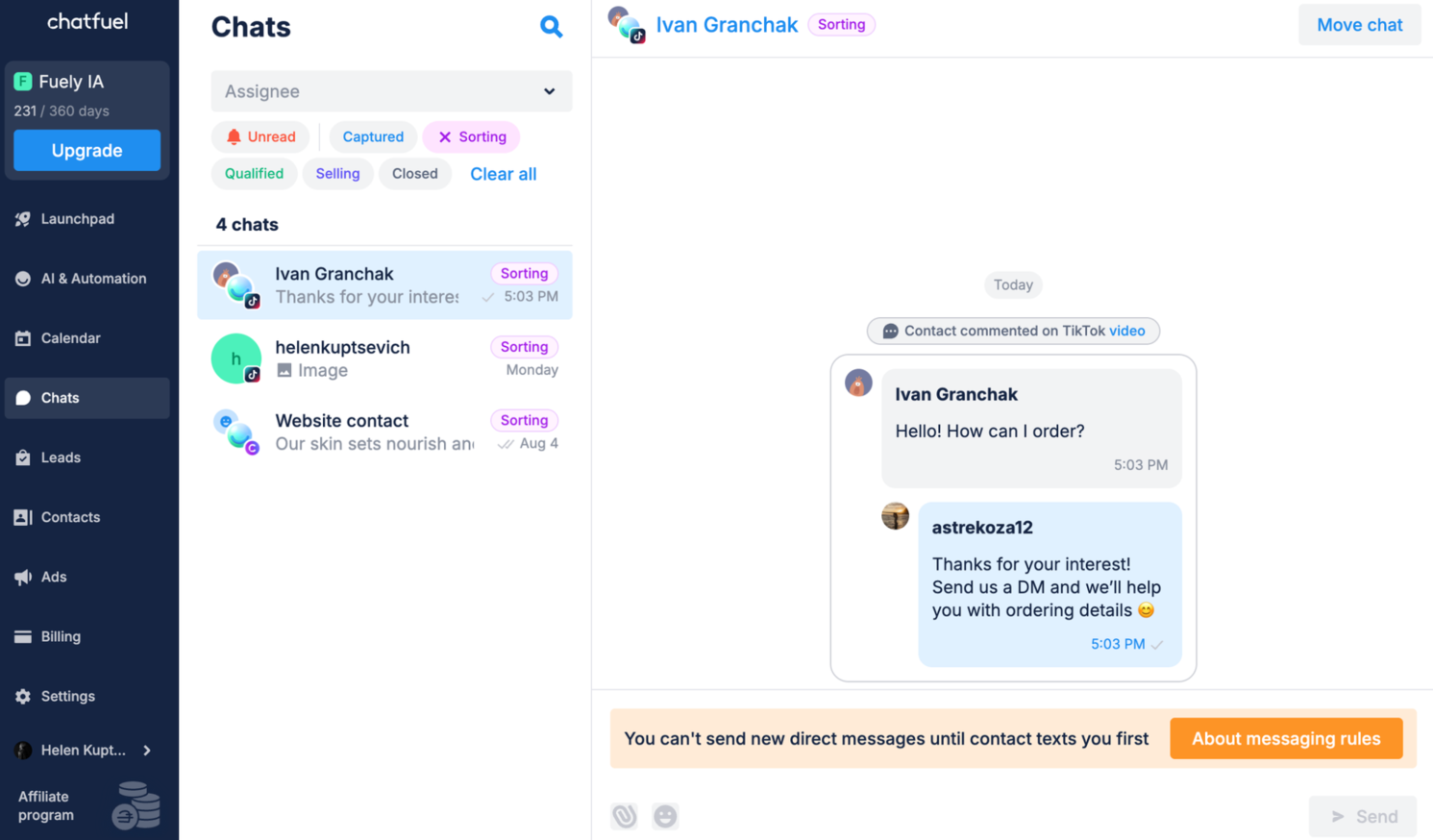 Managing TikTok automation in Chatfuel; source: Chatfuel
Chatfuel key features include:
- integration with the official TikTok Business Messaging API;
- AI-powered replies to TikTok DMs;
- context-aware responses;
- custom instructions for tone, goals, and example replies;
- keyword-based triggers;
- personalized messaging using customer names when available;
- smart qualification;
- routing conversations to WhatsApp, booking pages, or CRM systems;
- unified inbox management across different platforms;
- integration with ChatGPT and Fuely AI.
Pricing. TikTok automation with Chatfuel starts at $39 per month and includes a 7-day free trial. The main limitation is the number of active contacts, capped at 150. Messages per active contact are unlimited within a 30-day window.
UChat
UChat is an omnichannel platform that makes it easy for businesses to build a chatbot for TikTok and automate messaging for Business Accounts. With this TikTok chatbot builder, teams can send DMs triggered by TikTok ads and handle simple text- or image-based conversations. Triggers like TikTok Comments Created or TikTok Ads Referral let users control exactly when each workflow should start.
UChat’s AI features can be layered on top of TikTok automations or used separately across other channels. UChat’s AI agents are built around defined personas, clear rules, and optional business data provided by the user. This setup allows the AI-powered TikTok chatbot to understand natural-language questions, deliver context-aware answers, and stay within predefined boundaries, such as brand tone or escalation rules. The platform supports multiple LLMs, including OpenAI, Claude, and DeepSeek.
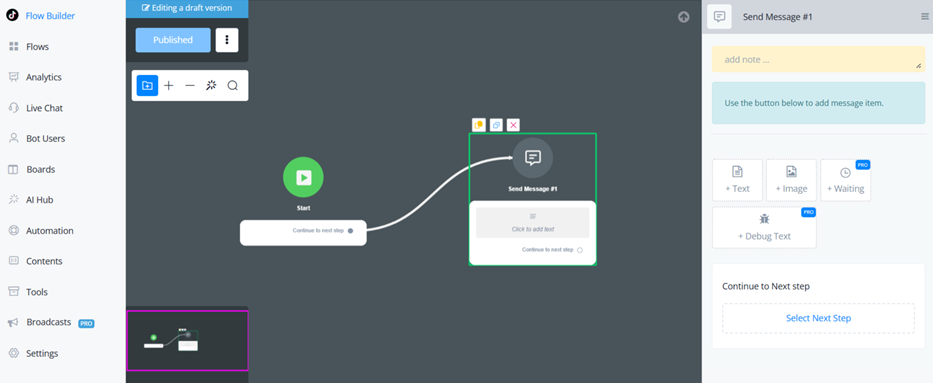 Building a chatbot flow for TikTok; source: UChat
UChat key features include:
- drag-and-drop chatbot builder;
- pre-built chatbot templates;
- integration with the official TikTok Business Messaging API;
- real-time visual flow mapping;
- automated replies to TikTok comments and DMs;
- AI-powered conversations with natural-language replies;
- smart memory that prevents repeated questions;
- AI agents with custom personas;
- AI intent recognition;
- text and image messages;
- comment-based and ad-based triggers that activate flows;
- comment management tools such as reply, hide, unhide, like, unlike, and delete;
- welcome messages, suggested questions, and chat prompts;
- integration with CRMs, payment gateways, and marketing tools.
Pricing. UChat offers a free plan that lets users create 1 bot and engage with up to 200 users. Paid plans start at $15 per month and include all advanced features, 1 chatbot, and up to 1,000 users, with unlimited automations and conversations. Additional bots can be added for $10 per month, and extra user capacity costs $5 per 1,000 users.
Manychat
Manychat is another platform that helps businesses automate conversations across popular social channels, including TikTok, Instagram, Messenger, and WhatsApp. Its TikTok chatbot builder focuses on simplifying how brands handle incoming messages. Automation is built around three main triggers: when a user sends a DM, clicks a unique link, or scans a QR code. From there, businesses can set up welcome messages, suggested questions, and default replies to guide users inside TikTok DMs. The platform supports rich message formats, including text, images, videos, buttons, and links.
The platform’s AI can identify what a user is trying to do and respond accordingly through its intention recognition. It also offers AI comment assistance that learns from existing replies and adapts to your brand’s tone, so automated responses still feel consistent and human. Additional AI tools, such as AI Steps, the AI Flow Builder, and the AI Text Improver, help teams build, refine, and scale automations faster.
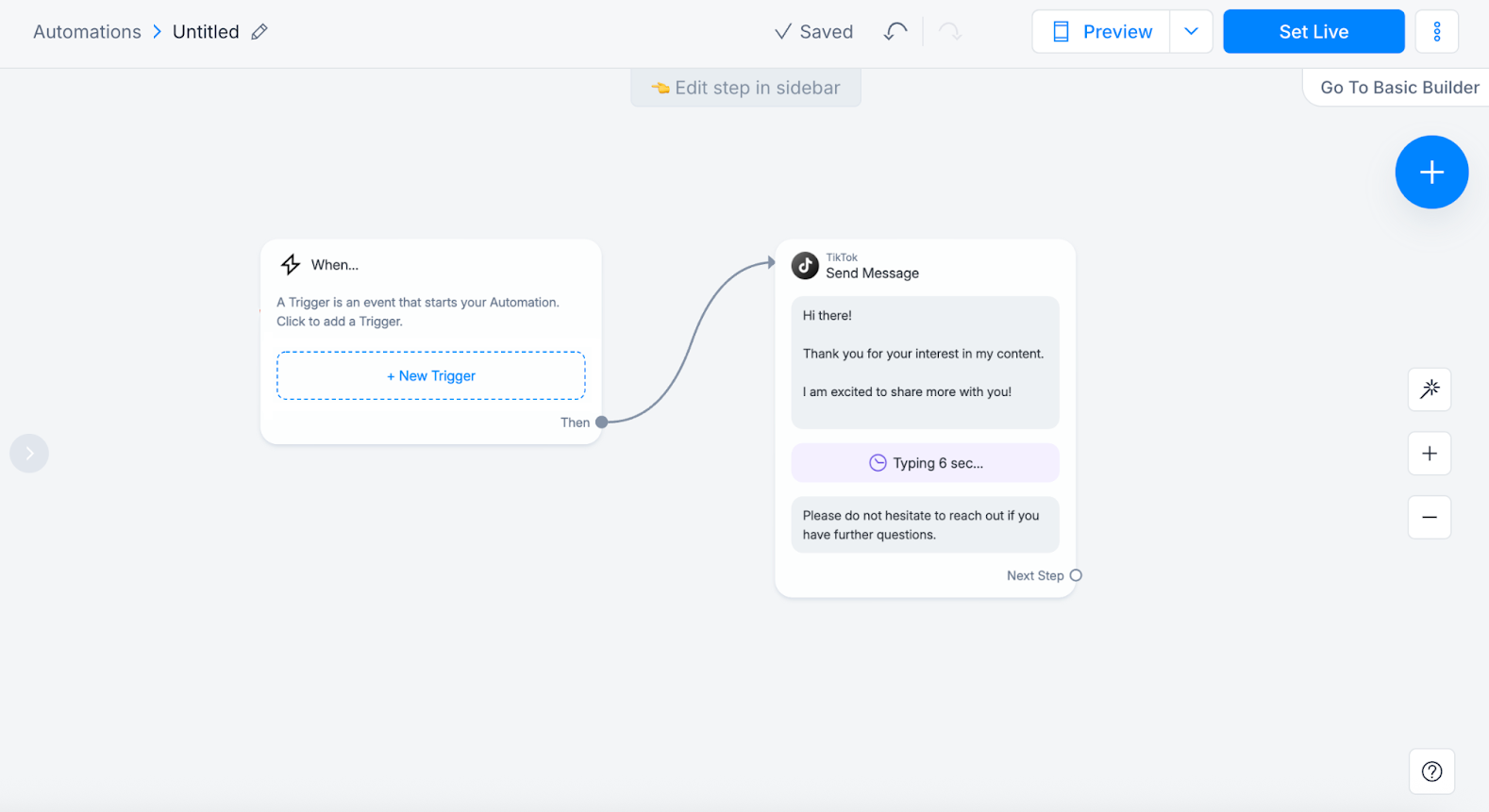 Setting up a TikTok chatbot using Manychat; source: Manychat
Manychat key features include:
- visual chatbot flow builder;
- AI Flow Builder assistant;
- automated DM, link, and QR code triggers;
- welcome messages, suggested questions, and default replies for new DMs;
- text, images, videos, and buttons inside TikTok messages;
- AI intention recognition;
- AI-generated replies that correspond to the brand’s voice;
- AI Steps for routing and handling complex queries;
- AI Text Improver to build automations;
- custom fields and advanced segmentation;
- integration of TikTok flows with WhatsApp, Instagram, Messenger, email or CRM tools.
Pricing. Manychat offers a free plan that supports the TikTok channel and basic automation features for up to 25 contacts. To unlock advanced functionality, including AI features, or add more channels, you need to upgrade to a paid plan, which starts at $29 per month (billed annually) for 2,500 contacts.
Respond.io
Respond.io is an omnichannel customer conversation platform designed to help businesses manage messages across TikTok, WhatsApp, Facebook Messenger, Instagram, and other channels from one inbox. Using its TikTok chatbot builder, teams can automate conversations that arrive through TikTok DMs, whether they come from Messaging ads or organic interactions.
Once a TikTok Business Account is connected, businesses can set up automated replies, lead qualification flows, and routing rules. The platform is built to work within TikTok’s messaging limits, including the 48-hour, 10-message window. It also accounts for platform restrictions by handling unsupported media with fallback messages and respecting rate limits.
Respond.io extends TikTok automation with AI agents that can greet users, answer FAQs, qualify leads, recommend products, route conversations, and analyze images for additional context. Businesses can use ready-made agents or create fully custom ones that match their internal workflows. Inside the inbox, teams also get AI-powered tools for message translation, tone adjustment, summaries, and grammar correction.
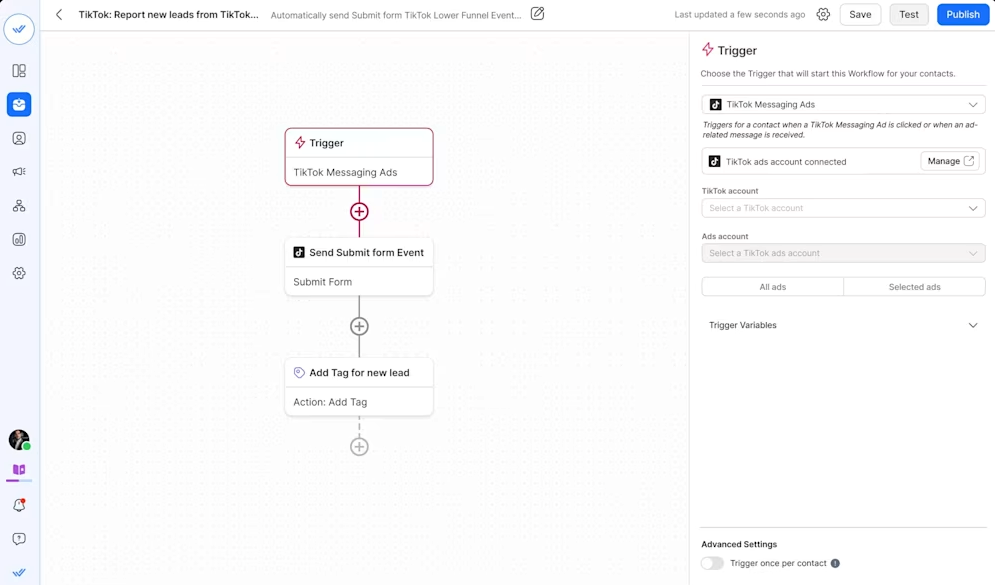 Building a chatbot flow for TikTok; source: Respond.io
Respond.io key features include:
- omnichannel inbox for managing conversations across platforms;
- no-code TikTok chatbot builder;
- routing, lead qualification, and conversation logic;
- AI agents for reception, sales, support or fully custom automation;
- AI tools for drafting messages, translation, tone adjustment, and summaries;
- customer journey and lifecycle tracking;
- support for TikTok Messaging ads and Meta Click-to-Chat ads;
- integrations with CRMs and eCommerce tools;
- real-time dashboard and performance reporting.
Pricing. Respond.io doesn’t offer a free plan, but it does provide a 7-day free trial. Paid plans start at $79 per month when billed annually. This entry plan includes unlimited contacts but does not support AI agents. To access AI agents and advanced AI features, businesses need to upgrade to a higher-tier plan, which starts at $159 per month for up to 1,000 contacts.
Conclusion
Creating AI chatbots for TikTok is a great way to automate customer communication and keep response times fast, even when your inbox fills up. Many platforms now offer no-code or low-code builders, and some can even generate ready-to-use flows based on what your business needs.
If you’re looking for a reliable TikTok chatbot builder, SendPulse is a solid option. Its drag-and-drop builder makes it simple to set up chatbots and built-in integrations with ChatGPT and Whisper help automate more natural, human-like conversations. You can create up to three chatbots for TikTok or other platforms for free, which makes it easy to test the platform before committing. And if you also rely on email or SMS to reach customers, SendPulse brings everything together in one dashboard, so managing customer interactions feels far more streamlined, not scattered across tools.
Give it a try today and save time on customer communications!