Email deliverability measures how many of your emails land in your subscribers’ inboxes versus how many you send overall. It’s a critical metric for email marketing that reveals whether your messages reach their recipients or end up flagged as spam.
When too many emails go to spam, it can damage your sender reputation, making it even harder to reach your audience in the future. ISPs may start blocking your emails entirely.
In this article, you’ll learn practical strategies to prevent these pitfalls and keep your emails reaching subscribers’ inboxes.
Use a corporate domain for your email campaigns
The first step toward achieving strong deliverability rates is to send emails from a corporate email address on your domain, rather than using free email clients. For instance, instead of yourname@gmail.com, use something like news@yourcompany.com, where yourcompany.com is your website domain.
A corporate email address appears professional, fosters trust with recipients, and enhances your chances of bypassing spam filters.
With SendPulse, you can easily add a custom email address to your account and send campaigns on behalf of your company.
However, ensure that your website’s domain and IP address are not listed in spam or blacklists first. To do this, use tools like Mail Tester or MXToolBox to verify them. If everything is fine, you can proceed to add your sender address.
In your SendPulse account, go to email service settings and open the “From Addresses” tab. Click “Add sender address” and enter an active email address registered on your corporate domain.
In the “Sender’s name” field, type in your name or your company name. Under “Advanced Options,” you can add your company name to automatically include it in email templates, subscription, and unsubscription confirmation pages. You can also add a link to your privacy policy here.
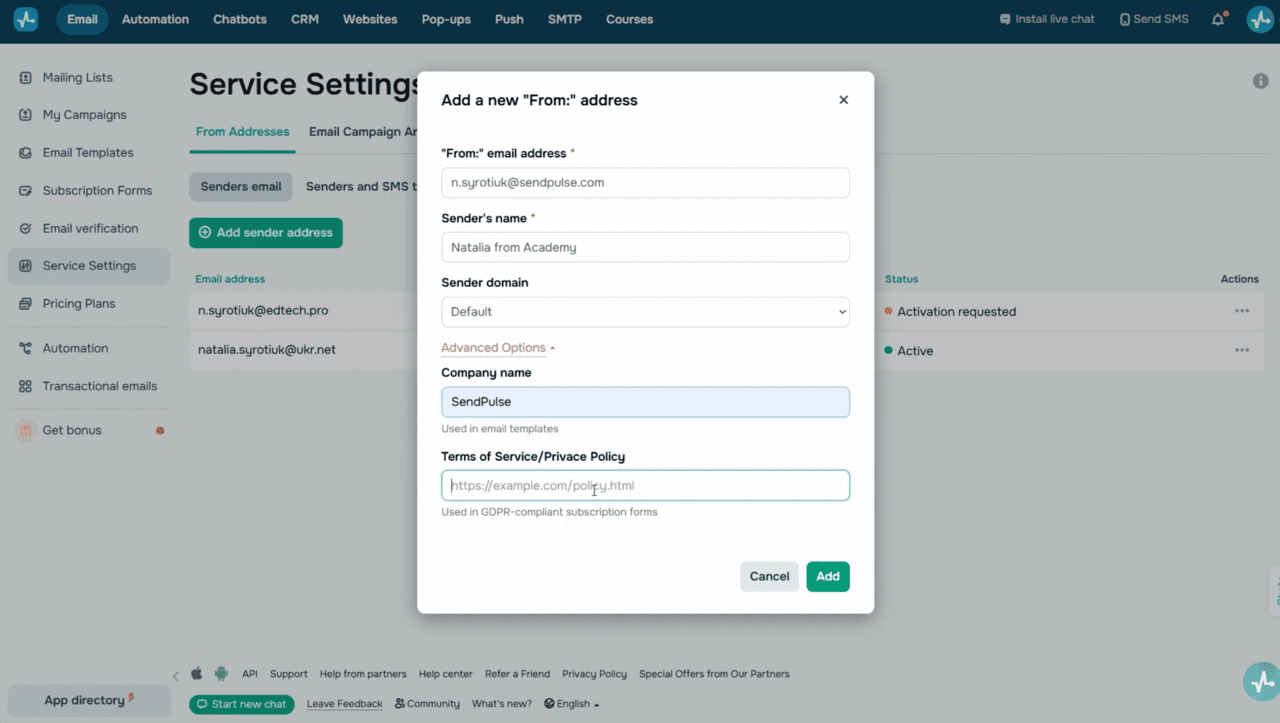 Email service settings
You’ll receive a confirmation email at the email address you’ve entered. Open it and click to activate your email address or copy your activation code.
Click the three dots next to your email address, select “Enter Code,” and paste it. Your email address status will change to “Active,” making it available for your email campaigns. You can edit or delete it at any time. SendPulse’s free pricing plan allows you to add up to three sender email addresses. If you need more, you can upgrade to a paid plan and use an unlimited number of email addresses.
To fully benefit from your custom domain, you need to authenticate it.
Authenticate your domain
Your sender domain must be authenticated to prove your ownership to email service providers. There are three essential authentication settings, including SPF, DKIM, and DMARC.
- An SPF record defines which servers can send emails on behalf of your domain. This helps you reduce the risk of sending spam under your name.
- Domain Keys Identified Mail (DKIM) uses a digital signature to enable recipients’ servers to verify that an email was sent from the claimed domain.
- Configure DMARC if you plan to send more than 5,000 emails per day. This protocol helps protect your email address against spoofing and phishing attacks.
Without these settings, email clients may not trust your messages and are more likely to mark them as spam.
SendPulse allows you to authenticate your domain for free. Let’s explore how you can do this.
To generate DKIM and SPF records, go to “Email” > “Service Settings” > “Domain settings.” In the “Sending domain” section, click “Activate.”
Enter your website’s domain name without the “http” protocol or the “www” prefix. Click “Generate SPF and DKIM records.” Copy the name and value of each entry and add them to your DNS provider’s settings.
To get your DMARC record, click “Advanced Options” and copy it.
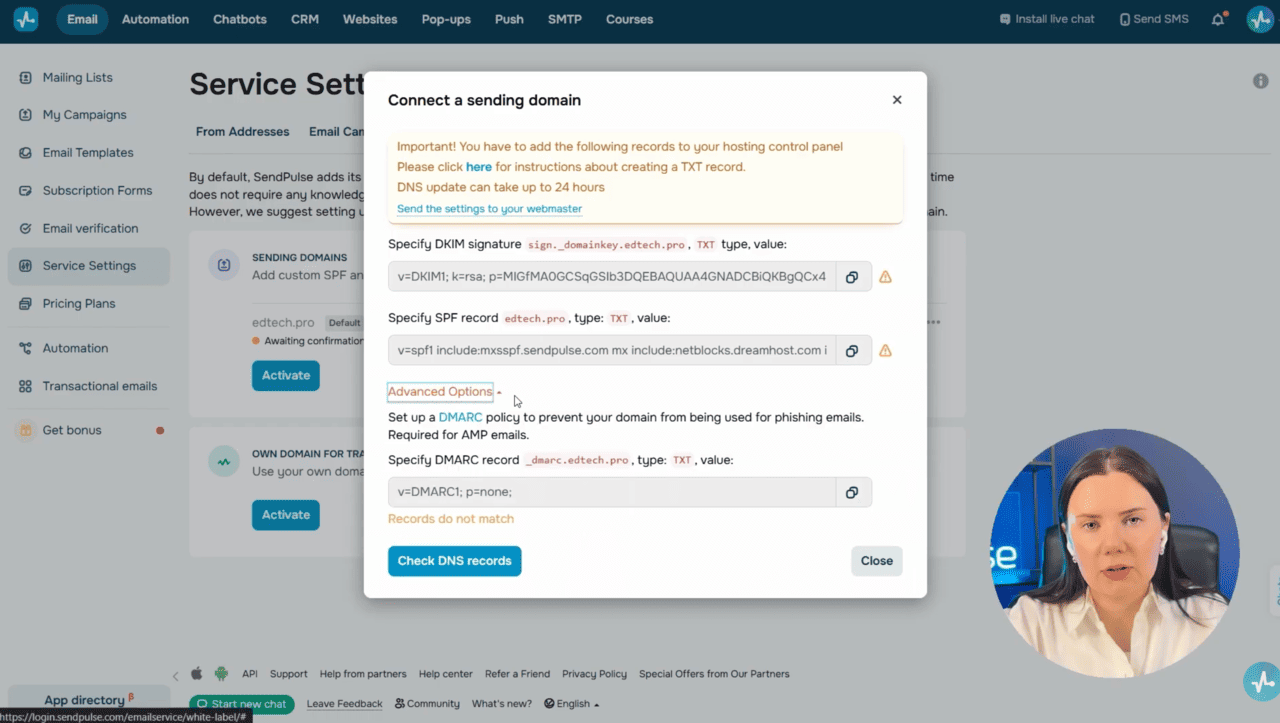 Domain settings — SPF, DKIM, and DMARC record generation
You can share these records with your developer or add them yourself through your hosting provider’s website. You’ll find a link to a detailed domain authentication guide in the description.
An authenticated domain builds a foundation for your sender reputation. Your next step is to strengthen this reputation.
Monitor your sender reputation and blacklists
Email providers are cautious with bulk campaigns from new domains or IP addresses. When using a new domain or IP address, start with small volumes and gradually increase them. To give you an idea, send a few hundred emails to engaged subscribers, then slowly expand this volume. Providers will see steady, controlled growth without complaints, which will help you establish a reliable sender reputation.
You should also regularly monitor blacklists and sender scores to maintain a trustworthy domain reputation. To track whether your domain or IP address appears in spam databases, use tools like MXToolbox.
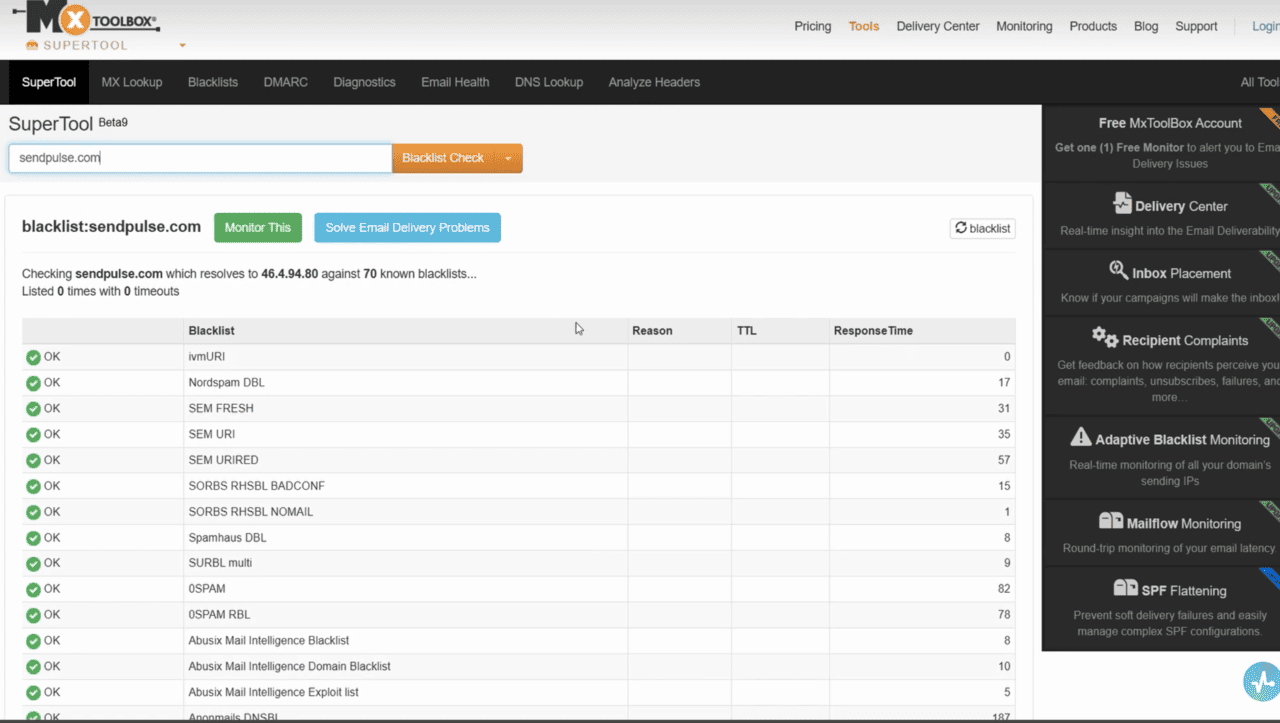 MXToolbox blacklist check for a domain
Monitoring these indicators allows you to respond to potential issues promptly. For instance, you can request removal from a spam database or pause campaigns to analyze a decline in sender reputation.
Yet, even an excellent sender reputation cannot deliver results if you send emails to inactive recipients. To enhance email deliverability, it’s also crucial to build an engaged subscriber list. Let’s see how to achieve this.
Avoid buying email marketing lists
Sending campaigns to purchased or third-party mailing lists is an ineffective and risky practice. These lists often include outdated or invalid email addresses, bots, or spam traps. Unsolicited emails result in high unsubscribe rates and complaints, which can severely damage your sender reputation.
Instead, focus on building a subscriber base of people genuinely interested in your content. Add sign-up forms to your website, run webinars and promotional campaigns, or arrange offline events to collect confirmed email addresses.
With SendPulse, you can quickly create a subscription form or a scenario-based pop-up and place it on your website. New contacts will be automatically saved to your mailing list. To learn how to set up subscription forms and pop-ups on your website, follow step-by-step video guides linked in the description.
To ensure your mailing list doesn’t include invalid or random addresses, it’s best to confirm the consent of every subscriber first. Let’s go over how to do this.
Utilize subscription confirmation (Double Opt-in)
Implement double opt-in to filter out uninterested users before sending your first campaign.
Here’s how it works: after filling out a form, a user receives an email asking them to confirm their subscription. Once they do, their email address will be added to your mailing list, and they will start receiving your emails.
This method guarantees that your mailing list has only genuinely interested recipients.
When creating subscription forms using SendPulse, you can turn on the “Enable double opt-in” toggle to send confirmation emails automatically. As for pop-ups, turn on the “Request subscription confirmation” toggle, select an email template from the list, and add a message that will appear once a user submits your form.
Once you’ve built and verified your mailing list, remember to clean it regularly. Let’s talk about how to keep it neat.
Keep your mailing list clean and tidy
Over time, your mailing list’s health can decline as some subscribers become inactive and lose interest. If you keep sending campaigns to these contacts, you can harm your email deliverability, so it’s essential to review and clean your list regularly.
SendPulse offers a built-in email validator. Upload your contact list, and the system will automatically detect and flag invalid and unconfirmed email addresses. You can then remove them easily to reduce bounce rates and maintain your sender reputation. To learn how to use SendPulse’s email validator, follow the video instructions linked in the description.
Beyond that, you should monitor subscriber engagement. If a contact hasn’t opened any of your emails in over six months, consider whether further campaigns to this user are worthwhile.
Nevertheless, instead of immediately removing all inactive contacts, try to re-engage them first. Let’s see what strategies can help you do this.
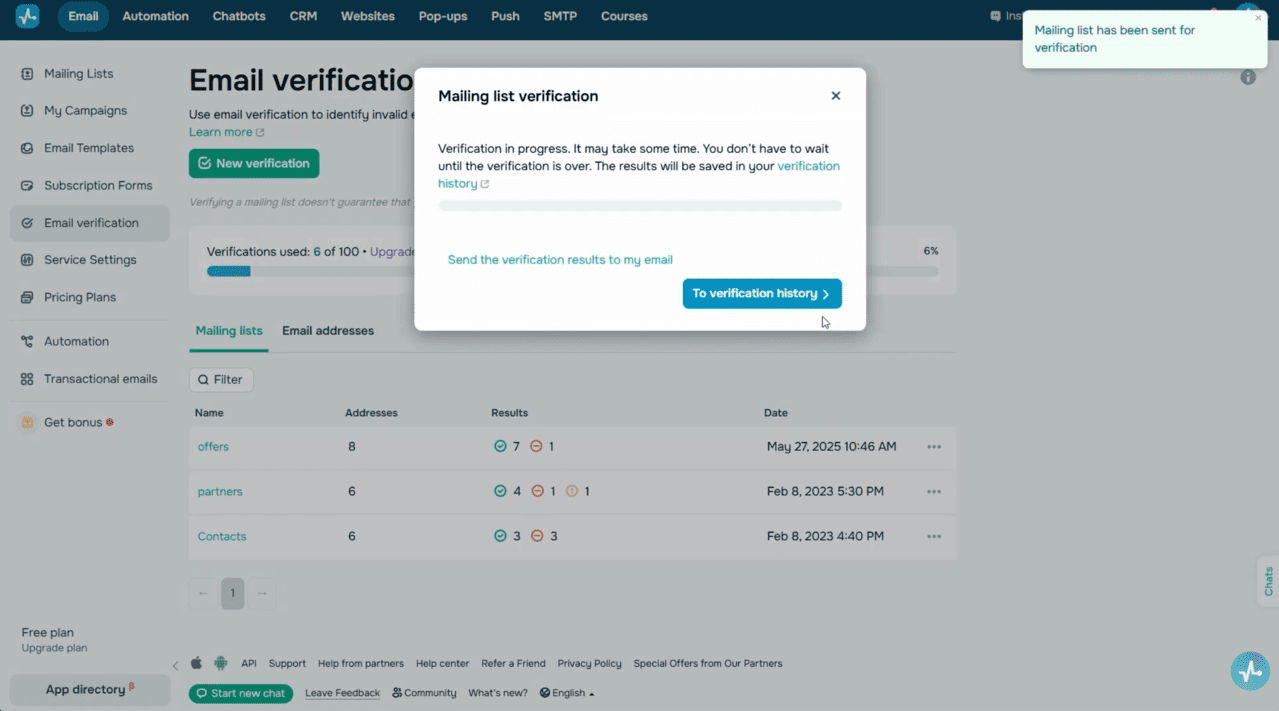 SendPulse email validator
Re-engage inactive subscribers
If you notice that subscribers haven’t been reading your emails for a while, run a re-engagement campaign to find out if they still want to receive messages from you.
With SendPulse’s advanced segmentation features, you can easily single out inactive subscribers. Simply set your conditions, and the system will automatically generate a segment with these contacts. To illustrate, you can choose the “Did not open recent emails” option and set the number of ignored emails, or use “Didn’t open mailings from/to date” to define the inactivity timeframe. Once selected, you can separate inactive subscribers into one segment and send them re-engagement emails.
Your message can take different approaches. You can use an emotive subject line, like “We Miss You,” along with a special offer, or add a curated selection of valuable content. If your subscriber doesn’t respond, remove them from your primary campaigns to avoid harming your overall performance metrics.
These strategies can help you maintain a healthy mailing list and a strong sender reputation. Still, even the best-managed mailing list can’t deliver results if your content triggers spam filters or fails to engage recipients. That’s why your next step is to make your content deliverable.
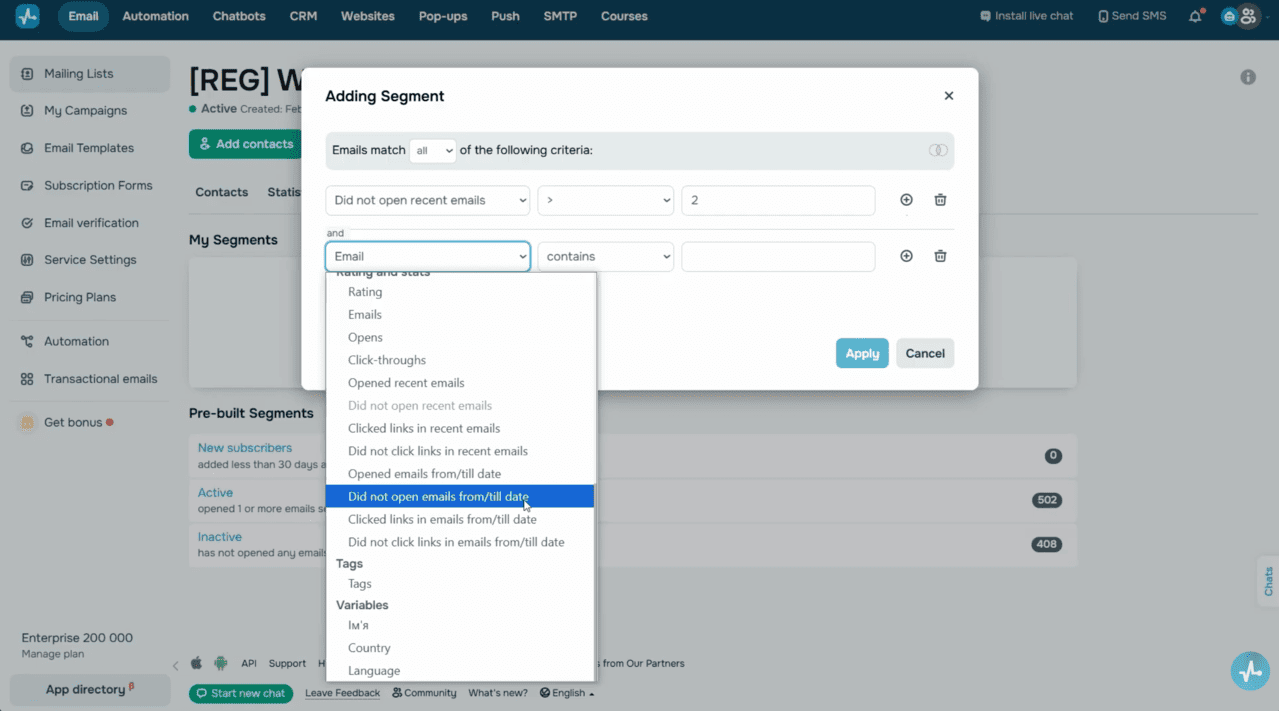 Segmentation — filtering inactive subscribers
Optimize your email content
Your email campaign content has a direct impact on your deliverability. Here are some essential guidelines to help you create messages that resonate with subscribers and bypass spam filters:
- Craft emails that match subscriber interests and offer valuable information, attractive offers, or key updates.
- Avoid writing in all caps and steer clear of spam-triggering words in your subject line, preheader, and email body. These are words like “free,” “urgent,” “money,” “prize,” and similar.
- Limit exclamation marks and keep colored or bold text to a reasonable level.
- Maintain a proper text-to-image ratio. Your email body should make up at least 60% of your email content.
- Add “Alt” attributes to images so that alternative text appears if images don’t load.
- Ensure that all links in your email work smoothly.
SendPulse features a built-in anti-spam checker that helps you pinpoint and resolve common issues before sending. Let’s say you forgot to add alternative text, confirm DKIM, or complete other critical settings. In this case, SendPulse will notify you so that you can address these issues and ensure better deliverability.
Manage your email sending frequency
You should also keep in mind that sending emails too often can annoy your audience, while sending them too rarely can make them forget you. Here are some tips to help you find the right balance:
- Establish a clear communication schedule and follow it. If you promise a weekly newsletter, ensure that you actually deliver it every week.
- Segment your audience. For instance, send weekly campaigns to highly engaged subscribers and monthly emails to less active users.
- Warm up your mailing list after a long break. If you haven’t sent emails for a while, start by emailing a smaller segment of your list, then gradually expand your reach.
- Finally, evaluate your campaign results using analytics tools.
With SendPulse, you can monitor performance metrics in real time. If you notice a drop in open rates or an increase in unsubscribes, adjust your sending frequency for future campaigns.
Follow these tips to refine your emails and try SendPulse’s tools to enhance your email deliverability, build an engaged subscriber list, and grow your business through effective email marketing.
Wishing you strong open rates, a loyal audience, and success with every campaign!