Businesses are always looking for new ways to reach customers, and Telegram stands out as a strong alternative to popular channels like email and social media. With over 1 billion monthly active users, it ranks among the world’s top communication platforms. For companies that prioritize fast, responsive customer service, Telegram CRM integration can make a real difference in keeping conversations organized, automating follow-ups, and giving teams the context they need to respond effectively. In this post, we’ll explore the benefits of Telegram CRM integration and review eight leading platforms that offer this feature.
Disclosure: This guide is published by SendPulse. Although we cover our own product alongside competitors, we aim to present each tool fairly.
A Telegram CRM is a customer relationship management platform that connects Telegram conversations, including bots, personal or business accounts, and shared team inboxes, with sales, support, and marketing automation. Modern CRMs for Telegram increasingly include AI-powered assistants, workflow automation, and omnichannel messaging capabilities.
The tools below were evaluated on Telegram integration depth, CRM functionality, automation features, AI capabilities, ease of use, and suitability for different business sizes. Pricing reflects the lowest publicly available entry-level plans at the time of writing and may change over time.
| Tool |
Best for |
Telegram integration |
Standout strength |
Free plan |
Starting price |
| SendPulse |
Budget-conscious businesses that want an affordable all-in-one marketing and sales platform |
Bot, Business and personal account sync |
All-in-one CRM, chatbots, and marketing; native MCP |
✅ |
$14.40/mo |
| Respond.io |
Customer support and sales teams handling high chat volumes |
Bot API and omnichannel inbox |
Advanced routing, AI agents, and workflow automation |
❌ |
$79/mo |
| NetHunt CRM |
Sales teams that manage customer relationships from Gmail |
Bot and personal account |
Telegram chats inside a Gmail-native CRM |
❌ |
$24/user/mo |
| CRMChat |
Teams that run most customer communication inside Telegram |
Telegram-native (bots, mini-apps) |
Sales workflows run entirely inside Telegram |
✅ |
$28/mo |
| Vtiger CRM |
Businesses that need sales, marketing, and customer support in one CRM |
Bot (chatbot token) |
Full CX suite with predictive and generative AI |
✅ |
$12/user/mo |
| Flowlu |
Small businesses that need CRM, project management, and operations in one platform |
Bot (via BotFather) |
CRM, projects, and invoicing in one platform; MCP server |
✅
(no Telegram) |
$9/user/mo |
| Kommo |
Sales teams that rely on messaging apps to generate and close deals |
Native Telegram bot |
Salesbot automation and deep sales AI |
❌ |
$12.50/user/mo |
| Breakcold |
Sales teams focused on relationship building and social selling |
Native account sync (DMs and groups) |
AI-native CRM with MCP, enrichment, and multi-channel inbox |
❌ |
$59/mo |
Each platform serves a different need. The right choice depends on your business size, process complexity, and whether you need a Telegram-first solution or broader omnichannel capabilities.
What is Telegram CRM?
Telegram CRM is a system that connects Telegram with a CRM platform, allowing businesses to manage Telegram conversations directly from their CRM. Most CRMs were originally built around email, so native Telegram support is rare and typically requires third-party integrations to work effectively.
The type of Telegram integration is one of the most important factors to consider when evaluating any Telegram CRM. Not all platforms support the same integration methods, and the features available can vary significantly depending on how Telegram is connected to the CRM system.
In 2026, Telegram CRM platforms generally support one or more of three integration models.
Telegram bot API integration
This is the most common integration method. Businesses connect a Telegram chatbot to their CRM solution and route customer conversations into shared inboxes, support desks, or sales pipelines. Bot-based integrations can automate lead capture, qualification, FAQ responses, appointment booking, and customer support workflows. They’re scalable and easy to launch, but the main limitation is that they only work through the bot itself, not a company’s personal Telegram accounts.
Bot API limits to know: Some Bot API rules affect what bot-based CRMs can do. Bots can’t start conversations, so users need to message the bot or click a link first. Telegram also limits sending: about one message per second per chat, around 20 messages per minute in groups, and roughly 30 messages per second for broadcasts unless you use paid broadcasts.
To receive messages, CRMs connect by polling (getUpdates) or, more commonly at scale, a webhook (setWebhook), which needs a public HTTPS endpoint with a valid SSL certificate. In group chats, privacy mode means a bot only sees commands and replies directed at it unless you turn that mode off.
These limits usually don’t matter for support or inbound sales, but they’re important if you want to do high-volume broadcasts or bot-driven outreach. For the latest details, check Telegram’s official Bot API docs.
Telegram Business Account integration
Telegram Business introduced native business features that can be connected to CRM systems. Depending on the platform, businesses may be able to sync Telegram Business conversations while using the following features:
- business opening hours;
- quick replies;
- welcome and away messages;
- automated messages;
- chatbot support;
- business profiles and contact information.
This model offers a more versatile customer communication experience and is becoming increasingly important for companies using Telegram as a primary support or sales channel.
Personal account synchronization
Some CRM platforms allow users to connect their personal Telegram accounts directly to the CRM. This allows sales representatives or account managers to keep communicating from their own Telegram identity while automatically syncing conversations, contacts, and interaction history into the CRM solution.
Personal account synchronization is particularly useful for relationship-based sales, consulting, recruiting, and B2B outreach, where customers expect to communicate with a specific person rather than a company bot.
Note that not every CRM for Telegram supports all three integration modes. Some tools only offer bot-based connections, while others support Telegram Business features, personal account sync, or a combination of approaches.
Benefits of Telegram CRM integration
Integrating CRM systems with Telegram brings several advantages that can boost your performance and improve customer communications. Here’s why Telegram CRM integration could be a valuable asset for your business.
Real-time communication
Integrating Telegram with a CRM system provides a real-time messaging solution that lets teams engage with customers instantly. Telegram notifications show up directly in the CRM system, allowing businesses to send quick responses that improve customer satisfaction and retention.
Centralized data
All Telegram interactions with customers are logged directly in the CRM system. This keeps customer data up to date and provides a complete history of conversations in one place, making it easy for team members to access the full context of any interaction.
Automated responses
Through Telegram CRM integration, you can effectively automate routine responses and workflows. For instance, automated replies can be triggered for everyday inquiries, scheduled messages can support your campaigns, and chatbots can handle frequently asked questions, allowing your team members to focus on more complex interactions.
Lead generation
With Telegram’s large active user base, it can serve as a direct source for capturing leads. Customer information collected via Telegram can be pushed into the CRM system in real time, enabling businesses to follow up quickly and efficiently.
Personalization
Integrating Telegram with a CRM system can make customer interactions on Telegram much more personalized. With access to customer data, businesses can send tailored messages, run targeted campaigns, and share updates that are relevant to individual users. Such integration can help you build stronger customer relationships and enhance engagement.
Data-driven insights
Telegram CRM integration allows businesses to effectively gather customer data and analyze interactions to gain valuable insights into their preferences, behavior patterns, and engagement levels. These analytics can help your business refine marketing strategies and create campaigns that resonate with your audience.
Overall, integrating Telegram with your CRM system goes beyond improving communication. It centralizes data, automates routine tasks, and surfaces insights your team can act on.

Power up your business with smart tools
From solo creators to global brands, thousands of customers trust SendPulse to run email campaigns, chatbots, automations, and more — all in one place.
Get started for free
Who needs a Telegram CRM?
A Telegram CRM integration can benefit any business that uses Telegram as a customer communication channel, but the specific requirements vary by industry and team structure.
- Sales teams. Telegram CRM tools can be used to centralize conversations, track leads, automate follow-ups, and maintain a complete record of customer interactions. This is particularly valuable when multiple sales representatives communicate with prospects through Telegram.
- Customer support. Support teams benefit from shared inboxes, ticket routing, and automation features that help manage high volumes of customer inquiries. Many platforms also offer AI-powered assistants and chatbots that can handle routine questions before escalating complex issues to human agents.
- eCommerce businesses. Online stores use Telegram CRM systems to automate customer communication, send order updates, recover abandoned carts, answer product questions, and more.
- Online learning. Educational organizations, coaches, and course creators can manage student inquiries, automate enrollment workflows, distribute learning resources, and maintain ongoing communication.
- SaaS companies. Businesses often use Telegram for product support, onboarding, customer success, and sales conversations. CRM integration helps teams maintain visibility across the entire customer journey.
- Real estate agencies. These professionals frequently rely on messaging apps for lead generation and client communication. A CRM for Telegram can help agents manage property inquiries, qualify leads, schedule viewings, etc.
To put this list together, we evaluated each platform against a set of criteria designed to identify the most capable CRM solutions for businesses using Telegram. Our goal was to highlight tools that offer reliable Telegram connectivity, strong customer management features, and practical automation capabilities.
- Telegram integration type. We assessed how each CRM tool connects with Telegram. This includes support for Telegram bots, Telegram Business accounts, and personal Telegram accounts. Platforms offering more flexible and native integration options were preferred.
- CRM depth. We reviewed the core CRM functionality available within each platform, such as contact management, sales pipelines, deal tracking, lead organization, and customer history features.
- AI maturity. We also evaluated the level of AI functionality offered, ranging from basic response suggestions and AI assistants to advanced AI chatbots and autonomous AI agents.
- Team inbox and collaboration. We examined whether teams can manage Telegram conversations collaboratively through a shared inbox, assign conversations, and monitor agent performance.
- Automation capabilities. We considered the range of automation features, including workflow builders, automated message routing, lead qualification, follow-up sequences, and integrations with third-party tools.
- Pricing transparency. We prioritized CRMs for Telegram that clearly publish pricing information, feature limits, and billing terms. Pricing details were verified through official public pricing pages.
Together, these criteria helped us identify tools that are not only feature-rich but also genuinely effective for real-world team workflows. This helps ensure the final selection is relevant for different business sizes and use cases.
All features, pricing, and positioning below are accurate as of July 9, 2026. Screenshots are sourced from providers’ official pages, YouTube channels, and review platforms.
As businesses increasingly turn to messaging apps to engage with customers, the demand for Telegram CRM integrations has grown significantly. These solutions range from specialized CRM platforms to versatile multi-channel communication tools that include Telegram alongside other popular messaging apps. To help you choose the right solution for your business, we’ve compiled a list of the top platforms offering robust Telegram CRM integrations.
SendPulse
G2: 4.6 ⭐ | Capterra: 4.6 ⭐
Best for: budget-conscious small and medium-sized businesses that want CRM, chatbots, and marketing automation in one platform.
SendPulse is an all-in-one sales and marketing automation platform with a built-in CRM designed to simplify sales and customer management. It helps businesses automate sales interactions, manage orders, collect customer data, and run marketing campaigns. The CRM also supports omnichannel data collection from forms, chatbots, emails, live chat, and pop-ups, which automatically feed into the system.
The platform’s seamless Telegram CRM integration lets teams link personal and Business Telegram accounts directly to the CRM, with all conversations automatically logged in the Conversations tab under the Chatbots section. SendPulse also supports Telegram chatbot integration, so automated CRM actions can be triggered directly from bot flows. Contacts with Telegram accounts can be messaged individually or in bulk by entering their usernames or phone numbers.
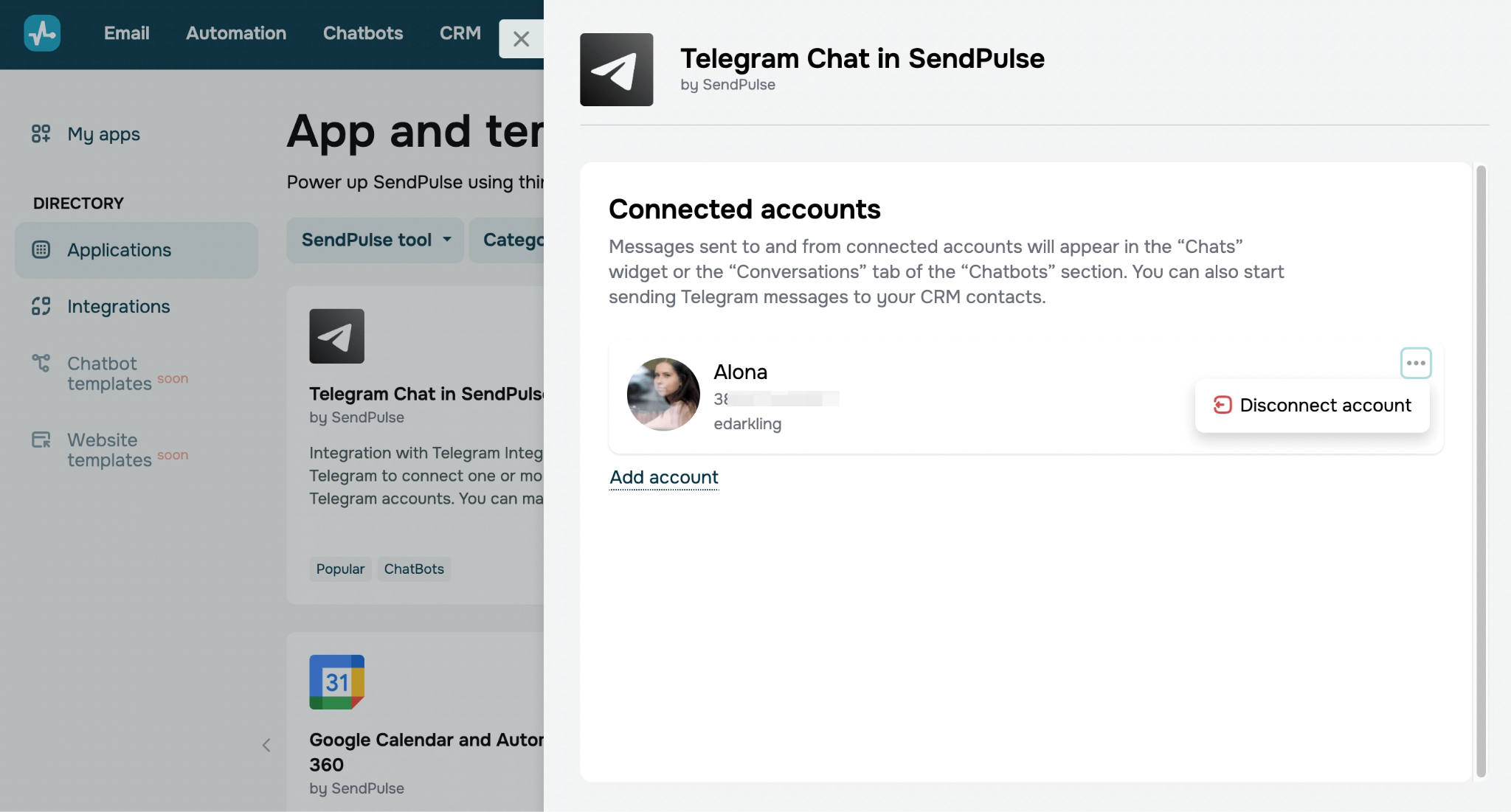 Setting up Telegram CRM integration in SendPulse
Chatbot automation extends into the CRM pipeline as well. Users connect a Telegram chatbot to create and update CRM deals automatically using the Action element. For instance, you can configure your chatbot to create a new deal in your CRM system whenever a user clicks a purchase button in your bot. Deals are placed in the designated pipeline stage and assigned to a team member automatically, with pipeline progress updating dynamically as users move through the bot flow.
| Standout features |
AI capabilities |
- all-in-one CRM with chatbots, email, and multi-channel marketing;
- personal Telegram account sync and Telegram chatbot integration;
- automatic logging of all Telegram conversations in the CRM system;
- visual sales pipelines with deal stages;
- shared team inbox and collaborative deal management;
- multi-contact messaging via usernames or phone numbers;
- pipeline automation triggered by Telegram interactions.
|
- AI Agent element for adding AI-driven steps to chatbot and automation flows;
- MCP integration to connect CRM data and workflows with AI assistants;
- AI-generated chatbot flows and automation scenarios;
- AI comments for deals, contacts, and tasks;
- AI-assisted email reply drafting inside the CRM inbox;
- AI tools to improve, translate, summarize, or rewrite notes, plus quick actions like tone change, paraphrasing, and shortening;
- custom AI prompt library.
|
Limitations. While SendPulse includes a built-in CRM system, it might lack some advanced features like deep pipeline management, forecasting, and sophisticated deal analytics.
Pricing. SendPulse’s free CRM plan includes up to 2 sales pipelines, 5 flows, 1GB of file storage, and 50 automation elements. The entry-level paid plan starts at $14.40/month, billed annually, and includes 2 sales pipelines, 8 flows, 3GB of file storage, and 50 automation elements. A fully custom subscription is also available, letting users select only the tools and features they need.
Respond.io
G2: 4.8 ⭐ | Capterra: 4.6 ⭐
Best for: support and sales teams handling conversations at high volume across chat and voice channels.
Respond.io is an AI-powered customer conversation management platform with a built-in CRM data model, designed for businesses handling customer interactions across multiple messaging channels. It pairs a shared inbox for Telegram, WhatsApp, Facebook Messenger, Instagram, email, web chat, and voice calls with the core CRM tools teams need to manage those relationships: contact records with custom fields, a customizable Lifecycle pipeline, lead capture and qualification, and reporting.
It provides its Telegram CRM integration through Telegram Bots, so teams can receive, respond to, and organize Telegram conversations directly in the platform. Every contact gets a unified record with full cross-channel history, custom fields, and tags, and duplicate contacts can be merged into a single customer view. Respond.io’s Lifecycle feature functions as a sales and support pipeline. It includes default and up to 20 customizable stages, so teams can track where each contact sits in the funnel, move them between stages automatically, and spot where conversations stall.
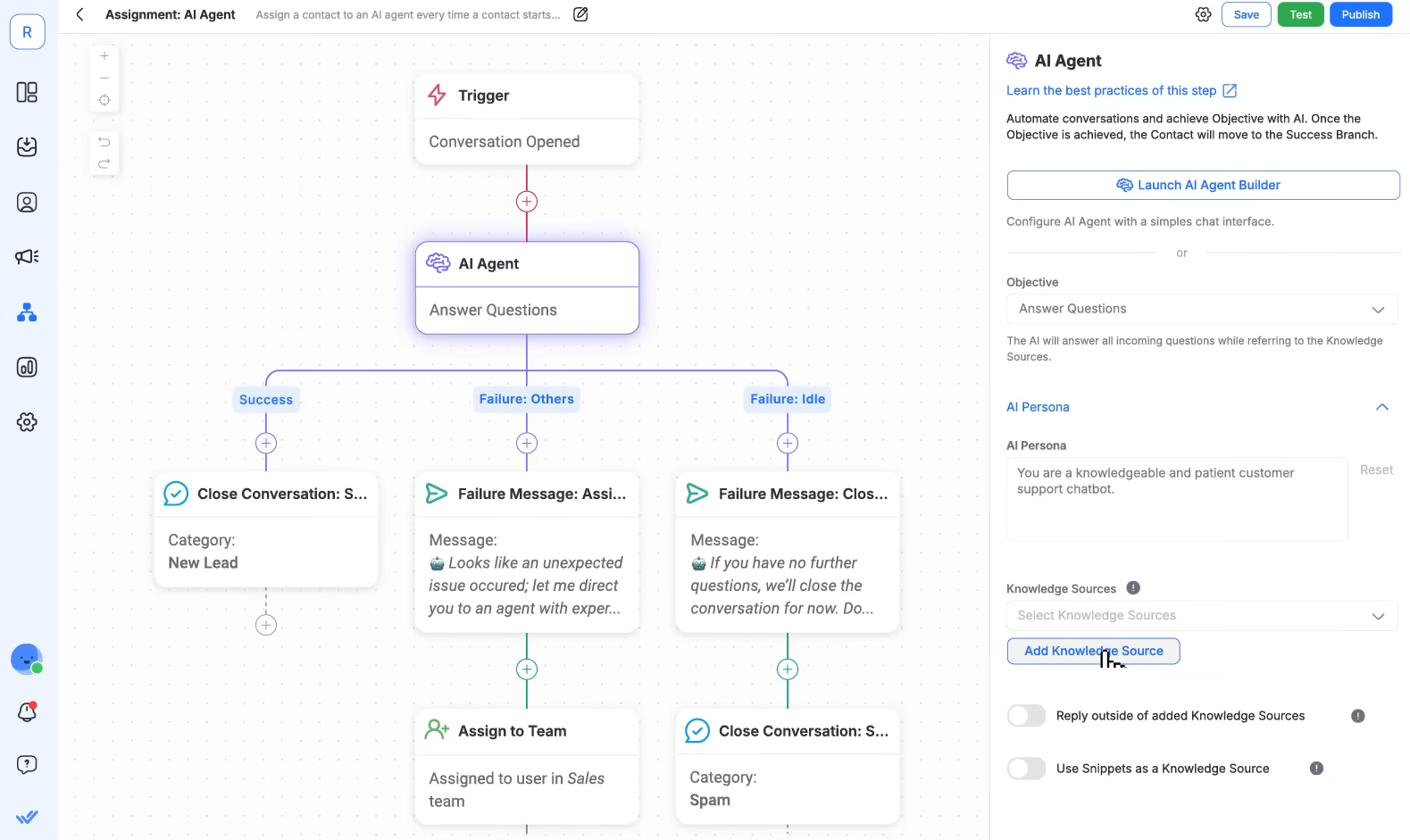 Setting up an AI Agent in a conversation workflow in Respond.io; source: YouTube
The platform stands out for its automation, AI, and team collaboration capabilities. Customizable workflows handle lead qualification, conversation routing, agent assignment, and support flows automatically, and data can be exchanged with an external CRM in real time when needed. AI features include AI Agents for routine inquiries, AI Assist for agent responses, and AI-powered contact classification, making it well-suited for organizations managing high volumes of customer conversations.
| Standout features |
AI capabilities |
- Telegram Bot integration with a shared, multi-agent inbox;
- omnichannel messaging across Telegram, WhatsApp, Instagram, Messenger, email, and web chat;
- native contact records, lead management, and Lifecycle pipeline stages;
- contact merging and customer identity resolution;
- advanced workflow automation (lead qualification, routing, assignment, escalation, follow-ups);
- two-way Telegram broadcasts;
- custom integrations via API, webhooks, and HTTP requests;
- advanced analytics and reporting.
|
- AI Agents for handling inquiries, FAQs, and lead qualification;
- AI intent detection with automated conversation routing;
- AI Assist to draft, refine, and improve agent replies;
- AI conversation and call summaries (with transcripts);
- AI translation across languages;
- AI knowledge retrieval from your help content.
|
Limitations. Respond.io covers the core customer management essentials, but it’s leaner than a traditional sales CRM on revenue-centric features like deal-value tracking, forecasting, and revenue reporting. Sales-led teams that need detailed deal and pipeline revenue management often run it alongside a dedicated CRM solution.
Pricing. Respond.io doesn’t offer a free plan, but new users get a 7-day free trial. The entry-level paid plan starts at $79/month, billed annually, and includes 5 user seats, unlimited monthly contacts, and integration with all supported communication channels, but limits AI and automation features.
NetHunt CRM
G2: 4.6 ⭐ | Capterra: N/A ⭐
Best for: Gmail-centric sales teams that want Telegram conversations connected to traditional CRM records.
NetHunt CRM is a robust platform built for businesses that run on Gmail, with CRM features integrated directly into the Gmail interface. Beyond Gmail, it connects with messaging platforms, including LinkedIn, Facebook, and Telegram. NetHunt also supports multiple telephony systems, allowing sales teams to make and receive calls, log call details, and review recordings.
NetHunt’s Telegram CRM integration lets businesses seamlessly create customer records from both personal and chatbot conversations and enrich them with publicly available Telegram data. There is no need to manually create customer records from incoming or outgoing Telegram messages. All messages are linked to the corresponding customer records, keeping communication history organized and accessible.
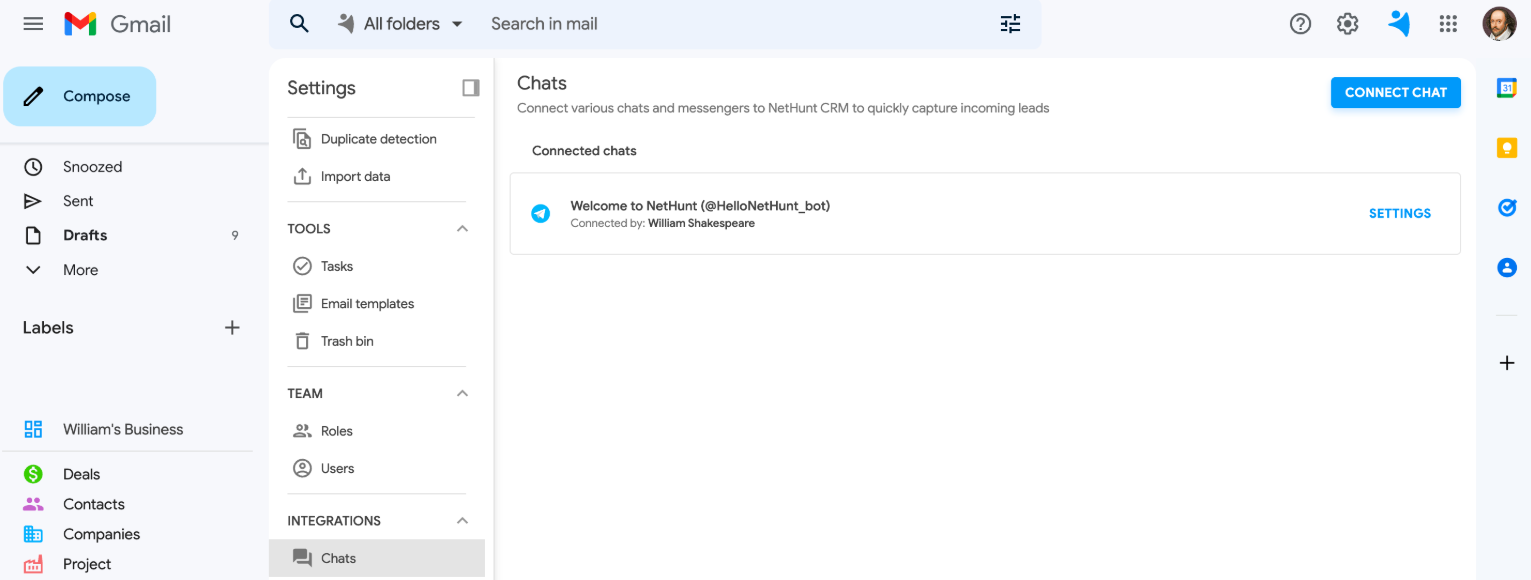 Connected Telegram bot in NetHunt CRM; source: NetHunt CRM
Teams can respond to Telegram chats directly from NetHunt CRM, either through the “Chats” tab or from within a customer record. The integration supports text, images, videos, and voice notes, with a full history of Telegram interactions available to all team members.
| Standout features |
AI capabilities |
- Gmail-native CRM;
- Telegram, WhatsApp, Instagram, and Messenger integrations;
- contacts, leads, and deals with multiple customizable pipelines;
- Telegram messages auto-linked to the matching customer record;
- activity logging across all customer interactions;
- filters, views, and saved dashboards for reporting;
- document storage and bulk record updates;
- webhooks, API, and VoIP integrations.
|
- AI speech analytics for VoIP calls (keyword/phrase extraction, sentiment analysis);
- automated call insights and reports;
- analyzed call data logged automatically into customer timelines;
- AI enrichment of customer profiles with external data.
|
Limitations. Telegram functionality depends on bot and API setup, which adds configuration complexity and can limit flexibility compared to native-first Telegram CRM tools.
Pricing. NetHunt CRM doesn’t offer a free plan, but all paid plans include a 14-day free trial. The entry-level paid plan starts at $24/month, billed annually, and includes basic CRM features, one connected messaging app account, and Gmail and Google Workspace integration. Telegram bot connection is available on this plan, but personal account connection requires a higher tier.
CRMChat
G2: N/A ⭐ | Capterra: N/A ⭐
Best for: Web3, crypto, and Telegram-first growth teams running high-volume outbound sales.
CRMChat is a Telegram-native CRM platform built directly on top of the Telegram ecosystem. It functions through Telegram bots, mini-apps, and API integrations. Instead of relying on external channels, this software embeds sales workflows inside Telegram itself and lets users manage conversations without switching tools. It also connects with external CRM systems, Google Workspace, and other apps via integrations.
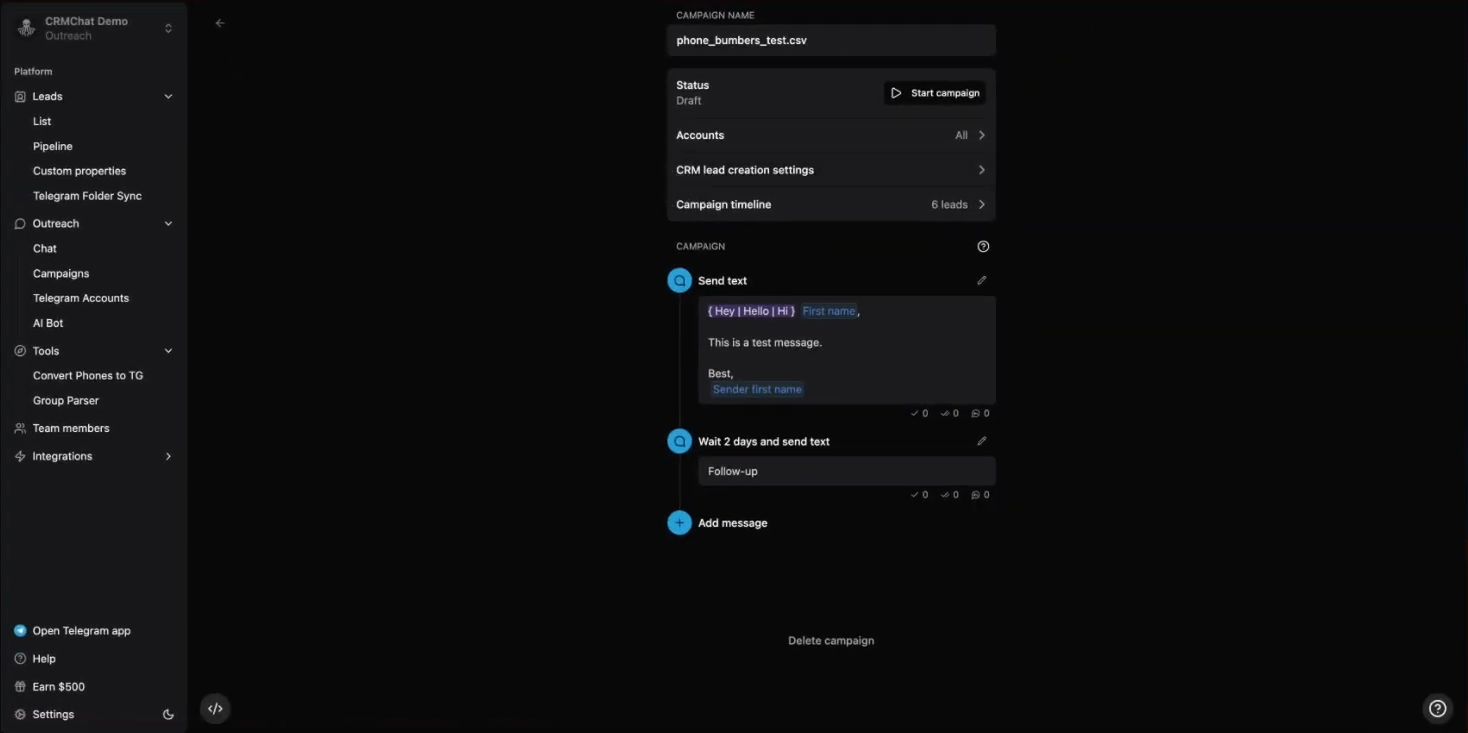 Creating a new Telegram campaign inside CRMChat; source: YouTube
This Telegram CRM combines pipeline management, deal tracking, and task assignment directly inside Telegram. Teams can collaborate in a shared inbox across multiple Telegram accounts and workspaces, where messages are synchronized in real time. Collaboration features include assigning tasks inside deals, sharing conversation context, and receiving digests of activity. The platform also includes AI chatbot workflows and automation use cases.
A key strength of CRMChat is its highly automated Telegram outreach engine. Users can launch multi-step message sequences, personalize messages at scale, and run high-volume campaigns.
| Standout features |
AI capabilities |
- Telegram-native CRM;
- unified inbox for multiple Telegram accounts;
- built-in pipeline to track leads, deals, and sales stages;
- multi-account outreach with automated message sequences;
- Telegram group parser to extract leads from public communities;
- task assignment and deal-based collaboration inside chats;
- full conversation logging and chat history.
|
- AI personalization for outbound messages;
- AI chatbot automation for inbound conversations;
- smart lead enrichment from Telegram group data;
- AI-optimized outreach sequencing and follow-ups;
- AI summaries of team activity and deal progress.
|
Limitations. Since the platform is heavily built around Telegram, teams with multi-channel needs may find it limiting.
Pricing. CRMChat offers a free plan with 50 CRM leads, 1 Telegram account, and multiple workspaces. The entry-level paid plan starts at $28/month, billed annually, and includes unlimited CRM leads, Telegram MCP and API for AI workflows, and access to integrations.
Vtiger CRM
G2: 4.3 ⭐ | Capterra: 4.3 ⭐
Best for: growing businesses that want to unify sales, marketing, and support in a single AI-powered CRM system.
Vtiger CRM is a cloud-based platform designed to help businesses enhance customer experiences and streamline operations. It offers a versatile set of tools for sales, marketing, customer support, and team collaboration. Also, Vtiger integrates with various business and messaging apps, including Telegram, allowing companies to centralize all customer data in one place for better management and efficiency.
The platform’s Telegram CRM integration enables businesses to manage Telegram conversations directly within Vtiger CRM. Businesses only need to create a Telegram chatbot and use its unique token for authentication. Once integrated, it lets businesses send and receive Telegram messages and attachments directly from modules like Live Chats, Contacts, and Deals.
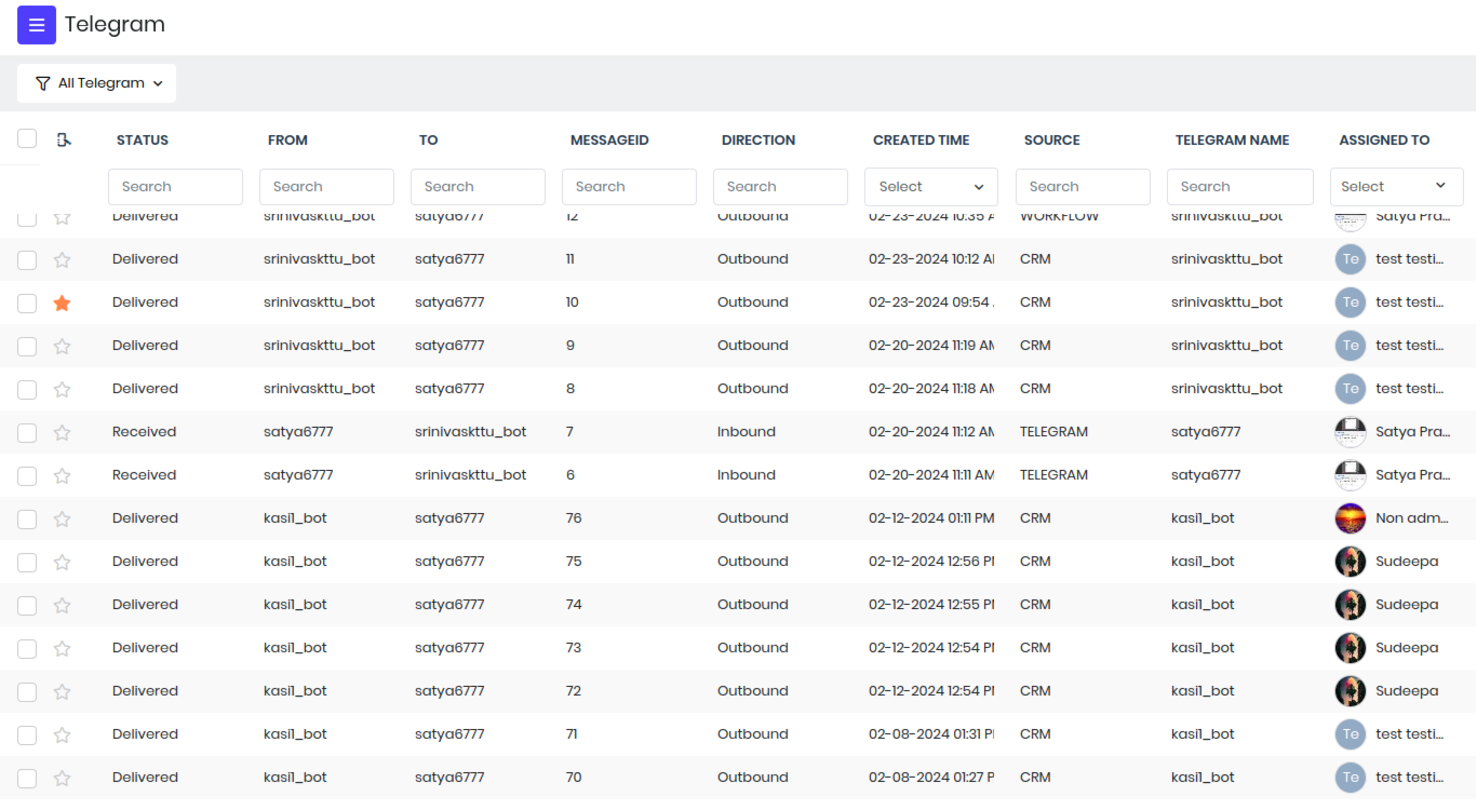 Telegram records in Vtiger CRM; source: Vtiger
The Live Chats module, for instance, tracks incoming Telegram messages, helping chat agents handle conversations efficiently. It serves as a centralized workspace for monitoring and managing incoming Telegram conversations. Messages are automatically saved as CRM records, allowing teams to analyze them through Chat Transcripts and Ratings. Additionally, the integration can create new contact records from incoming chats or link conversations to existing customer profiles.
| Standout features |
AI capabilities |
- unified CRM with a One View customer data model;
- Telegram real-time messaging with attachments, handled centrally;
- Telegram chats converted into CRM records automatically;
- sales automation (lead routing, multiple pipelines, workflows, approvals, playbooks);
- marketing automation;
- help desk with SLAs, ticket routing, surveys, and a customer portal;
- analytics and reporting dashboards.
|
- predictive AI for lead scoring, deal insights, and forecasting;
- generative AI for content and CRM task assistance;
- natural-language querying and AI query analytics;
- AI chatbot and bot management;
- customizable predictive models (AI Designer);
- voice assistant integrations.
|
Limitations. Setup requires external Telegram bot configuration, which may add technical steps for non-technical users. Also, some capabilities, like AI insights and advanced automation, are platform-wide and not tailored specifically to Telegram workflows.
Pricing. Vtiger offers a free plan with up to 10 users, 3,000 records, and tools for lead management, marketing automation, and sales pipeline management. The entry-level paid plan starts at $12/user/month, billed annually, and includes lead management, marketing campaigns, and AI features. A custom plan is also available for teams that only need specific features.
Flowlu
G2: 4.7 ⭐ | Capterra: 4.8 ⭐
Best for: small teams that want CRM, projects, and invoicing in one workspace, with Telegram built in.
Flowlu is an all-in-one business management platform covering CRM, project management, financial tracking, and team collaboration. It includes tools for task management, invoicing, and workflow automation, and integrates with various platforms, including Telegram.
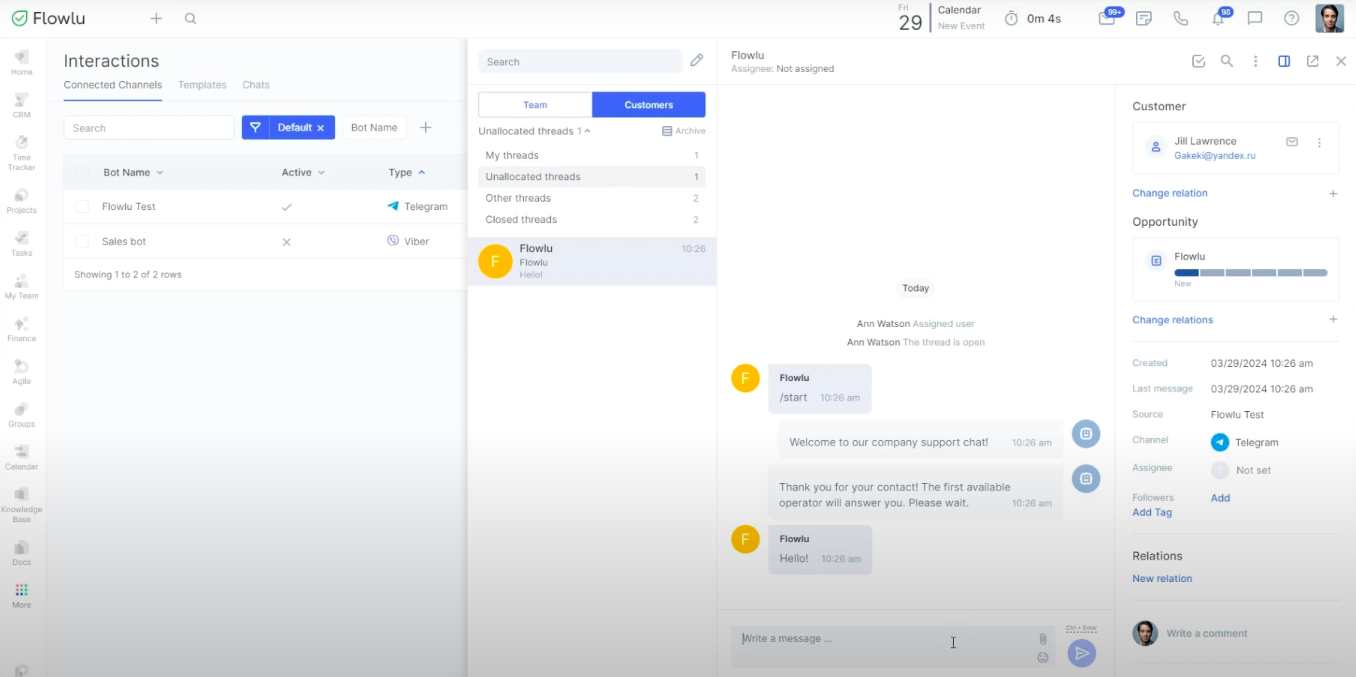 Managing Telegram messages in Flowlu; source: YouTube
Flowlu’s Telegram CRM integration is powered by the Interactions module. Setup involves creating a custom Telegram bot via the official @BotFather bot and connecting it to Flowlu using the bot token. Once integrated, all messages from Telegram are automatically displayed in Flowlu’s built-in messenger, where they can be tracked, managed, and stored as CRM records. Messages can be managed within the Communications module, which acts as a centralized inbox for client communication.
Automation features include custom automation rules for automated replies, welcome messages, and workflow actions triggered by incoming conversations. Teams can configure whether Telegram messages automatically create opportunities or are routed without generating CRM records. Telegram interactions can also be linked to existing customer records, creating a unified view of each customer’s communication history.
| Standout features |
AI capabilities |
- CRM, projects, and invoicing in one workspace;
- Telegram bot integration via BotFather;
- built-in Communications module with queue-based routing;
- Telegram chats linked to contacts, companies, and interaction history;
- task and CRM record creation from Telegram messages;
- automation rules triggered by incoming messages;
- shared CRM workspace for client collaboration.
|
- MCP server that connects Claude, ChatGPT, or Gemini to your Flowlu workspace (read/write CRM, projects, and tasks);
- natural-language queries over live CRM data;
- one-line AI project/status summaries.
|
Limitations. Setup and maintenance required for Telegram CRM depend on BotFather setup and manual configuration of the bot token, queues, and automation rules, which may need some technical familiarity to complete.
Pricing. Flowlu offers a free plan that includes essential CRM features, 100 contacts, 1 pipeline, and lead capture forms. However, the Telegram CRM integration is only available on paid plans, which start at $9/user/month, billed annually. Paid plans also include task automation, email tracking, and detailed reporting.
Kommo
G2: 4.2 ⭐ | Capterra: 4.4 ⭐
Best for: messaging-first sales teams that turn chats from Telegram and other apps into managed pipeline leads.
Kommo is an AI-powered CRM platform built for managing sales, marketing, and customer interactions across messaging channels. It stands out for its automation features, AI workflows, and multi-channel communication tools, with integrations across Telegram, Instagram, WhatsApp, TikTok, Messenger, and more.
Kommo’s Telegram CRM integration lets businesses capture leads directly from Telegram chatbot messages. Setting it up is simple: create a Telegram chatbot, obtain its API key, and add it as a lead source in Kommo using the built-in Telegram integration. Once connected, new Telegram leads are automatically added to the CRM pipeline. Teams can respond directly within Kommo, exchanging text, files, and images, with all conversations managed through Kommo’s centralized inbox and lead cards.
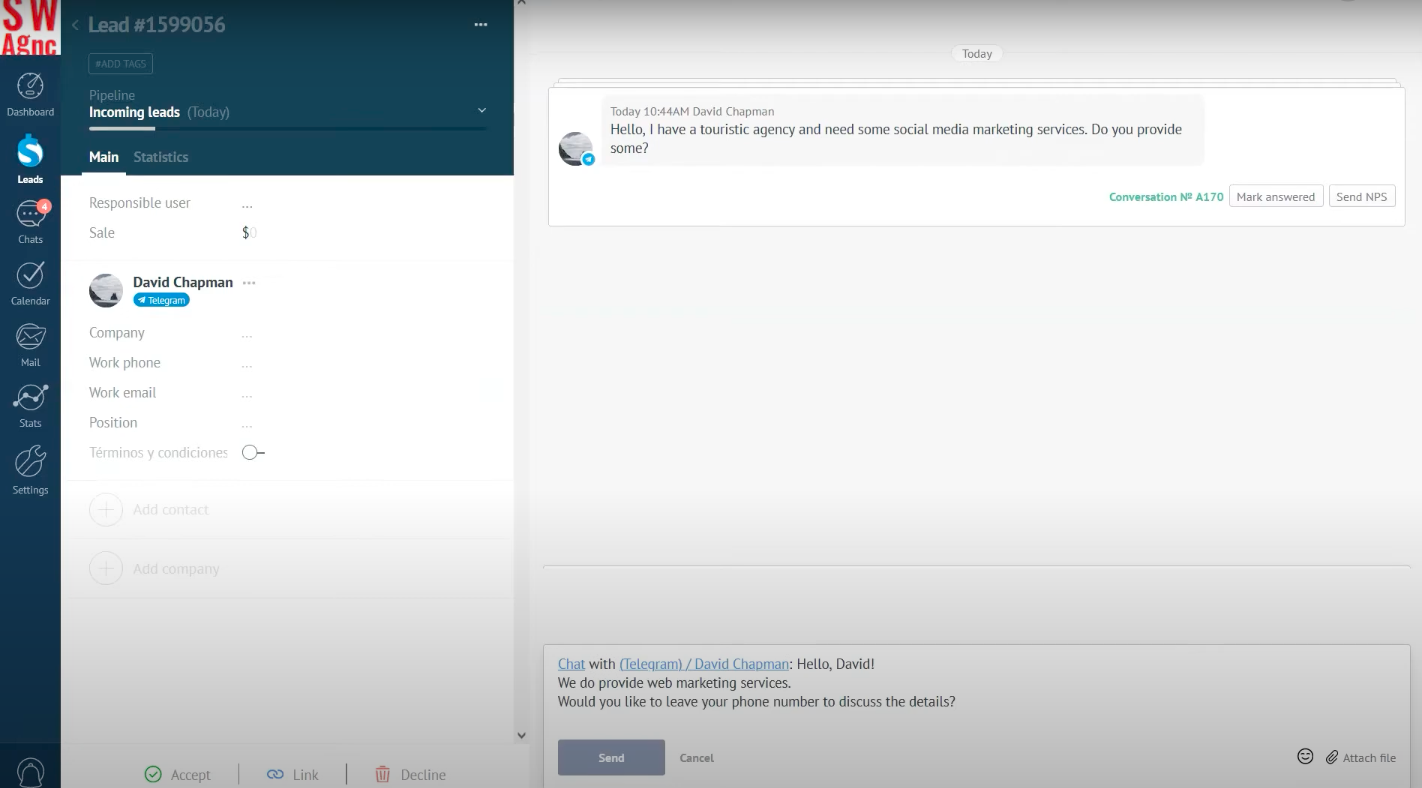 Using Telegram CRM in Kommo to message leads; source: YouTube
Kommo’s Salesbot can automate responses to Telegram leads, handling FAQs, collecting customer information, qualifying leads, and providing 24/7 support. All chat history is saved within CRM records, and the integration also supports sending invoices and feedback forms through Telegram.
| Standout features |
AI capabilities |
- native Telegram integration;
- automatic lead creation from incoming Telegram chats;
- unified inbox across Telegram, WhatsApp, Instagram, Messenger, and TikTok;
- complete chat history stored in each lead record;
- visual sales pipelines for Telegram-generated leads;
- no-code Salesbot for qualification, data collection, FAQs, and follow-ups;
- invoices and feedback forms sent through Telegram;
- broadcasting tools.
|
- AI agents that assess customer needs and recommend products;
- AI reply and next-action suggestions for sales teams;
- AI conversation summaries;
- AI writing assistance and field-value suggestions;
- missed-message detection to catch overlooked inquiries;
- AI appointment booking with scheduling and follow-ups;
- AI voice-message handling.
|
Limitations. New users may need time to learn Kommo’s AI, automation, pipeline management, and messaging tools before using the platform efficiently. At the same time, organizations needing advanced reporting, project management, or enterprise CRM depth may find it less comprehensive than traditional CRM platforms.
Pricing. Kommo doesn’t offer a free plan but provides a 14-day free trial. The minimum subscription period is six months, starting at $15/user/month for 2,500 leads. The annual plan starts at $12.50/month and includes core sales and AI features along with unlimited Telegram accounts.
Breakcold
G2: 4.7 ⭐ | Capterra: 4.8 ⭐
Best for: founders, agencies, and salespeople managing relationship-driven, social selling across Telegram, LinkedIn, and email.
Breakcold is an AI-native sales CRM designed around conversations. It consolidates Telegram, LinkedIn, WhatsApp, and email into a unified inbox, allowing representatives to manage messages and advance deals efficiently. The platform targets small and mid-sized sales teams that depend on social and messaging channels to build relationships and close sales.
Breakcold offers native Telegram CRM integration without third-party middleware. Once a rep connects their Telegram account, every direct message and group chat with a prospect syncs automatically to that contact’s CRM record. A Chrome extension lets reps import a prospect straight from Telegram with their name, username, and conversation history in a single click. Multiple threads across Telegram and other communication channels can be linked to the same contact or deal for a complete view of each relationship.
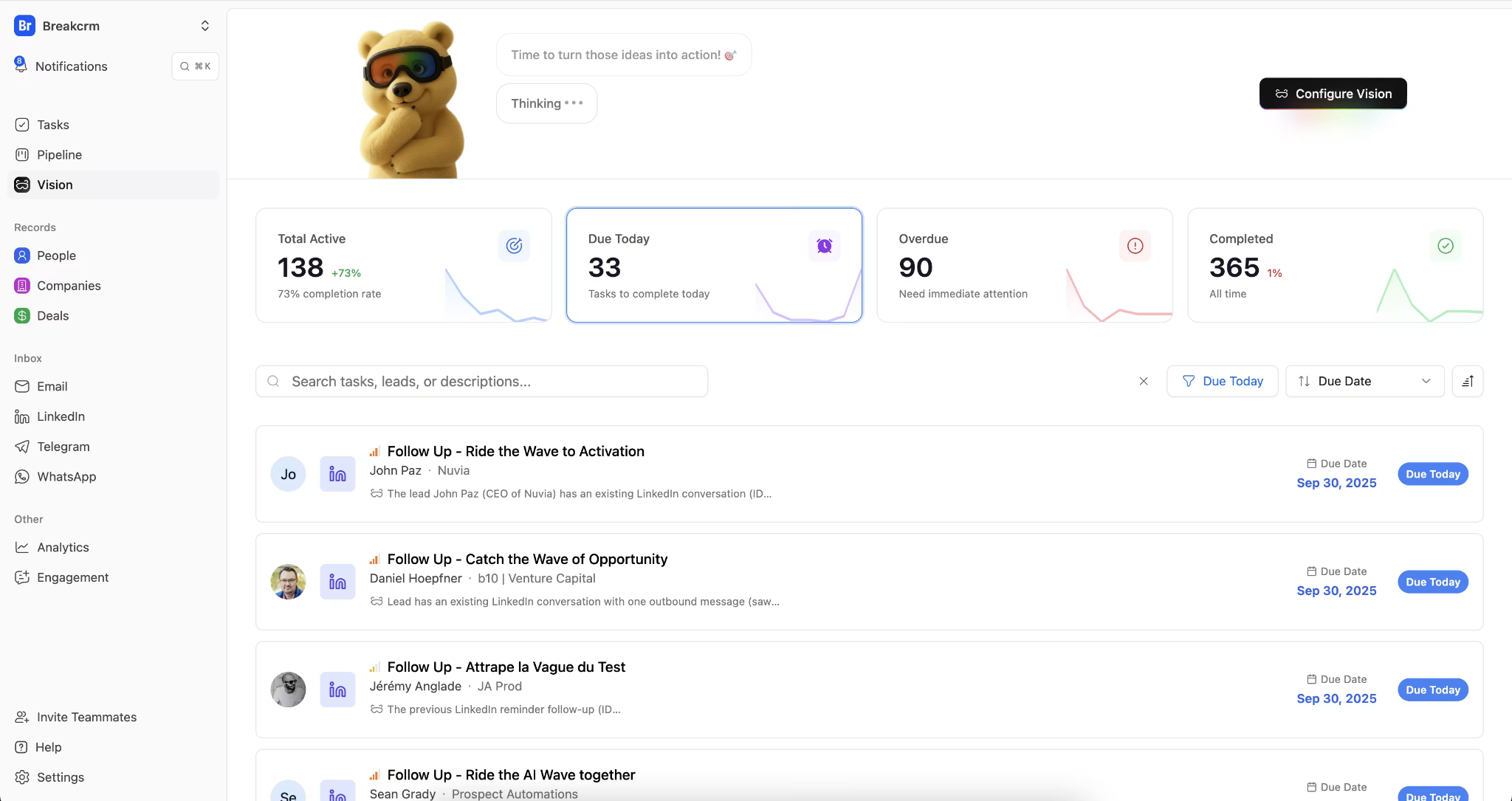 Core setup area in Breakcold, where you define the rules for how the AI monitors and moves your leads; source: Capterra
The platform leverages AI extensively. Its MCP connection allows CRM data to be accessed by assistants like Claude and ChatGPT, enabling natural language queries like, “What did this prospect say on Telegram last week about pricing?” Breakcold also offers contact and company enrichment, a meeting recorder, and AI-assisted workflows.
| Standout features |
AI capabilities |
- native Telegram account sync for DMs and group chats;
- unified multi-channel inbox (Telegram, LinkedIn, WhatsApp, email);
- Chrome extension for one-click prospect import from Telegram;
- linking of multiple conversations to a single contact or deal;
- unlimited contacts, pipelines, custom objects, and fields;
- 20+ native integrations, API, and MCP access;
- roles and permissions for teams and agency workspaces.
|
- MCP integration with Claude and ChatGPT for natural-language CRM queries;
- automatic contact and company data enrichment;
- AI-assisted pipeline and outreach workflows.
|
Limitations. Breakcold is a newer platform, so its features are still developing. Its token-based pricing for AI actions and enrichment can add up cost for teams that use those features heavily, and its outbound/social-selling focus may be more than support- or eCommerce-centric teams need.
Pricing. Breakcold offers a single plan at $59/month, which includes 1 user seat and 2 connected accounts; additional seats and accounts cost $10/month each. AI actions and data enrichment run on a token system, so heavier AI usage raises the cost. A 14-day free trial is available.
Some tools marketed as Telegram CRMs are not comprehensive CRM systems. Instead, they may function primarily as outreach tools, chatbot platforms, or shared team inboxes. When evaluating options, ensure the solution offers essential CRM features, including:
- contact and lead management;
- sales pipeline tracking;
- customer records and interaction history;
- workflow automation;
- reporting and analytics.
A platform that mainly focuses on message sending, inbox management, or chatbot automation without core customer-relationship features is better described as a Telegram communication platform than a true Telegram CRM. Conversely, some robust CRMs lack native Telegram support and require third-party integrations.
Several popular tools fall into one of these categories:
- HubSpot, Pipedrive, and Zoho CRM are powerful CRM solutions, but none of them offers native Telegram support. Integrating Telegram requires third-party tools, increasing cost and complexity.
- Manychat connects to Telegram using a bot token, but as a chat-marketing and automation tool, it lacks the contact records, pipelines, and deal management features of a true CRM solution.
- SleekFlow and Trengo support Telegram natively, but primarily function as omnichannel inboxes and help desks. They are suitable for shared-inbox messaging, but less ideal for pipeline and relationship management.
Which Telegram CRM should you choose?
If you’d rather skip the feature-by-feature comparison, here’s a quick breakdown of which Telegram CRM platform wins in each use case.
Best for small businesses
Winner: SendPulse
Runner-up: Flowlu
SendPulse offers the best balance of CRM, Telegram messaging, chatbots, marketing automation, and affordability. Its free plan is generous, setup is straightforward, and businesses can start managing leads and conversations without piecing together multiple tools.
Flowlu is a strong alternative for teams that want a simple all-in-one platform combining CRM, project management, and customer communication in a single workspace.
Best for Gmail users
Winner: NetHunt CRM
Runner-up: SendPulse
NetHunt CRM is the natural choice for teams that live inside Gmail. Customer records, emails, Telegram conversations, and sales activities all stay connected within the Google Workspace environment.
SendPulse comes second thanks to its easy-to-use CRM and strong communication features, but it doesn’t offer the same Gmail-native experience as NetHunt.
Best for high-volume support
Winner: Respond.io
Runner-up: Vtiger CRM
Respond.io was built for managing customer conversations at scale. Its omnichannel inbox, advanced routing, AI agents, and workflow automation make it well-suited for support teams handling large volumes of Telegram and messaging conversations.
Vtiger is a capable Telegram CRM alternative for organizations that need customer support, help desk, sales, and marketing functionality in one platform.
Best for AI automation
Winner: Kommo
Runner-up: SendPulse
Kommo stands out for its deep AI integration. It offers AI-powered sales assistance, conversation summaries, automated scheduling, reply suggestions, lead qualification, and messaging automation inside a single CRM.
SendPulse follows closely behind with a native MCP server, AI-assisted content creation, email drafting, note summarization, chatbot generation, and workflow automation that are especially useful for small and mid-sized businesses.
Best for full CRM depth
Winner: Vtiger CRM
Runner-up: NetHunt CRM
Vtiger offers the most comprehensive CRM for Telegram in this comparison, covering sales, marketing, customer support, automation, analytics, forecasting, and AI-powered insights in one platform.
NetHunt CRM earns second place with its mature pipeline management, reporting capabilities, and deep Gmail integration. This makes it a strong option for sales-focused teams that don’t need a full customer experience suite.
Best for Telegram-first sales and outreach
Winner: Breakcold
Runner-up: CRMChat
Breakcold is built for salespeople who work with deals directly in Telegram alongside LinkedIn and email, syncing every DM and group chat to the CRM record. It’s ideal for agencies, startups, and consultants running relationship-driven outbound messaging.
CRMChat is the more Telegram-pure option, running sales workflows entirely inside Telegram with multi-account outreach and a group parser. It’s a strong fit for Web3 and high-volume outbound teams.
Wrapping up
Integrating your CRM with Telegram is a practical way to streamline workflows and keep customer communication timely. If you’re already using sales or marketing software, adding Telegram to the mix can meaningfully improve how your team operates and how customers experience your brand.
Each platform covered in this post takes a different approach. Some focus on Telegram-native communication and outreach, while others offer broader CRM functionality, omnichannel messaging, or AI-powered tools. The right choice depends on your business size, budget, and whether you need a Telegram-first solution or a more comprehensive customer engagement platform.
For teams looking for an all-in-one option, SendPulse combines Telegram integration with CRM, chatbot automation, multi-channel marketing, and AI features, making it a solid starting point for managing customer communication, marketing, and sales from a single platform. Try it for free today and see how it fits your workflow.